- 16K
Customers
- 3M
Users
In this article
What Is AI-Powered Embedded Analytics?
AI-powered embedded analytics is the practice of placing reports, dashboards, and AI-assisted analysis inside a software application. Users can work with their data within their existing applications, without moving to a separate BI tool.
A product user can type a question and get an answer from the available data. Alerts can notify them when a metric changes unexpectedly. They can also review forecasts or read a written explanation of changes in a report. AI-powered embedded analytics ensures that data is truly democratized for all.
AI Capabilities You Can Embed
AI-driven analytics capabilities have a track-record of closing 'gaps' in the BI landscape. They can be easily embedded and work seamlessly to provide contextual insights.
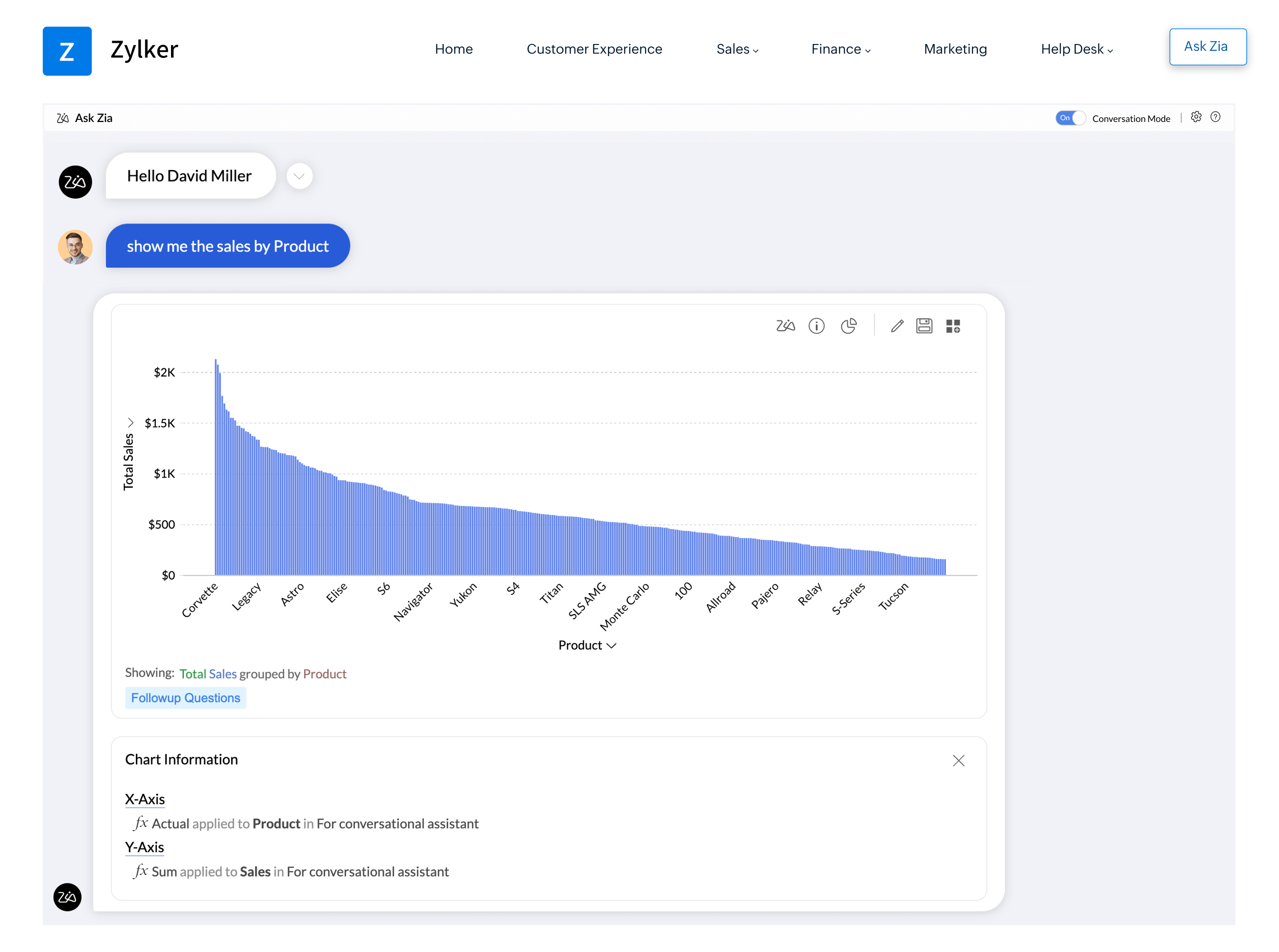
Conversational analytics with Ask Zia
Say a user wants to compare a metric between current and previous months. But on most occasions, the answer sits across two reports and makes the process of finding answers to even basic questions very time-consuming.
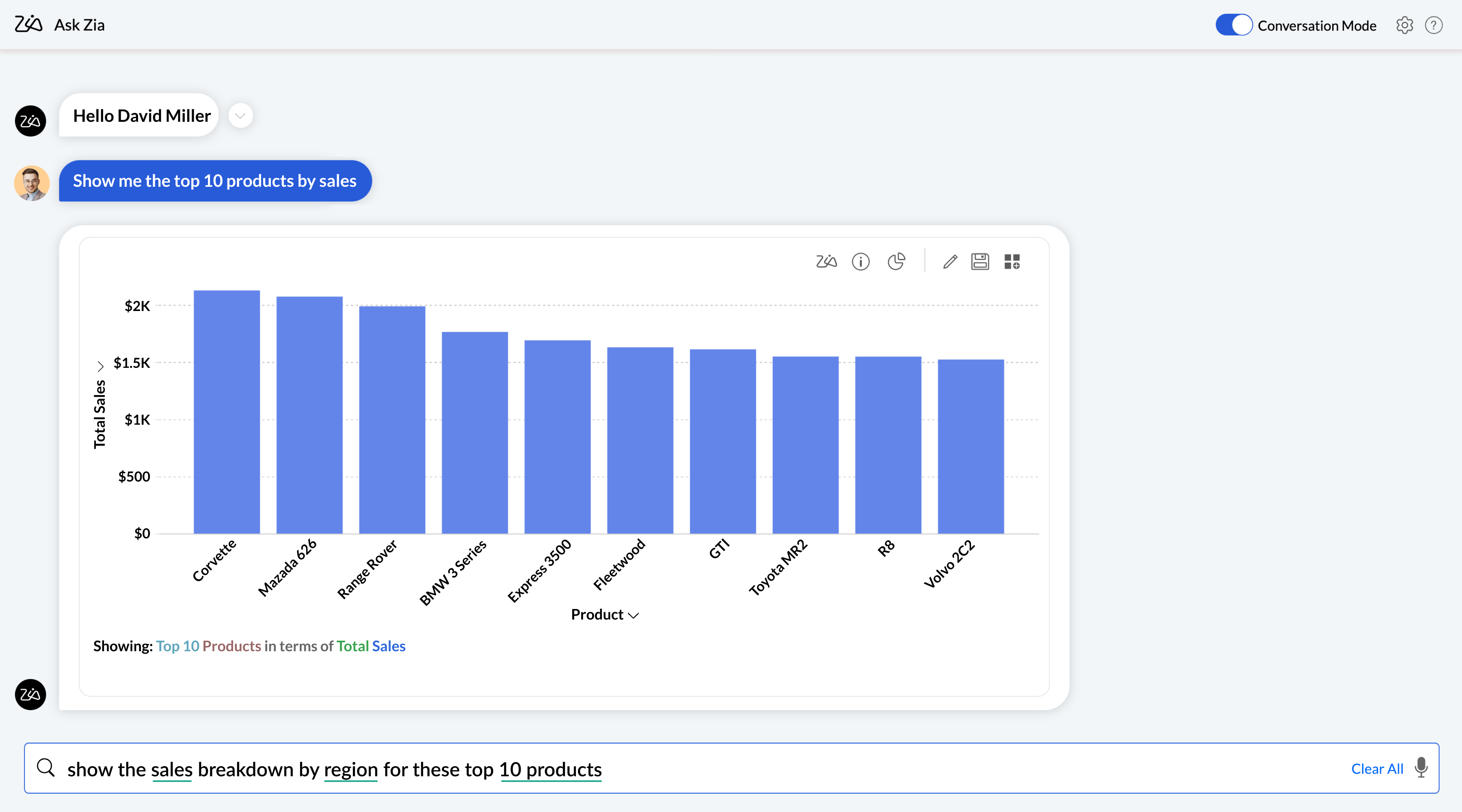
A conversational agent like Ask Zia saves you from this burden though. It lets users to type (or) voice their questions directly and provides answers in the form of chart, tabular view, KPI summaries or report views. Ask Zia works only within the scope of data that's accessible for each user, thereby ensuring strict data privacy.
Generated narratives
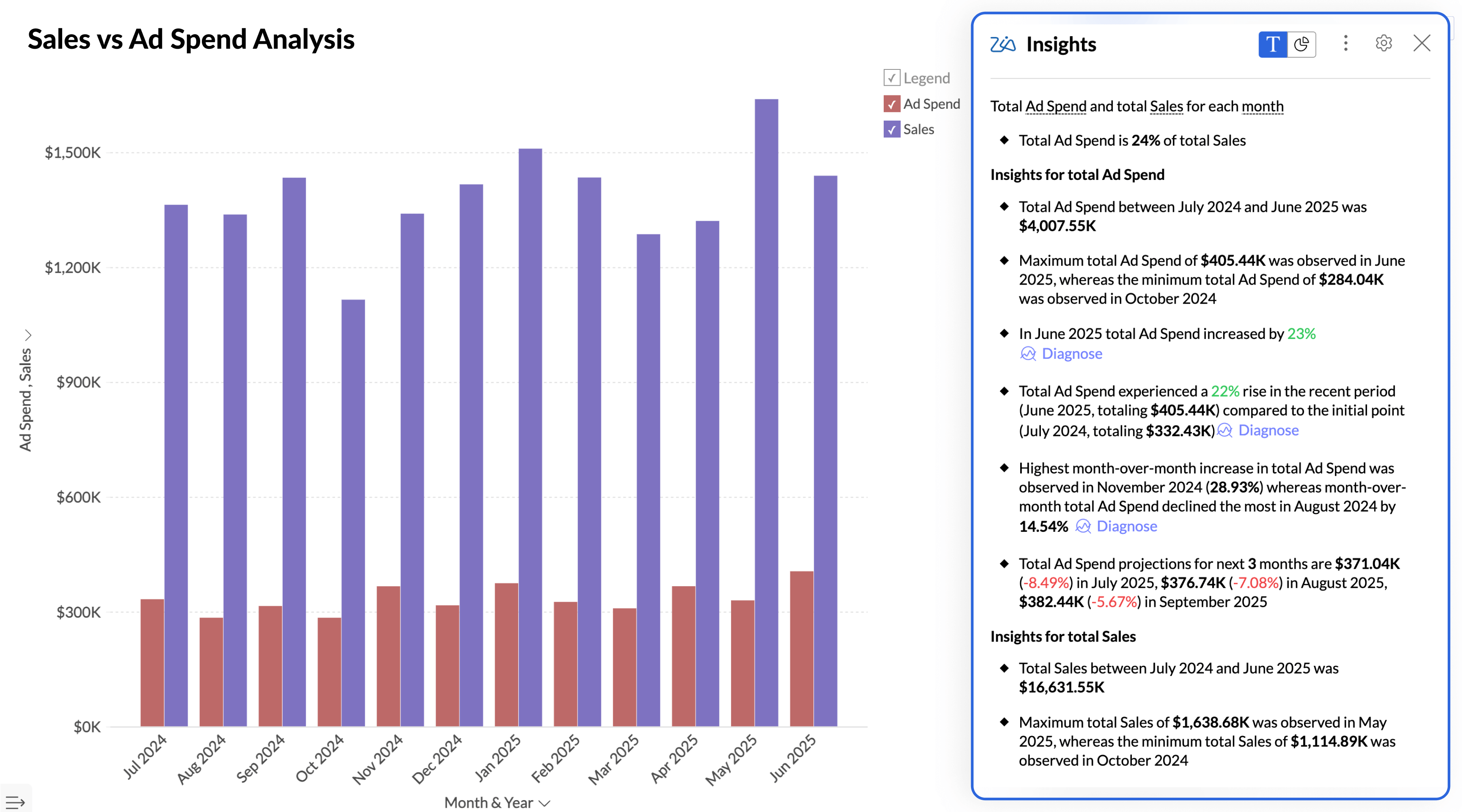
Charts can merely show the data. They don't explain it. Generative AI tools like Zia Insights can create detailed narratives within the context of reports and dashboards.
Narratives are built from available measures and get continuously updated with changing data. They provide additional context where charts alone may not fully explain movement in the data.
Smart alerts and anomaly detection
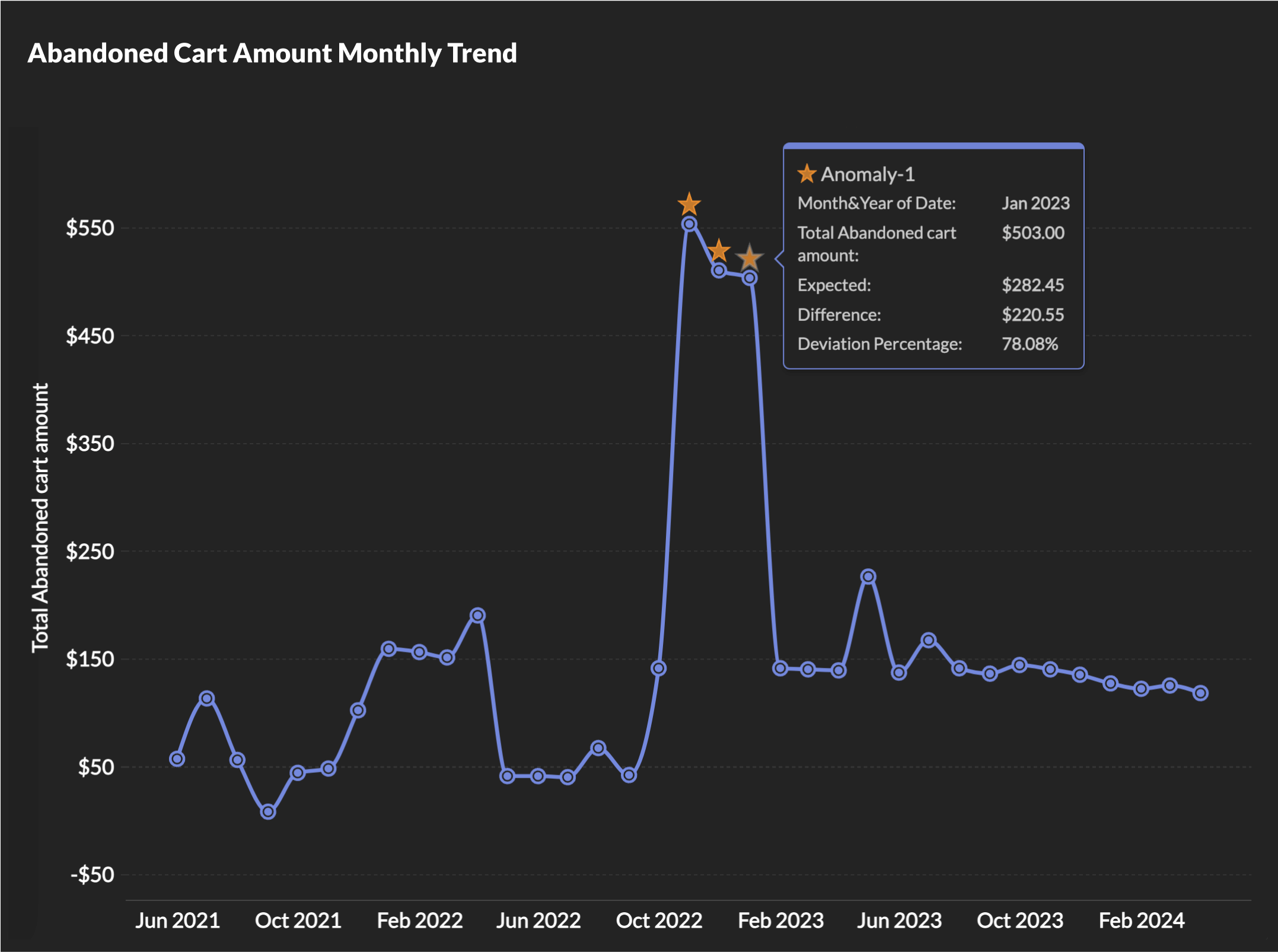
Smart alerts add monitoring directly to reports by evaluating selected measures against configured conditions. Rather than depending entirely on scheduled review cycles, alerts allow changes in data to be notified in real-time.
Alerts can be configured around thresholds, scheduled checks, detected variation, or business-specific conditions. Notifications may appear inside reports or trigger external communication depending on configuration.
Forecasting
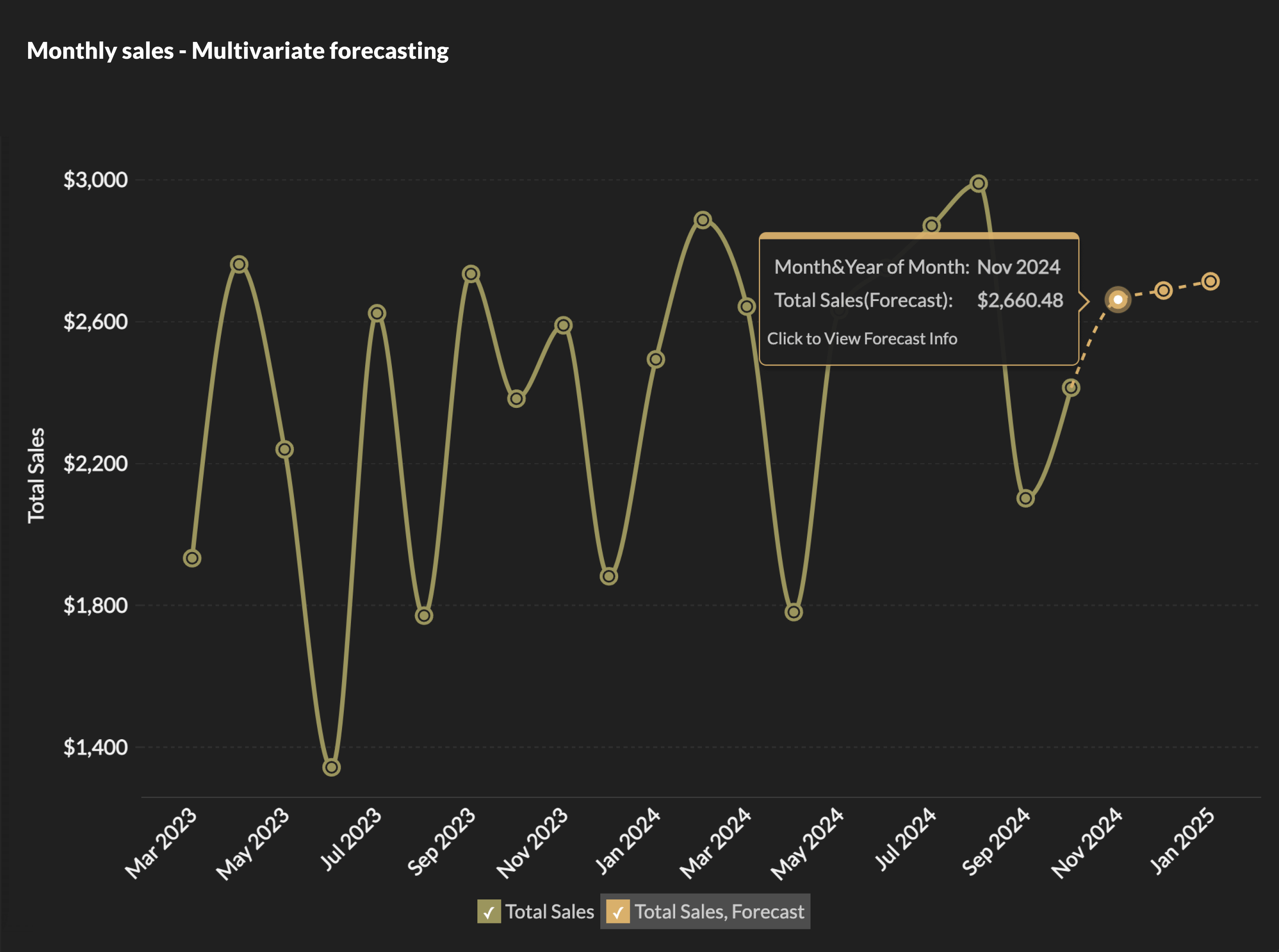
Forecasts can be created directly within reports using historical data and configurable reporting intervals. Configuration options determine forecast periods, selected measures, comparison views, and how projected values appear alongside historical reporting. Forecast settings can be adjusted independently across different reports and dashboards. Learn more about predictive analytics in Zoho Analytics.
Auto-generated reports
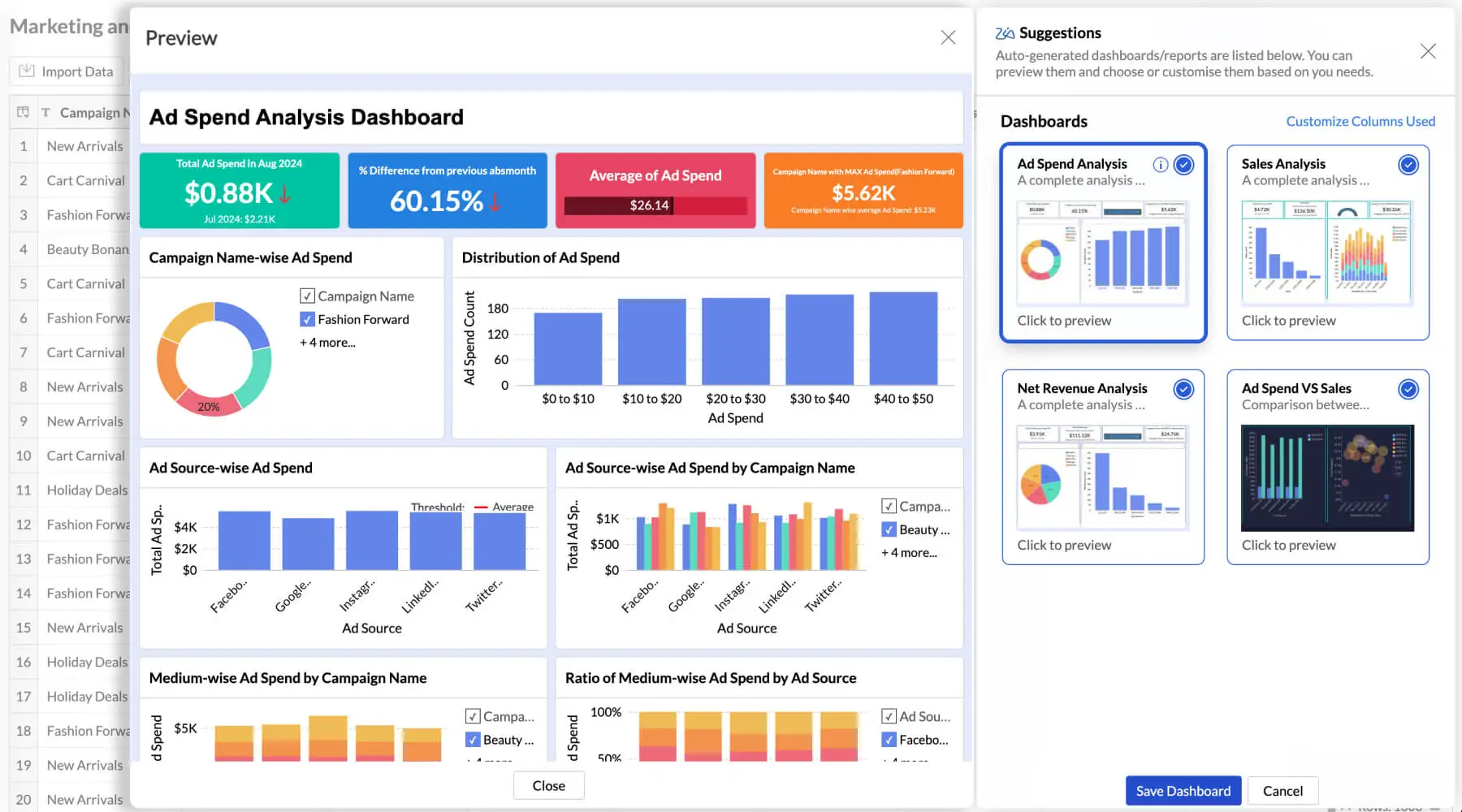
Building the first set of reports can take longer than the analysis itself. Platforms like Zoho Analytics offer AI-powered report builders that can read a connected dataset, identify relationships between fields, and suggest reports and dashboard layouts automatically. Teams adjust the output instead of starting from a blank canvas, which shortens the time between connecting data and putting useful views in front of users.
Segmentation
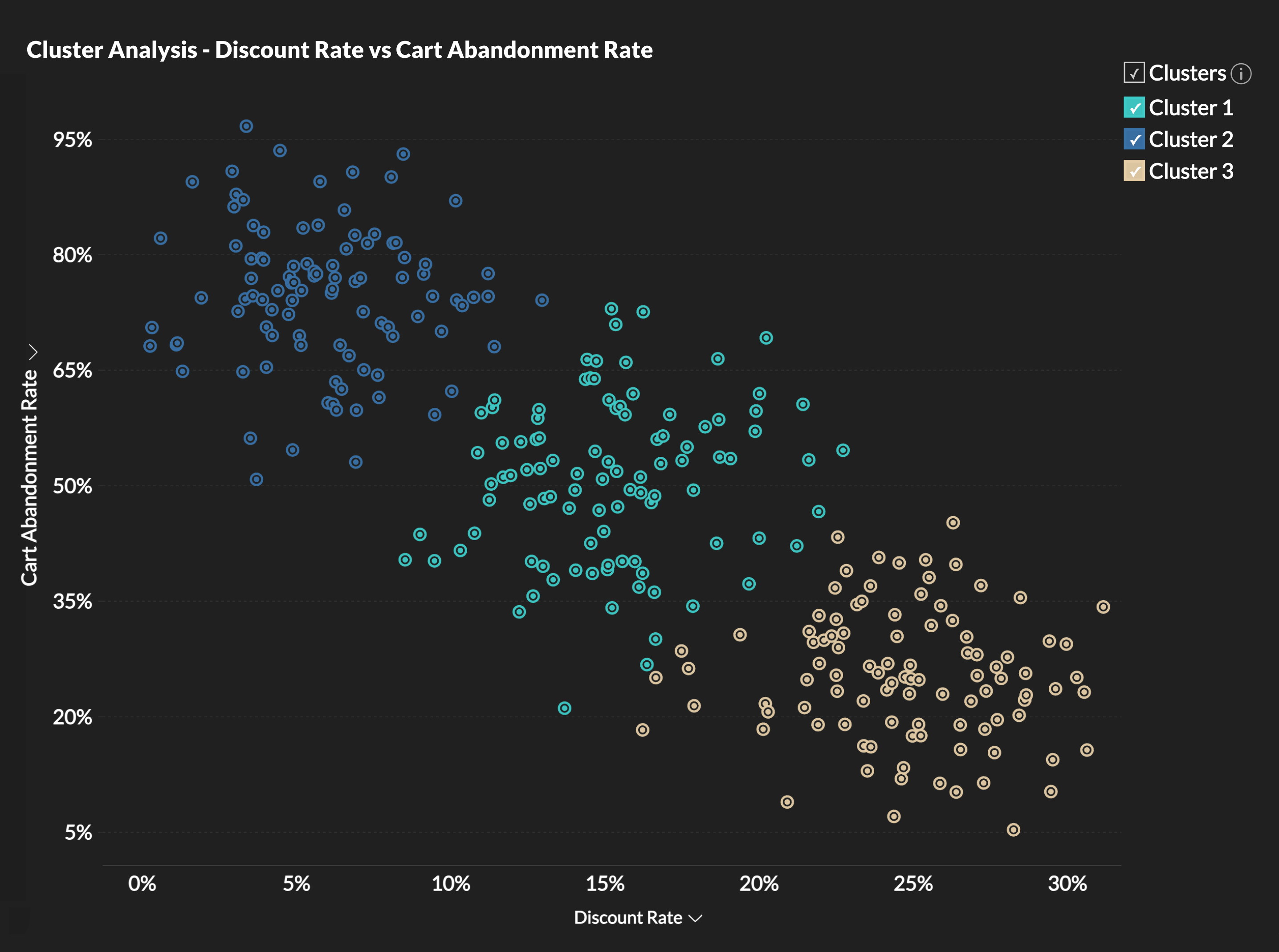
Clustering models group records that share characteristics across the attributes you select. Generated segments can be reused across reports and dashboards to support comparison and organization of reporting outputs. Segment definitions remain configurable depending on reporting requirements. Say a SaaS product could segment customer accounts by usage frequency, plan size, and support volume, then use those segments as filters across its embedded dashboards. Account managers see which group a customer belongs to and how that group is trending.
How to Embed AI-Powered Analytics in Your Application
Most embedded analytics implementations follow six core steps. As authentication and branding requirements depend on the chosen embedding approach, they are also handled as a part of the implementation process.
Step 1: Connect your data
Start by connecting the systems that hold your data to Zoho Analytics. These can include databases and cloud applications. Data warehouses and internal APIs can also be connected. Zoho Analytics offers more than 500 native connectors, along with API-based import for custom sources. Check data quality before enabling the AI features. Poor source data can affect forecasts and generated narratives. It can also cause alerts to fire on misleading values.
Step 2: Build reports and dashboards
You can create reports in the report builder. Zoho Analytics can also generate an initial set from the connected data, which you can edit afterward. Organize dashboards around the audiences who will see them, for example one set for customers and another for internal teams.
Step 3: Choose an embedding method
Zoho Analytics supports five embedding methods:
- Embed snippets. Generate iframe code for a report or dashboard from the Share menu and add it to your page. See embedding views in web pages.
- Embed API. Generate embed URLs programmatically. Each URL is short-lived and can carry filter criteria, which suits applications that create views per user or per session. See the Get Embed URL API.
- JavaScript SDK. Load dashboards directly into your application's front end for tighter interaction and custom event handling. The JavaScript SDK can be used when a dashboard needs to respond to actions elsewhere in the application's interface.
- Ask Zia embed. Generate an embed snippet or link from the Ask Zia settings. See embedding Ask Zia.
- White label portal. Deploy the full analytics environment under your own domain. See types of white label solutions.
Step 4: Set up authentication
Embedded views can require users to sign in to Zoho Analytics, or they can open through a private link that needs no login. Customer-facing products usually need something smoother. The white label solution supports single sign-on through JWT or SAML, so users authenticate once in your application and reach analytics without a second login. See single sign-on integration.
Step 5: Control tenant and user access
In a multi-tenant product, each customer must see only their own data. The Embed API accepts filter criteria with each request, so a single dashboard can serve every tenant while showing each one only its own rows. Workspace sharing can determine which reports a group can access. Role-based permissions can further restrict access to tables or AI functionality.
Step 6: Apply your branding
With a white label deployment, analytics is served from your own domain, carries your product name and logo in place of Zoho Analytics, and can be restricted to your trusted domains. Colors and layout can be configured to match the surrounding application. See customizing white label solutions.
AI-Powered Embedded Analytics Use Cases
How these AI capabilities are used depends on the application and its users. SaaS products, customer portals, internal business tools, and operational systems provide different examples.
SaaS platforms
SaaS products are one use case for embedded AI analytics. Reporting appears inside each customer's workspace, and every tenant sees only their own data. A project management platform, for instance, might give each customer a delivery dashboard and an Ask Zia panel. A customer could ask which projects are behind schedule. Ask Zia could return a table ranked by days overdue. The customer could then use that information while working in the same product. Read more about embedded analytics for SaaS.
Customer portals
Portals give account holders direct access to information about their own activity. A logistics provider could embed shipment dashboards in its client portal, with a generated summary at the top noting that on-time delivery improved this month while one route continues to lag. The summary gives the client information about the issue inside the portal. The account team can refer to the same reporting when discussing it.
Internal business tools
Embedded analytics is not limited to customer-facing products. CRM, HR, and finance applications benefit in the same way. A sales operations team might embed pipeline reports in its CRM(Know more about embedded analytics for sales). A regional manager could ask Ask Zia for win rates by sales rep over the past 2 quarters. The response might show that one rep's rate has dropped. The manager could use that information during a deal review.
Operational systems
Inventory, delivery, and production data changes through the day, so it needs monitoring rather than periodic review. A retailer could embed stock-level dashboards in its warehouse system, with alerts that flag unusual drops at any location. The warehouse lead receives the alert and can review the generated explanation. If replenishment is required, they can then create an order.
How to Choose an AI-Powered Embedded Analytics Solution
Embedding a chart is only one part of the evaluation. Checking how the analytics platform handles AI output and access controls is far more vital. The amount of work required to maintain the deployment also matters. In this context, these are the five areas that deserves the closest look during your evaluation for a suitable embedded analytics solution<.
Data readiness and integration
AI features depend on clean, connected data. Check which sources a platform connects to natively, how often it refreshes, and whether it can prepare and blend data before analysis. If a platform requires external data preparation, account for that work when evaluating its AI features.
Explainable AI output
Users act on AI output only when they understand it. Check what information accompanies a forecast so users can understand its basis. Generated narratives should refer to figures from the underlying report. For conversational queries, check whether users can inspect the data or chart behind an answer. It is also worth asking how the platform handles a question it cannot answer.
Security and tenant isolation
Confirm that row-level filtering is enforced on the server, not in the browser. Review how the platform handles single sign-on and role-based access. Check its audit logging separately. Also verify if the platform has relevant compliance certifications.
Branding and developer control
Check which parts of the embedded experience you can change. This can include the domain and logo as well as the features shown to users. Developers should be able to switch AI capabilities on or off for different audiences and generate embeds programmatically through an API.
Pricing at scale
Pricing models vary by user, viewer, or deployment. Estimate costs using the customer count you expect in 2 or 3 years. This shows how the vendor's pricing model changes as your own usage increases.
Why Choose Zoho Analytics
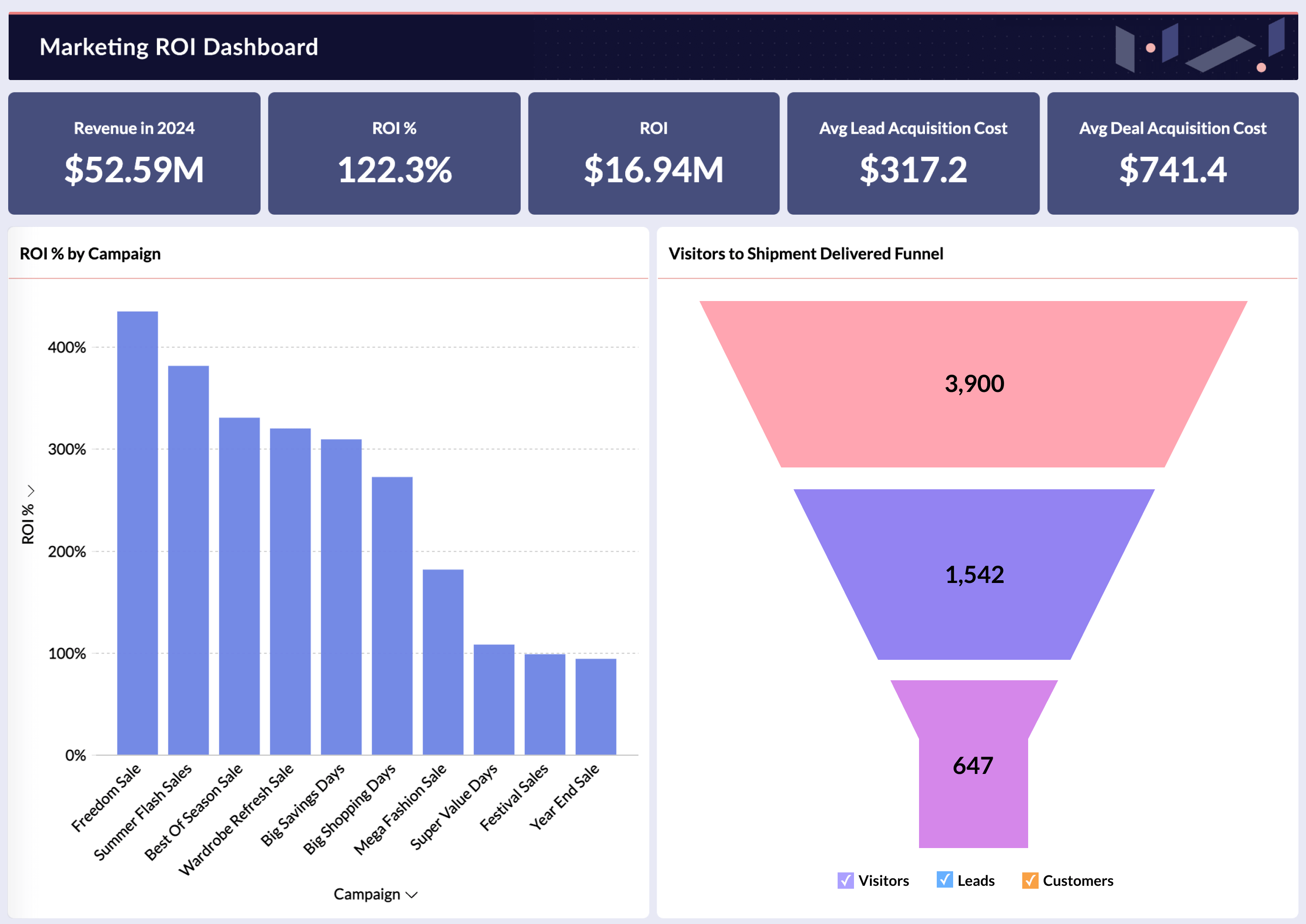
Zoho Analytics supports embedded reporting and AI-assisted analysis. It also has a white label deployment option. A team can begin with embedded dashboards. Ask Zia can be added when users need to ask questions that aren't covered by fixed reports. A white label deployment is available when the product requires a branded analytics environment.
Short-lived embed URLs and filter criteria can restrict access to embedded views. Single sign-on and role-based permissions provide additional access controls. Data can enter through native connectors or APIs. AI functions use the reports and data available in Zoho Analytics. Explore Zoho's AI analytics software or see the full range of embedded analytics options.
What Can You Embed with Zoho Analytics?
Embedding reporting places it inside the workflow where users already work. The real decision is how much of the analytics experience to bring in. Zoho Analytics supports multiple ways to expose the analytics experience. The choice depends in part on whether users need fixed reports or the ability to ask their own questions.
| Option | What users get | Best when |
|---|---|---|
| Reports and dashboards | Specific charts, tables, and dashboards placed in your application screens | Users need the same metrics on every visit |
| Ask Zia | A conversational interface that answers typed questions with charts and tables | Questions vary too much for fixed dashboards |
| Full analytics experience | A complete white-labeled environment for browsing, building, and querying reports | Customers expect self-service analysis under your brand |
Reports and dashboards
The most focused option is to place individual charts, tables, or full embedded dashboards into specific screens of your application. A usage dashboard can appear on a customer's account page. In a CRM, pipeline charts can appear on the sales manager's home screen. Each view is delivered through an iframe snippet or the Embed API, and filters can restrict each user to their own records.
Ask Zia
When questions vary too much for a fixed dashboard, Ask Zia gives users a conversational interface instead. A user types a question such as "Which regions missed target last quarter?" and receives a chart, table, or KPI summary in response. Ask Zia can be embedded as a snippet or a link, on its own or alongside dashboards. Users can ask ad hoc questions through Ask Zia instead of sending each question to an analyst.
Full analytics experience
A product that provides self-service analytics under its own brand can use the white label deployment. A white label deployment gives users the full Zoho Analytics environment on your domain, carrying your name and logo. Users can browse shared reports, build their own, and use Ask Zia, and they sign in once through your application. White label deployment is available on request.
Frequently Asked Questions
What is AI-powered embedded analytics?
- AI-powered embedded analytics places reports, dashboards, and AI-assisted analysis inside a software application. Users can ask questions in plain language and review forecasts inside the application. Alerts can notify them about unusual changes, while generated explanations provide additional context.
How do I embed AI-powered analytics into my application?
- Connect your data sources, build the reports and dashboards you want to share, and choose an embedding method. Zoho Analytics supports iframe snippets and an Embed API that generates short-lived filtered URLs. SDK-based embedding is also available. Ask Zia can be embedded separately, while the white label option provides the broader analytics environment. For customer-facing products, set up single sign-on so users reach analytics without a separate login, and apply filters so each user sees only their own data.
What AI capabilities can an embedded analytics SDK deliver inside my application?
- Ask Zia can provide conversational querying inside the application. Zia Insights can add generated narratives to reports. Zoho Analytics also supports alerts and forecasts based on the available data. Report generation and clustering provide additional options for analysis. In Zoho Analytics, these capabilities run inside embedded views and respect the access permissions set for each user.
What is the difference between embedded AI and generative AI?
- Embedded AI describes where AI runs, which is inside an existing product or workflow. Generative AI describes what a model does, which is create new content such as text or summaries. The two meet in embedded analytics. A generated narrative on an embedded dashboard is generative AI delivered through an embedded experience.
What AI-powered embedded analytics tools should I consider in 2026?
- Start with the reporting requirements your application needs to support. Check which embedding methods each platform supports and how authentication works. Review its access controls and white label options separately. Confirm which AI functions remain available in embedded views, then calculate costs at your expected usage. Commonly evaluated platforms include Zoho Analytics, Tableau Embedded, Power BI Embedded and Reveal BI. Zoho Analytics supports embedded dashboards and Ask Zia. A full white label deployment is also available.
What is the best way to deliver embedded dashboards inside a customer portal?
- Use a secure, tokenized method that authenticates each user and limits them to their own data. Customer portals can use iframe, JavaScript SDK, or white label deployment depending on their integration requirements. Iframe embedding with private or short-lived URLs requires relatively little front-end integration. JavaScript SDK embedding loads dashboards directly into your portal's front end, which suits dashboards that need to respond to actions elsewhere in the portal. A white label deployment with single sign-on suits multi-tenant portals that need dashboards to look native across many customer accounts. Confirm where row-level filtering is enforced. Check the sign-in flow so users don't have to authenticate again unnecessarily. You should also test how the dashboards fit the portal's design. See our embedded reporting tool and embedded analytics for SaaS pages for more.
Can you suggest customer-facing analytics tools that can be embedded into our SaaS platform?
- For a multi-tenant application, check how the analytics platform authenticates users and applies data permissions. Confirm how customer data is separated after the analytics is embedded. Consider how much control your developers need, from complete dashboards to individual charts. Zoho Analytics supports customer-facing embedding through iframe snippets, the Embed API, and white label deployment, with filters that restrict each user to their own data.
Can you suggest customer-facing analytics tools with enterprise-grade security?
- Start with your customers' security and compliance requirements. Check the vendor's authentication and authorization controls. Review its encryption practices, audit capabilities, and method for separating tenant data. Zoho Analytics provides role-based and data-level access controls, single sign-on, and governance features. Verify specific certifications against Zoho's current documentation before procurement.
How much control do developers get over embedded analytics?
- Developers can configure access through the available embedding and authentication controls. They can also determine which supported analytics features appear for different users. Embed URLs generated through the API are short-lived and can carry filter criteria, so each user sees only their own rows, and single sign-on carries authentication over from your application. Ask Zia can be enabled for users who need conversational querying, while other users can work with fixed dashboards. For how the access and query layer is structured, see embedded analytics architecture.