Transforming global IT support: WHO Foundation’s remote IT support improves by 35—40% with Zoho Assist
The non-profit organization: WHO Foundation
The WHO Foundation, based in Geneva, focuses on supporting global health projects through philanthropy and fundraising efforts. Working in close collaboration with the World Health Organization (WHO), the foundation mobilizes resources to address urgent health challenges worldwide.
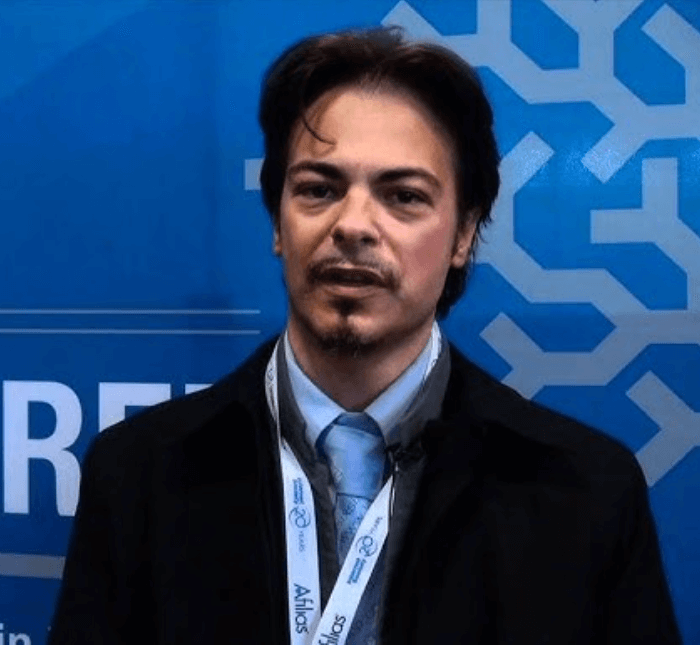
As an international non-profit organization, their IT infrastructure must accommodate a diverse workforce across multiple time zones. The foundation’s IT Manager and Digital Transformation Expert, Federico Galati, is responsible for maintaining and improving their IT ecosystem to enable seamless digital operations. To achieve this, they required a reliable and secure remote support solution. After evaluating various options, they chose Zoho Assist to streamline remote support operations.
"Zoho Assist is reassuring for users. It provides a secure, user-friendly, and scalable remote support solution that meets the needs of our global foundation."
The Challenge
The WHO Foundation has a workforce spread across different time zones and locations, so they needed a remote support tool that could cater to their globally distributed workforce. They searched for a tool that offers:
- User-friendly access:The organization needed a straightforward solution for both IT professionals and end-users.
- High performance:Achieving faster response times and efficient remote troubleshooting were important goals.The foundation needed a secure, easy-to-use, and scalable solution to provide seamless IT support to its remote workforce.
The solution
After a search for the perfect remote desktop tool, Galati discovered Zoho Assist through a third-party website and recommendations from their IT support company. Several factors made Zoho Assist the preferred choice:
- Cloud-based & Cross-Platform Compatibility: The foundation operates a hybrid IT environment with Windows and macOS devices, making Zoho Assist’s cross-platform support a key advantage. With Zoho Assist, team members, whether using Windows, Mac, Android, or iOS devices, can get timely assistance without compatibility issues. This flexibility ensures that support is available for all staff, regardless of their device.
- Scalability for a Growing Team: As the foundation continues to expand, Zoho Assist provides the flexibility to onboard new team members without limitations and ensure that IT support keeps pace with organizational growth.
- Security & Compliance: GDPR compliance and industry-standard security protocols were crucial factors in the decision-making process.
- Customer Support: Quick response times and effective assistance from Zoho Assist's support team ensured smooth adoption and troubleshooting when required.
- Troubleshooting Employee Devices Worldwide: Zoho Assist is used to troubleshoot internal employee devices remotely and ensure smooth IT operations across the globe. This global support capability ensures smooth operations for the foundation’s distributed workforce.
- Integration with Other Zoho Products: As the WHO Foundation explores additional Zoho tools to enhance their digital ecosystem, Zoho Assist can seamlessly integrate with other Zoho applications. This integration allows them to streamline support processes and ensures a unified and efficient operation across their digital tools.
"I found that my work in IT directly helps others perform their roles in supporting global health initiatives. Having a reliable remote support tool like Zoho Assist ensures that our team can stay focused on their mission."
Several key remote support features within Zoho Assist, designed for quick and responsive troubleshooting, have proven to be invaluable for the WHO Foundation.
- Instant Session Start: Zoho Assist enables IT teams to initiate support sessions instantly with one-click access. This responsiveness reduces wait times for internal employees, allowing them to receive timely support and quickly resolve technical issues to ensure their productivity is not disrupted.
- Multi-Monitor Support: With multi-monitor support, IT technicians can view and control multiple screens on a remote device simultaneously. This feature allows employees who work on devices with multiple screens to address issues more efficiently, ensuring a faster resolution and minimizing downtime so they can focus on their work.
- Reboot and Reconnect: This feature allows IT teams to remotely restart devices and automatically reconnect. It ensures continuous support without requiring users to manually reboot their devices, which helps minimize downtime.
- IndustryNonprofit Organization
- TypeIndependent Foundation
The results
Since implementing Zoho Assist, the foundation has experienced a 35–40% improvement in remote support efficiency, which has significantly enhanced their IT operations. The ability to initiate support sessions in just a few clicks has streamlined the troubleshooting process, reduced wait times, and made it easier for users to connect with IT support.
This has led to decreased downtime for remote employees, allowing them to stay productive and avoid prolonged disruptions. Zoho Assist’s seamless remote access capabilities have also enabled IT teams to provide consistent support across multiple time zones and ensure that technical issues are addressed promptly, regardless of location. This improved efficiency has strengthened the foundation’s digital operations and allowed them to focus more on their core humanitarian initiatives.
Looking forward
Zoho Assist has successfully boosted the WHO Foundation’s remote IT support operations by offering an affordable, secure, and efficient solution. As they continue to explore Zoho’s suite of products, the foundation is poised for further digital transformation aimed at ensuring smooth IT operations in their efforts to promote public health worldwide.