What is email phishing?
Email phishing is a type of cyberattack in which scammers send deceptive emails to trick recipients into revealing sensitive information, such as passwords, login credentials, and financial details. These emails often appear to come from trusted sources, such as banks, well-known companies, or colleagues.
Phishing emails may contain malicious links that lead to fake websites or attachments that install malware when opened. Attackers use these methods to steal information, gain unauthorized access to accounts, or compromise an organization's systems.
Phishing attacks can also occur through other communication channels, including phone calls, text messages (SMS), and social media platforms.
How does email phishing work?
Email phishing works by making fraudulent emails appear to come from trusted sources, such as banks, service providers, or colleagues. Attackers often spoof sender addresses, use familiar company logos, and create urgent messages to convince recipients to take action.
A typical email phishing attack involves the following steps:
- Spoofing the sender: Attackers forge email addresses or use lookalike domains to make messages appear to come from legitimate organizations or individuals.
- Creating a deceptive message: The email may warn about a suspended account, failed payment, or security issue to pressure the recipient into acting quickly.
- Including malicious links or attachments: Attackers add links that redirect recipients to fake websites or attach files containing malware.
- Stealing credentials or installing malware: When recipients enter their login credentials on a fake website, attackers can capture them. Opening a malicious attachment may install malware that compromises the device or steals sensitive information.
- Exploiting the compromised account: Attackers may use stolen credentials to gain unauthorized access, steal confidential data, commit financial fraud, or send further phishing emails.
For example, an employee receives an email that appears to come from their company's IT department, requesting an immediate password reset. The email contains a link to a fake login page that resembles the company's actual sign-in page. When the employee enters their credentials, the attacker captures the information and may use it to access the employee's account.
Email phishing works by tricking recipients into trusting fraudulent emails and taking actions that compromise their personal information or account security. Attackers often impersonate legitimate organizations, colleagues, or service providers to make their emails appear trustworthy.
Examples of phishing email
Example 1: Fake account deactivation alert
In this example, the phishing email falsely claims that the recipient's account has been suspended and requires immediate verification to avoid permanent deactivation. It creates urgency and encourages the recipient to click a suspicious link or download a PDF attachment, potentially exposing sensitive information or installing malware.

In the above example, the subject of the email has a sense of urgency, which increases the chances of a response. If the target user downloads the file or clicks the URL, it will result in a security compromise that will pose an immediate threat to the user's confidential information like passwords, bank account details, business email compromise (BEC), and more.
Example 2: Fake security warning
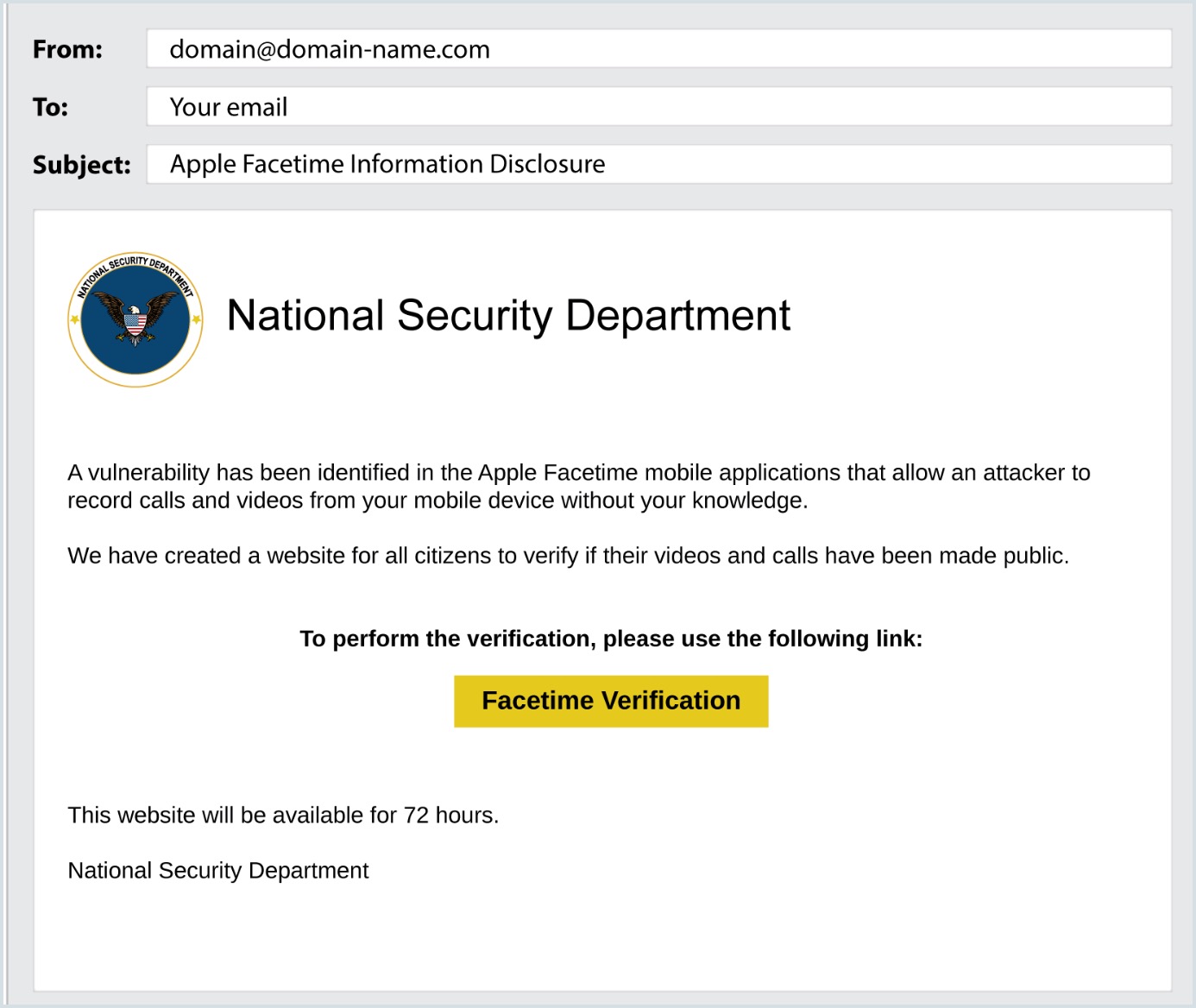
In this example, the email impersonates a government security department and warns about a facetime vulnerability. It creates urgency with a 72-hour deadline, encouraging recipients to click a suspicious link that could lead to credential theft or malware infection.
Example 3: Fake account security alert
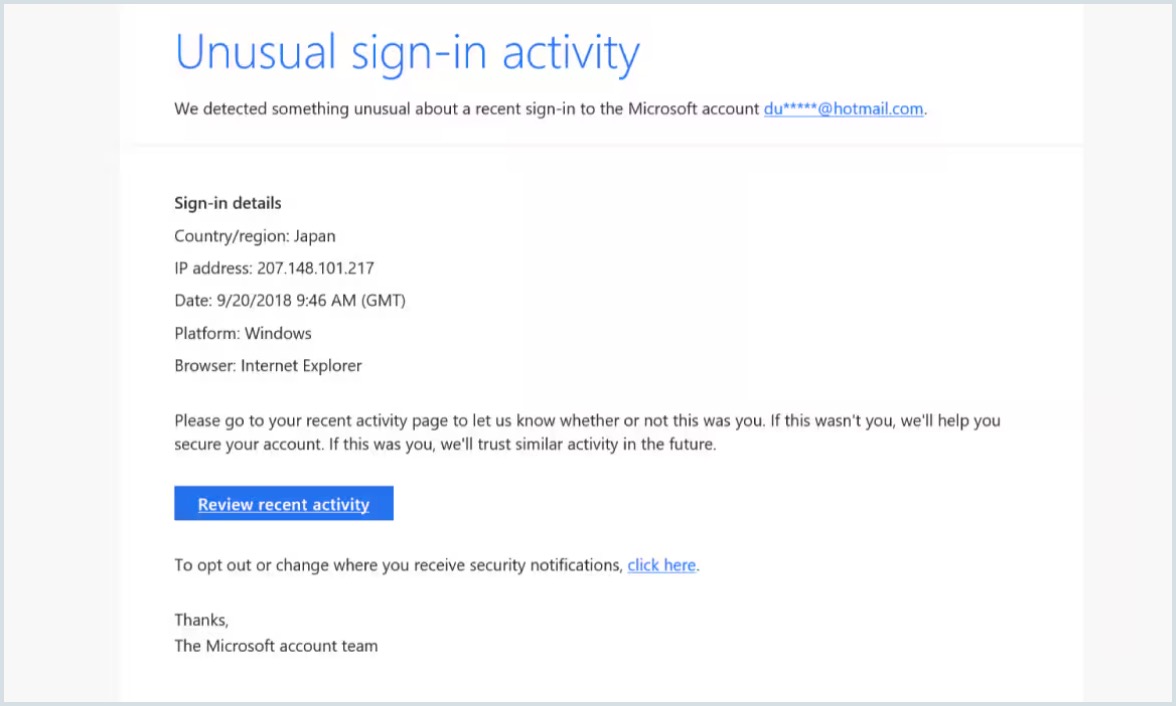
In this example, the email impersonates Microsoft's security team and warns about unusual sign-in activity. The Review recent activity button may lead to a fake login page designed to steal account credentials.
What are the different types of email phishing?
Phishing attacks are classified based on the medium the phishing attempt is made by fraudsters. The different types of phishing are:
Bulk email phishing
Bulk email phishing is a common form of phishing in which attackers send fraudulent emails to a large number of recipients. These emails often create a sense of urgency, prompting recipients to take immediate action, such as clicking a malicious link or opening an attachment. The goal is to trick users into revealing sensitive information, including login credentials, bank account details, or other personal information.
Spear phishing
Spear phishing is a targeted approach to phishing, unlike bulk or group phishing. The attacker gathers information about its target user through sources like social media and sends a personalized email that might include information like their full name, company's name, job title, or details of their job role. Collecting information about the target makes it easier to deceive them.
Whaling
Whaling refers to targeting 'big fish'—the senior officials in a company. It's difficult for the attackers to lure in senior executives, so the content drafted for whaling attacks is made to look like it's from government offices, courts, or customers. Policy violations and urgent money transfers to close a deal are some of the examples of Whaling.
Smishing and vishing
In this case, the phishing attacks are carried out using a telephone. Smishing is nothing but sending a text message with a website URL and requesting the user to complete a mandatory user verification process. Voice phishing also known as vishing, uses a voice call as a tool for deception. The attackers persuade a user on voice call making them believe that their request is legitimate. Users fall prey to vishing attacks if they follow the instructions given by the attacker.
Clone phishing
As the term indicates, clone phishing is an attempt to clone an existing legitimate email and replace the links/ attachments in that email. This attack has two levels of compromise. In the first step, the attacker hacks the contents of either the sender's or receiver's emails. In the second step, the attacker replaces the files in the legitimate email with malware and imitates the sender's identity.
Angler phishing
Social media has become a popular channel for interacting with companies and financial or government institutions. Phishing attacks on social media can be highly targeted as information about user interests is freely available. The attackers share fake tweets, reels, posts, or malicious URLs with their targets on social media, masquerading their true identity. This is called angler phishing.
These attacks can be avoided if social media users are cautious enough to identify and interact with verified company accounts only.
How to prevent email phishing?
- Use email security software: Businesses which use email for professional communication should ensure their email communication is secured using an email security software like Zoho eprotect. A strong anti-spam, phishing and malware setting can reduce the risk of data theft and account breaches.
- Set up email filters and rules: Admins can configure and monitor incoming and outgoing rules. They can block known bad senders and watch for rules that quietly forward mail to outside addresses.
- Check who actually sent it: Phishing emails fake the sender's identity. Before you reply or click, look at the display name, the full email address, and the domain.
- Watch for pressure: The contents of phishing email generally have an urgent tone, ask for personal/confidential information, offer financial rewards, or have a set of instructions to download a file that is malware. Proceed with caution when you receive such emails.
- Train your employees: In any organization, their security and privacy standards are only as strong as their weakest link. Since employees are susceptible to phishing attacks, they must be given all the information they will need in case there is an attempt to breach security and privacy.
- Run phishing simulations: Use approved phishing simulator tools to send phishing emails to the users within your organization. Monitor how many users reported the email as phishing and otherwise. Take appropriate steps after the activity.
- Set up SPF, DKIM, and DMARC. These DNS records verify that an email really came from the domain it claims. SPF lists the servers allowed to send mail for your domain. DKIM adds a signature so receivers can tell if anyone changed the message in transit. DMARC tells receiving servers what to do when a check fails. Together they make spoofing your domain much harder.
Learn more about SPF, DKIM, and DMARC.
Best practices to identify phishing emails
Although the emails appear to be from a trustworthy source, users can differentiate a phishing email from a legitimate one. The users in an organization are the first line of defence against email phishing. Educate your users on the best practices to recognize phishing emails. Listed below are some of the ways using which a phishing email can be identified:
- Pay attention to emails that have a sense of urgency. Reach out to the official customer care toll-free number of the company to ensure the email's credibility.
- Do not click hyperlinks inside an email if you are unsure of the sender.
- Do not download attachments since it can be a malware attempting to download a virus into your computer.
- Validate the sender information/ metadata. If you receive an unusual email from a known sender, cross-check with the sender about the legitimacy of the email.
- Look out for attractive statements in the email content.
- Identify grammatical and spelling errors.
- Hover over the link in an email and observe the actual redirection link.