Secure Attachment Policy
With Zoho Mail being a secure email service, the attachments in the emails you Send/ Receive in Zoho Mail are subject to the Secure Attachment Policy. The Secure Attachment Policy intends to protect users from malicious files and attachments. Certain attachments containing executable/ program files may have destructive programs or malicious functions which perform phishing/ spamming/ malicious activities in the users' system, and may even misuse the users' identity. Hence to avoid such security threats, emails with certain file attachments are blocked in Zoho Mail.
Attachment types that are blocked
The attachment types that are blocked by this policy include the following
| File extension type | File type full form |
|---|---|
| .ade | Access Database Engine Project |
| .adp | Access Data Project |
| .apk | Android Package Kit |
| .appx | Application Package |
| .appxbundle | Application Package Bundle |
| .bat | Batch File |
| .cab | Cabinet File |
| .chm | Compiled HTML Help |
| .cmd | Command Script |
| .com | Command File |
| .cpl | Control Panel Extension |
| .dll | Dynamic Link Library |
| .dmg | Disk Image |
| .exe | Executable File |
| .hta | HTML Application |
| .ins | Internet Settings / Installer Script |
| .iso | ISO Disk Image |
| .isp | Internet Service Provider Settings |
| .jar | Java Archive |
| .js | JavaScript File |
| .jse | Encoded JavaScript |
| .lnk | Link File |
| .mde | Access MDE File |
| .msc | Microsoft Management Console |
| .msi | Microsoft Installer Package |
| .msix | Microsoft Installer (Modern) |
| .msixbundle | MSIX Bundle |
| .msp | Microsoft Patch |
| .mst | Microsoft Transform |
| .nsh | NSIS Script Header |
| .pif | Program Information File |
| .ps1 | PowerShell Script |
| .scr | Screen Saver |
| .sct | Scriptlet File |
| .shb | Shell Scrap Object |
| .sys | System File |
| .vb | Visual Basic Source File |
| .vbe | Encoded Visual Basic Script |
| .vbs | Visual Basic Script |
| .vxd | Virtual Device Driver |
| .wsc | Windows Script Component |
| .wsf | Windows Script File |
| .wsh | Windows Script Host Settings |
| .terminal | Terminal Profile |
| .cer | Certificate File |
| .url | Internet Shortcut |
| .mhtml | MIME HTML |
| .aspx | Active Server Pages Extended |
| .crt | Certificate File |
| .plg | Plugin File |
| .mdb | Microsoft Database |
| .app | Application Bundle |
| .img | Disk Image |
| .prg | Program File |
| .mcf | Managed Code File |
| .bas | Basic Source File |
| .asp | Active Server Pages |
| .reg | Registry File |
| .pst | Personal Storage Table |
| .pl | Perl Script |
| .application | ClickOnce Application |
| .jnlp | Java Network Launch Protocol |
| .der | Distinguished Encoding Rules |
| .pyo | Python Optimized Object |
| .inf | Setup Information File |
| .mat | MATLAB Data File |
| .ops | Office Profile Settings |
| .osd | Operating System Deployment |
| .cnt | Help Contents File |
| .pyc | Python Compiled File |
| .cdxml | ChemDraw XML |
| .shs | Shell Scrap Object |
| .csh | C Shell Script |
| .msh | Monad Shell Script |
| .library-ms | Windows Library Definition |
| .theme | Windows Theme File |
| .prf | Outlook Profile File |
| .mdz | Access Wizard Template |
| .bgi | Borland Graphics Interface |
| .ws | Windows Script |
| .grp | Program Group File |
| .appref-ms | Application Reference |
| .elf | Executable and linkable formats |
The emails with these attachments will not be Sent/ Received via Zoho Mail and will be bounced back. This also holds true if these file types are placed in a zip file. That is, even if one file among the many in a zip archive contains any of the above-mentioned file types, it will not be sent/received via Zoho Mail.
So if you try to attach any one of these file types in an email, you will receive error messages while attaching the file and the email will not be sent to your recipient(s) and will remain in your outbox.
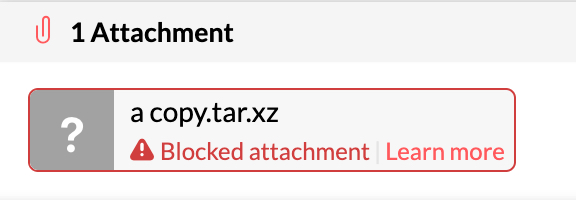
Similarly, you also won't be receiving these file types as attachments in your inbox in Zoho Mail either.
In case you are sure that it is a trusted attachment, you can use Zoho WorkDrive or similar services, to upload the files and share them as links in your emails.
Anti-Virus Scanning:
An anti-virus scanner automatically scans all the incoming emails and processes them to bounce any email with malicious attachments or files. The emails with files that are found to have virus attachments will be bounced back and will not be relayed to the user, even if the email is from trusted contacts.