Bug life cycle in software testing: How every defect moves from new to closed
- Key Takeaways
- What is a software bug?
- Bugs/defects, failures, and errors: Terminology explained
- What is the bug life cycle?
- Why the bug life cycle matters
- Stages of the bug life cycle
- The 11 core stages of the bug life cycle explained
- Who manages the bug life cycle
- How to write a bug report
- 8 essential fields every bug report should include
- Bug report template
- 5 Key defect metrics every QA team should track
- Bug triage: How teams prioritize defects
- Who participates in bug triage?
- Factors that determine bug priority
- Bug severity vs. bug priority
- How to report and track bugs
- Best practices for managing the bug life cycle
- How to manage a bug
- How Zoho QEngine streamlines the bug life cycle
- Conclusion
The bug life cycle (also called the defect life cycle) is the sequence of stages a software defect passes through from first detection to the moment it's verified and closed. A structured bug life cycle is the operational mechanism that catches defects before they reach users.
This guide covers all 11 stages of the bug life cycle, the stakeholder roles involved, how to write actionable bug reports, best practices, and how Zoho QEngine automates the workflow end to end.
Key Takeaways
- Definition: The bug life cycle (defect life cycle) tracks a defect through defined stages—from identification to fix, retest, verification, and closure.
- Eleven core stages: New → Assigned → Open → Fixed → Pending retest → Retest → Verified → Reopen → Closed → Rejected → Deferred, plus alternate statuses (Reopened, Duplicate, Not a defect)
- Bug vs. defect: The terms are often used interchangeably; formally, a bug is a coding error while a defect is any deviation from requirements.
- Stakeholders: Testers, QA leads, QA managers, developers, project managers, test automation engineers, and DevOps engineers each own part of the cycle.
- Bug report mandatory fields: This includes eight mandatory fields: title, steps to reproduce, expected behavior, actual behavior, environment details, severity, priority, and supporting evidence.
- Metrics: Five key metrics track bug life cycle health: defect density, MTTR, DRE, reopen rate, and defect leakage rate
- Bug severity vs. bug priority: Bug severity (technical impact) and bug priority (urgency to fix) are independent dimensions assigned during triage.
- Zoho QEngine is a unified, agentic AI test automation platform for web, mobile, and API that streamlines the bug life cycle. Equipped with features like cross-platform testing, cross-browser testing, AI root cause analytics, and integrations with Jenkins, Zoho Sprints, and Jira, QEngine powers end-to-end testing all in one place.
What is a software bug?
A software bug is an error that stops an application from working as intended.
In most QA teams, bug and defect are used interchangeably. In formal software engineering there's a subtle distinction: a bug is a coding or implementation error in the source code, while a defect is any deviation from the expected requirement, which may or may not come from code. Either way, both follow the same life cycle.
Bugs/defects, failures, and errors: Terminology explained
Three terms appear frequently in QA documentation, and distinguishing them reduces ambiguity in bug reports:
- Errors: Errors are human mistakes made by a developer, analyst, or tester—for example, a logic flaw in a calculation or a misunderstanding of a requirement. IEEE 1044-2009 defines an error as "a human action that produces an incorrect result."
- Defects (Bugs): Defects/bugs are the manifestation of an error in the code or documentation—the actual discrepancy between expected and actual behavior that a tester can observe and reproduce.
- Failures: Failures are what an end user experiences when a defect is triggered in production—the observable system malfunction that results from a defect.
In the bug life cycle, the workflow begins when a tester logs a defect. The life cycle manages that defect, not the underlying error (which cannot be tracked until it produces an observable defect).
What is the bug life cycle?
The bug life cycle is the end-to-end process that tracks a software defect or bug from the moment it's reported to the moment it's independently verified and formally closed.
It defines every stage of a defect's journey, ensuring clear ownership, accountability, and communication between testers, developers, QA leads, and project managers.
Each stage is represented by a status—such as New, Assigned, Open, Fixed, Pending retest, Retest, Verified, Reopen, Closed, Rejected, Deferred—that indicates the current state of the defect and the next action required. As the bug progresses through these stages, responsibility shifts to the appropriate team member, ensuring the issue is investigated, resolved, retested, and confirmed before closure.
Without a formal bug life cycle, defects are lost in handoffs, fixes go unverified, and production failures increase.
Why the bug life cycle matters (the cost of catching bugs late)
A structured life cycle exists because defects get exponentially more expensive the later they're found
Stages of the bug life cycle
During the bug life cycle, a defect transitions through several stages. At each one it's assigned a defect status that signals the follow-up action. There are 11 stages of the bug life cycle that define a complete defect workflow: from the moment a tester first logs an issue to the point where the fix is independently confirmed and the defect record is permanently closed.
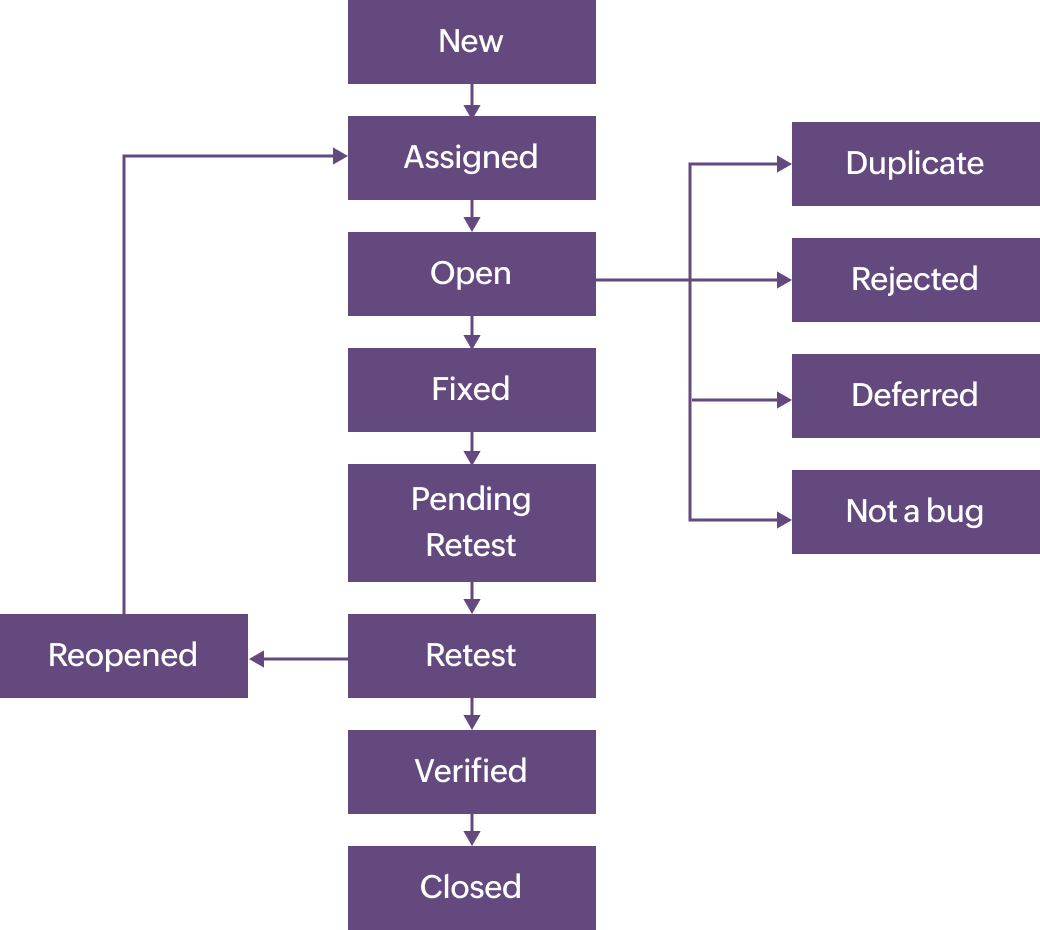
| Status | Owner | Trigger | Next action |
|---|---|---|---|
| New | Tester | Defect found and documented for the first time | QA lead reviews it |
| Assigned | QA lead → Developer | Lead validates the defect and routes it to development | Developer investigates |
| Open | Developer | Developer starts working the defect | Fix it or tag Duplicate/Rejected/Deferred/Not a defect |
| Fixed | Developer | Code change made and self-verified | Return to the testing team |
| Retest | Tester | Tester re-runs the failing case | Pass → Verified; Fail → Reopened |
| Verified | Tester | Defect no longer reproduces | Move to Closed |
| Closed | Tester | Verified fixed, no further changes needed | Life cycle complete |
| Reopened | Tester | A previously fixed bug recurs | Re-enter the cycle (back to Assigned/Open) |
| Duplicate | QA lead | The same bug is already logged | Link to the original and close |
| Deferred | QA lead/PM | Low priority; scheduled for a later build | Revisit in a future cycle |
| Rejected | QA lead/Developer | Not a valid bug, or invalid report | Close |
| Not a Bug | QA lead | Minor issue with no impact on core functionality | Close |
The 11 core stages of the bug life cycle explained
1. New
When a defect is identified for the first time, it's logged as New. The tester documents it in detail—steps to reproduce, expected vs. actual behavior, severity, and evidence.
The defect sits in a review queue. A QA lead or test manager reviews it to confirm it is valid, reproducible, and correctly categorized before moving it forward.
Pro tip:
Zoho QEngine natively integrates with project management tools like Jira and Zoho Sprints, enabling users to automatically add work items for failed test cases into the sprints backlog without manual intervention.
2. Assigned
Assigned is the status a defect receives after a QA lead confirms its validity and routes it to the developer responsible for the affected module.
The developer receives a notification and is accountable for investigation and resolution. The defect remains in Assigned until the developer opens and actively begins working on it.
3. Open
Open means the developer has acknowledged the defect, accepted it as valid, and is actively investigating or implementing a fix.
This is the longest stage in the average bug life cycle. If, during investigation, the developer determines the report is invalid or non-reproducible, the status moves to Rejected rather than continuing to Fixed.
4. Fixed
Fixed is the status assigned when a developer has resolved the defect—the code changes are complete, committed, and ready for tester verification.
The developer adds fix notes describing what was changed and which build contains the fix. Fixed doesn't mean the issue is resolved from the QA perspective; it means the developer's work is done and verification has not yet occurred.
5. Pending retest
Pending retest is a transitional status indicating that the developer has marked the bug Fixed, but the tester has not yet started verification, so the defect is waiting in the tester's queue.
This status is used when testers work asynchronously from developers and prevents Fixed defects from being overlooked in busy sprint cycles. Not all teams use Pending retest as a distinct state; some workflows move directly from Fixed to Retest.
6. Retest
Retest is the active verification stage—the tester is executing the original reproduction steps against the updated build to confirm whether the fix holds.
No status change occurs until the tester either confirms resolution (→ Verified) or finds the defect still present (→ Reopen).
7. Verified
Verified means the tester has confirmed the defect is fully resolved and no regression has been introduced.
The defect record moves to the QA lead for formal closure. Verified is the last quality gate before Closed—once a defect reaches Verified, the fix is considered complete from both the developer and tester perspective.
8. Reopened
Reopened occurs when a tester confirms that the defect is still present after the fix, or that the fix has introduced a regression.
The defect is returned to the developer with updated reproduction steps and context. A reopened bug is always accompanied by documentation of what was retested, what was expected, and what was observed.
9. Closed
Closed is the final status, assigned by a QA lead when an independently verified defect is formally signed off and archived. No further action is required.
The record is retained for defect metrics tracking—reopen rate, MTTR, and defect density calculations all depend on accurately closed records.
10. Rejected
Rejected means a developer or QA lead has determined the reported issue is not a valid defect—the behavior is working as designed, the report is a duplicate of an existing record, or the reproduction steps cannot produce the reported result in the standard environment.
Every rejection requires a documented reason. The tester may appeal a Rejected status by providing additional evidence: a screen recording, an updated reproduction case, or a specification reference.
11. Deferred
Deferred means the team has decided not to fix the defect in the current release—not because it's invalid, but because release capacity, timeline, or business priority doesn't accommodate it.
The defect is formally carried into the next sprint or release planning cycle, where it's re-evaluated. Deferred isn't a dead end. As a good practice, revisit deferred defects at each release-planning cycle and escalate any that linger across several releases, so they aren't forgotten.
Alternate statuses
1. Duplicate
Duplicate is assigned when a tester or developer identifies that a newly reported defect describes the same root cause and observable behavior as an already-open defect. The duplicate record is linked to the original and closed without a separate fix—the original report remains the authoritative tracking record.
2. Not a defect
Not a defect (also known as Invalid in some bug tracking tools) is assigned when an investigation confirms that the reported issue isn't caused by a software defect. The observed behavior may be the intended functionality, the result of incorrect test data or configuration, an environmental issue, or a misunderstanding of the requirements. Once validated, the bug is marked as Not a defect and closed without requiring any code changes, ensuring the development team focuses only on genuine software defects.
Who manages the bug life cycle: Stakeholder roles
A successful bug life cycle depends on clear ownership at every stage. While the exact responsibilities may vary across organizations, these five roles are typically involved in ensuring defects are identified, resolved, verified, and closed efficiently.
| Role | Primary responsibility in the bug life cycle |
|---|---|
| QA Engineer/Tester | Discovers and logs defects (New → Assigned); executes retesting (Retest → Verified/Reopen); owns the verification step |
| Developer | Investigates and resolves defects (Open → Fixed); determines validity for Rejected status; provides fix notes and build references |
| QA Lead/Test Manager | Reviews incoming defects for validity; approves assignment routing; applies triage priority; formally closes verified defects |
| Project Manager | Authorizes deferred decisions when fix priority conflicts with release scope; tracks overall defect velocity and release readiness |
| Business Analyst (optional) | Clarifies requirement ambiguities that cause Rejected status disputes; determines whether "working as designed" claims are correct |
On smaller teams, a single person may perform multiple roles—for example, a developer may also handle testing, or a QA lead may act as the project manager. Regardless of team size, clearly defined ownership and visibility into every defect are essential for keeping the release process efficient.
Pro tip:
Zoho QEngine simplifies defect management by providing role-based access control, centralized user management, and seamless integrations with CI/CD tools. This enables testers, developers, QA leads, and project managers to collaborate in real time while managing the entire testing life cycle—from test creation and execution to defect tracking and reporting—from a single platform.
How to write a bug report: Mandatory fields and template
A complete bug report must include eight mandatory fields: title, steps to reproduce, expected behavior, actual behavior, environment details, severity, priority, and supporting evidence. Without all eight fields, a developer cannot reproduce, confirm, or fix the defect—and the report becomes a source of back and forth rather than a resolved issue.
According to IEEE 829-2008 (Software and System Test Documentation), defect reports should fully specify the conditions under which the failure occurred to enable root cause analysis. A structured bug report reduces mean time to resolution (MTTR) by eliminating the clarification cycle between testers and developers.
The 8 essential fields every bug report should include
A well-written bug report gives developers everything they need to understand, reproduce, and fix an issue without unnecessary back and forth. Every bug report should include the following information:
1. Title
A clear, concise summary that describes the defect in a single line, the title should be specific enough for anyone to understand the issue at a glance.
- Poor: Login broken.
- Better: Login button becomes unresponsive in Chrome 124 after an incorrect password is entered on the first attempt.
2. Steps to reproduce
This is the numbered sequence of actions required to reproduce the defect consistently. Start from the application's initial state and include every necessary step so another tester or developer can replicate the issue without guesswork.
3. Expected behavior
Describe what the application should do according to the product requirements, design specifications, or acceptance criteria. This establishes the intended behavior against which the defect is evaluated.
4. Actual behavior
Explain what actually happens when the steps are performed. Clearly highlights how the application's behavior differs from the expected outcome.
5. Environment
Specify the environment in which the defect occurred. Include details such as:
- Browser name and version.
- Operating system and version.
- Device (if applicable).
- Application build or version number.
- Relevant test data, configuration, or network conditions.
Providing environment details helps determine whether the issue is environment-specific or reproducible across multiple platforms.
6. Severity
Severity indicates the technical impact of the defect on the application.
- Critical – Causes system crashes, data loss, security vulnerabilities, or complete application failure.
- Major – Breaks a core feature or significantly affects functionality.
- Minor – Affects part of a feature but has a workaround and doesn't block testing.
- Trivial – Cosmetic or usability issue with little or no impact on functionality.
7. Priority
Priority indicates how urgently the defect needs to be fixed based on business impact and release goals. Unlike severity, priority is determined by business needs rather than technical impact.
- High – Must be fixed immediately or before the next release.
- Medium – Should be resolved during the current sprint or planned release.
- Low – Can be scheduled for a future release without affecting critical functionality.
8. Supporting evidence
Include any evidence that helps developers investigate the issue more efficiently, such as:
- Screenshots
- Screen recordings
- Error messages
- Console or server logs
- Stack traces
- Crash reports
Supporting evidence reduces ambiguity, speeds up debugging, and improves the chances of reproducing the defect on the first attempt.
Bug report template
| Title: | [component + action + observed symptom] |
| Step to reproduce: |
|
| Expected behavior: | [what should happen] |
| Actual behavior: | [what actually happens] |
| Environment: | Browser: [e.g. Chrome 124] OS: [e.g. macOS 14.4] Build: [e.g. v2.3.1-staging] |
| Severity: | [Critical/Major/Minor/Trivial] |
| Priority: | [High/Medium/Low] |
| Attachments: | [ ] Screenshot [ ] Screen recording [ ] Error log |
5 Key defect metrics every QA team should track
Tracking defect metrics helps teams evaluate not just how many bugs are found but how effectively they're identified, resolved, and prevented from reaching production. These insights reveal trends in product quality, testing effectiveness, and development efficiency.
1. Defect density
This measures the number of defects relative to the size of the software—for example, defects per 1,000 lines of code (KLOC), feature, module, or user story. A high defect density may indicate complex, unstable, or poorly tested areas of the application that require additional attention.
2. Mean time to resolution (MTTR)
MTTR measures the average time taken to resolve a defect, from the moment it's reported (New) until it's verified and Closed. A lower MTTR indicates a faster and more efficient defect resolution process.
3. Defect removal efficiency (DRE)
DRE measures how effectively defects are identified and fixed before the software is released. It's calculated by comparing the number of defects detected during development and testing against the total number of defects found both before and after release. A higher DRE reflects a more effective quality assurance process.
4. Reopen rate
This measures the percentage of defects that are reopened after being marked as Fixed or Closed. A high reopen rate often indicates incomplete fixes, inadequate testing, or regression issues, making it a useful indicator of fix quality.
5. Defect leakage
This measures the number or percentage of defects that escape the testing process and are discovered by end users or in production. Lower defect leakage indicates better test coverage, more effective testing practices, and higher product quality.
Bug triage: How teams prioritize defects
Bug triage is the process of reviewing newly reported defects to determine how serious they are, how urgently they should be fixed, and who is responsible for resolving them. It brings together QA, development, and project stakeholders to ensure the most critical issues are addressed first while lower-priority defects are scheduled appropriately.
Rather than allowing bugs to accumulate in the backlog, triage helps teams make informed decisions about which defects must be resolved before a release and which can be deferred without impacting product quality or business goals.
Bug triage is typically conducted as a recurring meeting—daily in fast-paced Agile teams or weekly in longer release cycles. During each session, newly reported defects are reviewed, validated, prioritized, and assigned to the appropriate developer.
According to the ISTQB Advanced Level Test Manager Syllabus (v3.0), defect triage is an essential quality management activity that helps prevent backlog overload and ensures high-impact defects receive timely attention.
Who participates in bug triage?
Bug triage is a collaborative process involving multiple stakeholders, each contributing a different perspective.
| Role | Responsibility during bug triage |
|---|---|
| QA Lead/Test Manager | Facilitates the triage meeting, validates reported defects, confirms severity, and ensures each bug is assigned appropriately |
| Developer or Module Owner | Evaluates the technical impact, estimates the effort required to fix the defect, and identifies duplicate, invalid, or non-reproducible reports where applicable |
| Project Manager/Product Manager | Determines the business priority of each defect, balances fixes against release timelines, and approves decisions to defer lower-priority issues |
| QA Engineer/Tester (Optional) | Provides additional context, explains reproduction steps, clarifies test environments, and answers questions about the reported behavior |
Factors that determine bug priority
During triage, teams evaluate several factors before assigning a priority to a defect. Instead of relying on technical impact alone, priority reflects both engineering and business considerations.
Functional impact
The first consideration is how significantly the defect affects the application's functionality. Bugs that prevent users from completing critical workflows—such as logging in, making payments, or submitting forms—are typically prioritized over cosmetic or usability issues.
Reproducibility
A defect that can be reproduced consistently is generally easier to investigate and fix than one that occurs intermittently. Bugs with clear, repeatable reproduction steps are often prioritized because developers can diagnose them more efficiently.
User impact
Teams also consider how many users are affected. A defect on the application's login page or checkout flow has a much broader impact than an issue affecting an infrequently used administrative feature.
Release timeline
Priority often changes as a release approaches. A defect that might be scheduled for a future sprint early in development can become a high-priority issue if it threatens release readiness just days before deployment.
Bug severity vs. bug priority: Understanding the difference
Although severity and priority are closely related, they measure two different aspects of a software defect.
- Bug severity measures the technical impact of a defect—how much it affects the application's functionality, stability, or performance.
- Bug priority measures the business urgency of fixing that defect—how quickly it needs to be resolved based on user impact, release timelines, and business objectives.
The two are independent. A defect can be technically severe but not urgent to fix, or it can have minimal technical impact yet require immediate attention because of its business implications.
According to the ISTQB official glossary (2023), severity is "degree of impact that a defect has on the development or operation of a component or system," while priority is "the level of business importance assigned to an item."
Severity and priority together determine how a defect progresses through the bug life cycle and how quickly it is addressed. Read more about bug severity and priority here
How to report and track bugs
Bug tracking tools create a standard operating procedure for the defect life cycle and keep every status change logged automatically. Commonly used tools include Jira, GitHub, Zoho BugTracker, and Zoho Sprints.
The life cycle runs faster when your bug tracker is integrated with your test automation setup, so defects found during testing are reported directly with full context.
Best practices for managing the bug life cycle
An effective bug life cycle is built on consistency, collaboration, and automation. While every organization follows its own workflow, a few proven practices can significantly reduce delays, improve defect quality, and accelerate releases.
The following best practices help QA and development teams manage defects more efficiently, from reporting through resolution:
Standardise bug reports with mandatory fields
A bug report is only as useful as the information it contains. Require every defect to include essential details, like the title, steps to reproduce, expected and actual behavior, environment, severity, priority, and supporting evidence before it can be submitted.
Standardized bug reports reduce ambiguity, minimize back-and-forth between testers and developers, and improve the likelihood of reproducing the issue on the first attempt.
Link automated tests to defect management
When an automated test fails, the corresponding defect should be created or updated automatically rather than relying on manual bug logging.
Integrating test automation with defect management ensures each bug report includes the exact test case, failed step, execution environment, build version, screenshots, and logs that caused the failure. This shortens the time between defect detection and investigation while improving documentation accuracy.
Prevent deferred defects from becoming forgotten defects
Deferring a defect is sometimes necessary when business priorities or release timelines require more critical work to take precedence. However, deferred bugs should never remain unresolved indefinitely.
Establish a review process that periodically reassesses deferred defects—such as during sprint planning or release planning—to determine whether they should be prioritized, resolved, or retired based on current business needs.
Keep verification independent
The developer who fixes a defect shouldn't be the person who verifies it. Independent verification by a QA engineer or tester confirms that the issue has truly been resolved and that no new problems have been introduced.
Maintaining this separation between fixing and verification provides an important quality gate before a defect is marked as Closed.
Perform root cause analysis for recurring defects
If a defect is reopened multiple times or similar issues continue to appear, look beyond the immediate fix and investigate the underlying cause.
Root cause analysis helps teams identify gaps in requirements, design, development practices, test coverage, or deployment processes. Addressing these underlying issues reduces recurring defects and improves long-term software quality.
Follow a consistent defect reporting standard
Use a standard defect reporting template across the organization to ensure every bug is documented consistently. Industry standards like IEEE 829 (and its successor, ISO/IEC/IEEE 29119) recommend documenting the conditions, environment, and sequence of actions needed to reproduce a defect.
Consistent documentation improves communication across teams, reduces non-reproducible defects, and makes it easier to analyze historical defect trends.
Continuously measure and improve the process
Regularly monitor key defect metrics such as mean time to resolution (MTTR), defect density, defect removal efficiency (DRE), reopen rate, and defect leakage. These metrics provide valuable insights into testing effectiveness, development quality, and release readiness.
Reviewing these metrics after each sprint or release helps identify process bottlenecks and drive continuous improvement.
How to manage a bug from first report to closure
The bug life cycle defines the journey of a defect from discovery to resolution. While the statuses remain the same across most organizations, how each stage is executed determines how quickly and effectively a bug is resolved.
The following walkthrough demonstrates how a defect moves through each stage of the bug life cycle using a real-world example: the Mozilla Firefox add-on certificate expiry incident (May 2019), where an expired security certificate unexpectedly disabled browser extensions for millions of Firefox users worldwide. The incident illustrates nearly every stage of the defect life cycle—from reporting and investigation to reopening, verification, and closure.
1. New
Report the defect as soon as it is discovered
As soon as a defect is identified, create a bug report with all the information currently available. Even if every detail isn't known yet, logging the issue immediately ensures it is tracked, prioritized, and assigned instead of being lost in emails or chat messages.
A good initial report should include:
- A clear summary of the issue.
- The affected application version or build.
- The environment where it occurred.
- Initial reproduction steps (if known).
Real-world example: On May 4, 2019, Firefox users across the world suddenly discovered that all browser extensions had been disabled. Thousands of users reported the issue through support forums and bug trackers, creating the initial new defects that triggered Mozilla's incident response.
2. Assigned
Assign ownership to the appropriate team
Once the defect has been reviewed, it should be assigned to the developer or engineering team most likely to investigate the issue. Every bug should have a clearly identified owner—unassigned defects often remain unresolved.
Real-world example: Mozilla quickly assigned the incident to its add-ons engineering team, which coordinated with the certificate management and infrastructure teams responsible for extension signing.
3. Open
Investigate the root cause
During the Open stage, developers reproduce the issue, analyze logs, review recent changes, and determine what caused the defect. The goal isn't simply to observe the symptoms, but to understand why the issue occurred.
Real-world example: Mozilla discovered that an intermediate certificate used to validate browser extensions had expired. Two different teams assumed the other was monitoring certificate expiry, resulting in a critical gap that allowed the certificate to lapse.
4. Fixed
Implement the solution
After identifying the root cause, developers implement a fix and document what changed, including the affected files, build number, and implementation details. At this stage, the developer's work is complete, but the fix has not yet been validated.
A bug should move to Fixed, not Closed, until QA confirms the solution works.
Real-world example: Within a few hours, Mozilla deployed a temporary workaround using its Normandy system to delay certificate validation. Although users began recovering functionality, this was only an interim solution rather than a permanent fix.
5. Pending Retest
Prepare the fix for verification
Before testing begins, the fixed build is deployed to the appropriate test environment and handed over to QA. The bug report should specify:
- The build containing the fix.
- The test environment.
- Any special validation instructions.
A clear handoff ensures testers know exactly what needs to be verified.
Real-world example: Mozilla gradually rolled out the workaround while monitoring telemetry and community feedback to confirm whether the update was reaching affected users.
6. Retest
Verify the fix independently
QA engineers now execute the original reproduction steps using the updated build. They should also perform regression testing on related functionality to ensure the fix hasn't introduced new defects.
Verification should always be independent of the developer who implemented the fix.
Real-world example: Testing revealed that the workaround didn't resolve the issue for every user. Older Firefox versions, Android users, and users who had disabled Firefox Studies continued experiencing the problem.
7. Reopened
Return unresolved defects for further investigation
If testing confirms that the issue still exists—or only part of it has been resolved—the bug is reopened instead of creating a new defect.
The bug report should clearly document:
- What was tested.
- What still fails.
- Which environments remain affected.
Reopening preserves the complete history of the defect and avoids duplicate tracking.
Real-world example: Because many users were still affected, Mozilla reopened the investigation and determined that a temporary workaround wasn't sufficient. A permanent solution was required.
8. Fixed (Second Iteration)
Implement the permanent solution
When a reopened defect is fixed again, developers should document how the new solution differs from the previous attempt and explain why it addresses the remaining issues.
Maintaining this history helps future teams understand previous approaches and avoid repeating incomplete fixes.
Real-world example: Mozilla released Firefox 66.0.4, which included a newly issued, valid certificate. Unlike the earlier workaround, this permanently resolved the root cause and restored browser extensions for most users.
9. Verified
Confirm that the defect has been fully resolved
QA independently validates that the defect has been fixed by repeating the original test scenario and confirming the expected behavior across supported environments.
Only after successful verification should the defect move toward closure.
Real-world example: Mozilla's QA team and community members confirmed that updating to Firefox 66.0.4 restored browser extensions successfully across supported platforms. The incident was considered resolved.
10. Closed
Close the defect after documenting the outcome
A bug should be marked Closed only after:
- The fix has been independently verified..
- All stakeholders agree the issue is resolved..
- The bug report includes the root cause, implemented solution, verification results, and any follow-up actions..
For significant production incidents, publishing a post-mortem helps teams learn from the issue and reduce the likelihood of similar defects in future releases.
Real-world example: On May 9, 2019, Mozilla published a detailed technical post-mortem explaining the root cause, response timeline, implemented fixes, and preventive measures. A few days later, additional updates were released for older Firefox versions that weren't covered in the initial fix, demonstrating how lower-priority or legacy issues can be addressed separately without delaying the primary production fix.
Key takeaway
A well-defined bug life cycle ensures that every defect is:
- Reported and tracked from the moment it is discovered.
- Assigned to the right owner for investigation.
- Fixed and independently verified before closure.
- Documented for future reference and continuous improvement.
By following a structured workflow, teams improve collaboration, reduce defect leakage, and deliver higher-quality software releases with greater confidence.
How Zoho QEngine streamlines the bug life cycle
Managing defects efficiently requires more than just identifying bugs—it requires seamless collaboration between testing, defect tracking, and deployment. Zoho QEngine streamlines the entire bug life cycle by automating the transition between these stages, reducing manual effort, improving traceability, and accelerating defect resolution.
Automatically create defects from failed test executions
One of the most time-consuming parts of traditional defect management is manually logging bugs after an automated test fails. Testers often have to collect screenshots, copy error messages, document reproduction steps, and create a bug report in a separate tracking system.
Zoho QEngine eliminates this manual process. By integrating with Zoho Sprints, users can log defects or bugs within a Sprints backlog in just a click, without any manual intervention.
Benefits:
- Eliminates manual bug logging.
- Reduces reporting errors and missing information.
- Improves collaboration between testers and developers.
- Accelerates investigation and root-cause analysis.
Reduce test maintenance with self-healing AI
UI changes are one of the biggest causes of automated test failures. A renamed button, modified element ID, or updated page structure can break test scripts even when the application's functionality hasn't changed.
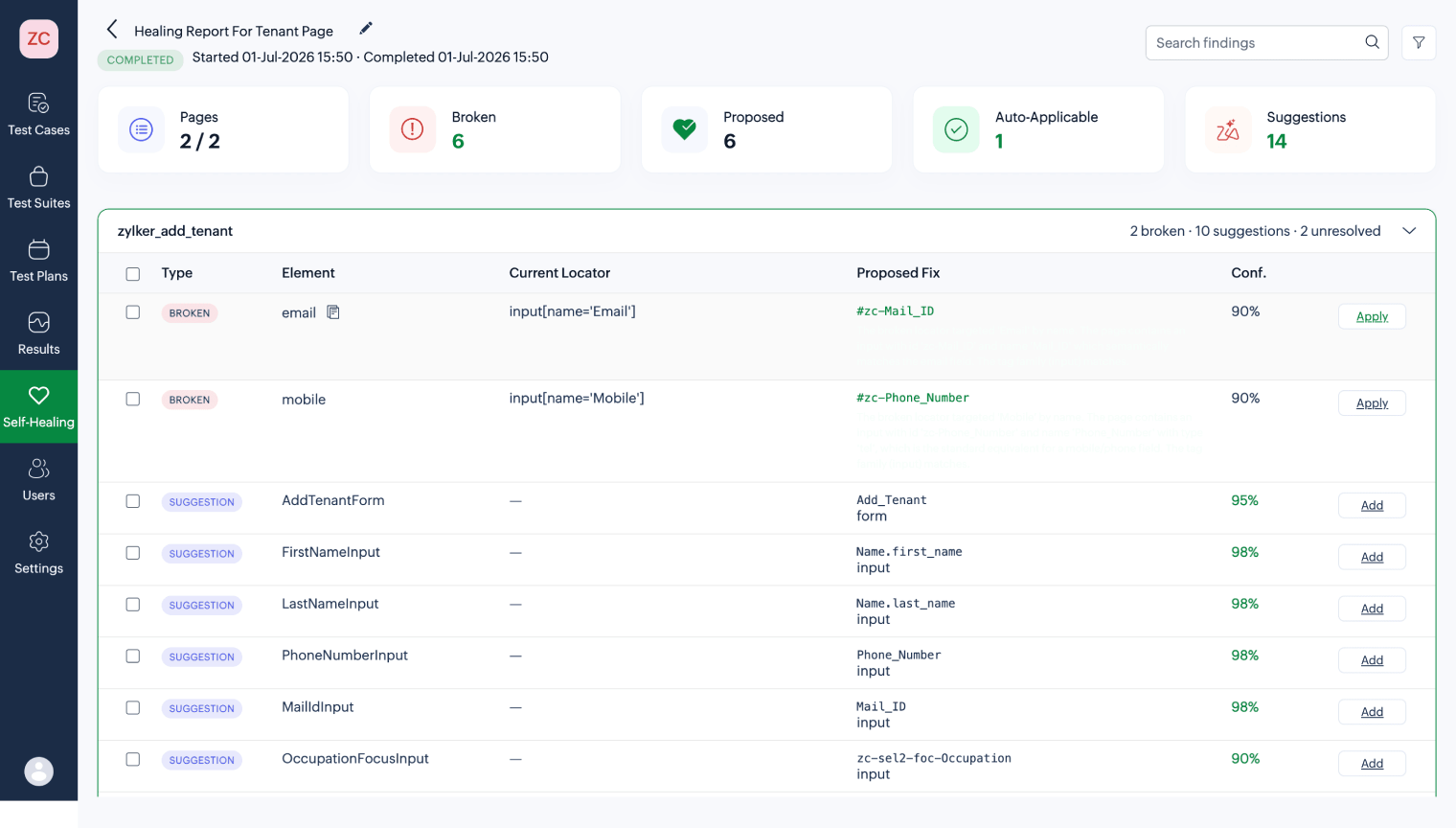
Instead of failing because of outdated locators, Zoho QEngine's self-healing AI automatically detects changes in the application's user interface and updates element locators using contextual matching and alternative attributes.
The self-updating POM architecture suggests the locator changes across test cases and updates the existing test case scripts, reducing flaky tests or failures.
Benefits:
- Minimizes false test failures.
- Keeps regression suites stable after UI updates.
- Reduces maintenance of automated test scripts.
- Allows QA teams to focus on genuine application defects instead of broken locators.
Automate regression testing after bug fixes
Once a developer fixes a defect, the next step is verification. In many organizations, this involves waiting for the next scheduled regression run or manually asking QA to retest the application.
Zoho QEngine removes this delay by integrating with popular CI/CD platforms like Jenkins.
When a new build is deployed to a testing environment, QEngine can automatically trigger the relevant regression suite. This means verification begins immediately after deployment instead of waiting for manual intervention.
By automating the Fixed → Retest → Verified stages, teams can significantly reduce the time required to validate bug fixes and move releases forward with greater confidence.
Benefits:
- Starts retesting immediately after deployment.
- Accelerates the verification process.
- Supports continuous integration and continuous delivery workflows.
- Shortens the overall defect resolution cycle.
Improve visibility throughout the defect life cycle
Beyond automation, Zoho QEngine provides a centralized view of testing and defect management, allowing QA teams, developers, and project managers to collaborate from a single platform.
Teams can:
- Track defects from creation through closure.
- Monitor test execution results in real time.
- View screenshots, logs, and execution history alongside defects.
- Analyze defect trends using built-in reporting and dashboards.
- Measure key quality metrics, such as defect density, reopen rate, and MTTR.
This end-to-end visibility helps teams identify bottlenecks earlier, improve testing efficiency, and make informed release decisions.
Conclusion
A traditional bug management process often involves multiple disconnected tools and manual handoffs between testing, development, and project management. These gaps can delay defect resolution and increase the likelihood of inconsistent or incomplete bug reports.
Zoho QEngine unifies test automation, defect management, reporting, and CI/CD integration into a single platform. By automating repetitive tasks and maintaining complete traceability throughout the bug life cycle, it enables teams to resolve defects faster, improve collaboration, and deliver higher-quality software with greater confidence.
Frequently asked questions
What is the difference between the bug life cycle and the defect life cycle?
The bug life cycle and the defect life cycle refer to the same process — the sequence of states a reported issue passes through from initial discovery to final closure. "Bug" and "defect" are used interchangeably in most QA tools and teams. Technically, a bug is a code-level error, while a defect is the observable deviation from expected behavior that the error produces — but in tracking workflows, both terms describe the same logged record moving through the same stages.
What happens when a bug is marked Rejected?
A Rejected defect is one that a developer or QA lead determines is not valid — the reported behavior is intentional (working as designed), the report is a duplicate of an existing record, or the reproduction steps cannot produce the reported result in the standard environment. The defect record is closed with a mandatory documented reason. The original tester may appeal a Rejected status by providing additional evidence: a screen recording, an updated reproduction case, or a specification reference.
How is the bug life cycle managed in agile development?
In agile development, the bug life cycle is embedded within the sprint cycle rather than managed as a separate parallel process. New defects are triaged at sprint planning, assigned to developers within the sprint, and verified by testers before the sprint demo. Only user stories and features with all linked defects in Verified or Closed status are demonstrated to stakeholders. Zoho QEngine's CI/CD integrations surface automated test failures as BugTracker defects before sprint planning — ensuring teams have accurate defect counts when scoping sprint capacity.
What is defect leakage and how do you prevent it?
Defect leakage is the percentage of defects that escape testing and reach end users in production: (defects found post-release ÷ total defects) × 100. A rate above 10% indicates a systemic testing gap (Capgemini World Quality Report, 2024). The primary prevention methods are: expanding regression suite coverage to include all user-facing workflows, adding cross-browser coverage for environment-specific defects, and enforcing independent verification — never allowing developers to close their own defects without tester sign-off.
What tools are used to manage the bug life cycle?
Common bug tracking tools include Jira (widely used in engineering-led teams), GitHub Issues (integrated with Git workflows), Azure Test Plans (Microsoft ecosystem), and Zoho BugTracker (native integration with Zoho QEngine for automated defect creation from test failures). The tool choice determines which states are supported, which fields are mandatory, and which workflow automation is available. Zoho BugTracker's direct integration with QEngine adds an automation layer that most standalone trackers require third-party plugins or webhooks to replicate.
How does Zoho QEngine reduce manual retesting effort?
Zoho QEngine reduces manual retesting effort in three ways:
- automated test cases re-execute automatically when a defect is marked Fixed in the CI/CD pipeline — removing the need for a tester to manually run the same steps on the updated build.
- self-healing AI maintains test locators when the application's UI changes, preventing false failures from locator breakage.
- cross-browser regression suites run in parallel across all target environments simultaneously, replacing sequential manual retesting with a single automated run.