How Zoho RPA simplifies procurement automation and vendor quote comparison
- Key takeaways
- Problem statement
- How RPA helps procurement use cases
- What changed with Zoho RPA
- How Zoho RPA helps procurement professionals
- Ready to automate vendor comparison and quote generation?
Key takeaways
- Procurement teams often spend significant time comparing vendor quotes, logging in to multiple supplier portals and manually gathering pricing and product information.
- Zoho RPA automates vendor data collection and comparison, allowing procurement teams to retrieve pricing details and prepare quotes faster.
- The bot interacts with vendor portals like a user, navigating websites, downloading catalogs, or extracting product details directly from the interface.
- Vendor information is automatically populated into a comparison spreadsheet, helping teams analyze prices, specifications, and delivery timelines more efficiently.
- After collecting vendor data, the bot updates the comparison sheet and generates quotes automatically, preparing them for internal review and approval.
- By automating vendor comparison and quote generation, procurement teams reduce manual work, improve accuracy, and make faster sourcing decisions.
Problem statement
Procurement management is all about sourcing the right products from the right vendors while controlling costs, meeting deadlines, and ensuring compliance. In large organizations, this often means comparing multiple quotes from different vendors, considering factors such as delivery timelines, vendor reliability, payment terms, and product specifications before making a final decision.
Let’s look at a procurement use case involving an automobile company. Here a procurement coordinator is responsible for sourcing parts for production and generating quotes for internal approvals. On a typical day, the coordinator may need to log into three or four vendor portals to gather the latest prices and prepare accurate quotes.
Each vendor portal works differently:
- Some allow downloading a catalog.
- Others only allow reading product details from the UI.
- Many have no APIs, making automation difficult without specialized tools.
For each request, the coordinator usually has to enter product details into the procurement portal, extract information from each vendor, update a comparison spreadsheet, and generate quotes for approval. Handling numerous requests in a day, especially when multiple vendor options are involved, quickly becomes overwhelming and leaves little room for higher-value tasks such as vendor negotiations or strategic decision-making.
How RPA helps procurement use cases
Zoho RPA automates these steps, allowing procurement teams to gather vendor information, compare options, and generate quotes faster, with greater accuracy and less effort. Here’s how it works:
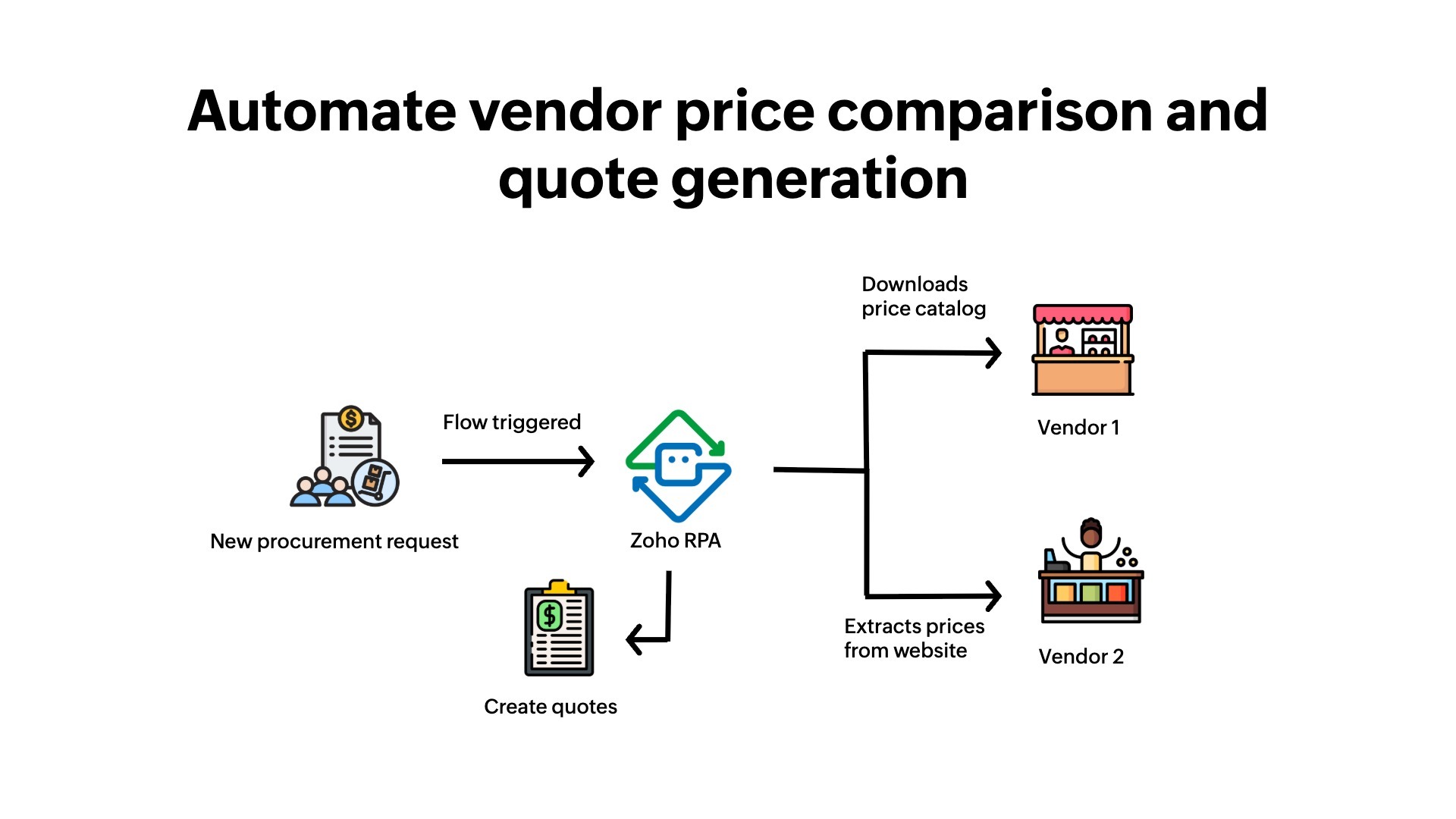
1. The user initiates the request.
The procurement coordinator manually creates a new request in the portal, including product details, quantities, and specifications.
2. The RPA bot is triggered.
Once the request is submitted, the Zoho RPA bot is triggered automatically to start the workflow.
3. The spreadsheet is updated.
The bot opens the comparison spreadsheet and populates it with item names, quantities, and specifications from the request. This sheet will be used for price analysis and quote generation.
4. Data from Vendor 1 is collected.
The bot navigates to the first vendor and downloads the latest product catalog.
5. Data from Vendor 2 is extracted.
RPA bots then log into the next vendor and scrapes relevant item details from the UI.
6. Data from other vendors is collected.
The bot navigates each vendor’s portal, downloading the catalog if it’s available or reading prices and details directly from the UI to capture all of the required data.
7. The comparison spreadsheet and generating quotes are updated.
- After collecting data from all of the vendors, the bot updates the comparison spreadsheet with the latest information.
- Quotes are then automatically generated for internal approvals, ready for review.
To see this procurement use case automation in action, watch the demo video here.
What changed with Zoho RPA
| Before RPA | After RPA |
| Staff manually visited vendor websites, downloaded catalogs, and updated spreadsheets. | The bot fetches catalogs, extracts vendor details, updates spreadsheets, and generates quotes automatically. |
| Comparing vendor prices and generating quotes was slow and error-prone. | Comparison sheet and quotes are ready instantly without errors. |
| Staff spent hours handling each purchase request. | Staff can focus on strategy, vendor negotiations, and compliance. |
| Risk of outdated or missing vendor data existed. | Always stays updated with the latest vendor catalogs. |
How Zoho RPA helps procurement professionals
- Zero manual data entry: Vendor prices and quotes are automatically fetched and updated.
- Faster decision-making: Comparison sheets and quotes are ready in minutes.
- Accurate pricing data: Eliminates mistakes from manually copying/pasting.
- Scalable: Works across multiple vendors and large volumes of items efficiently.
Ready to automate vendor comparison and quote generation?
Zoho RPA automates procurement end-to-end, eliminating manual tasks.
Want to see it in action? Let’s talk!