Chat
You can customize color and properties of the Chat window like text, background color, chat handoff banner, submit button, message suggestion, etc to match the look and feel of your application.
Chat.backgroudColor
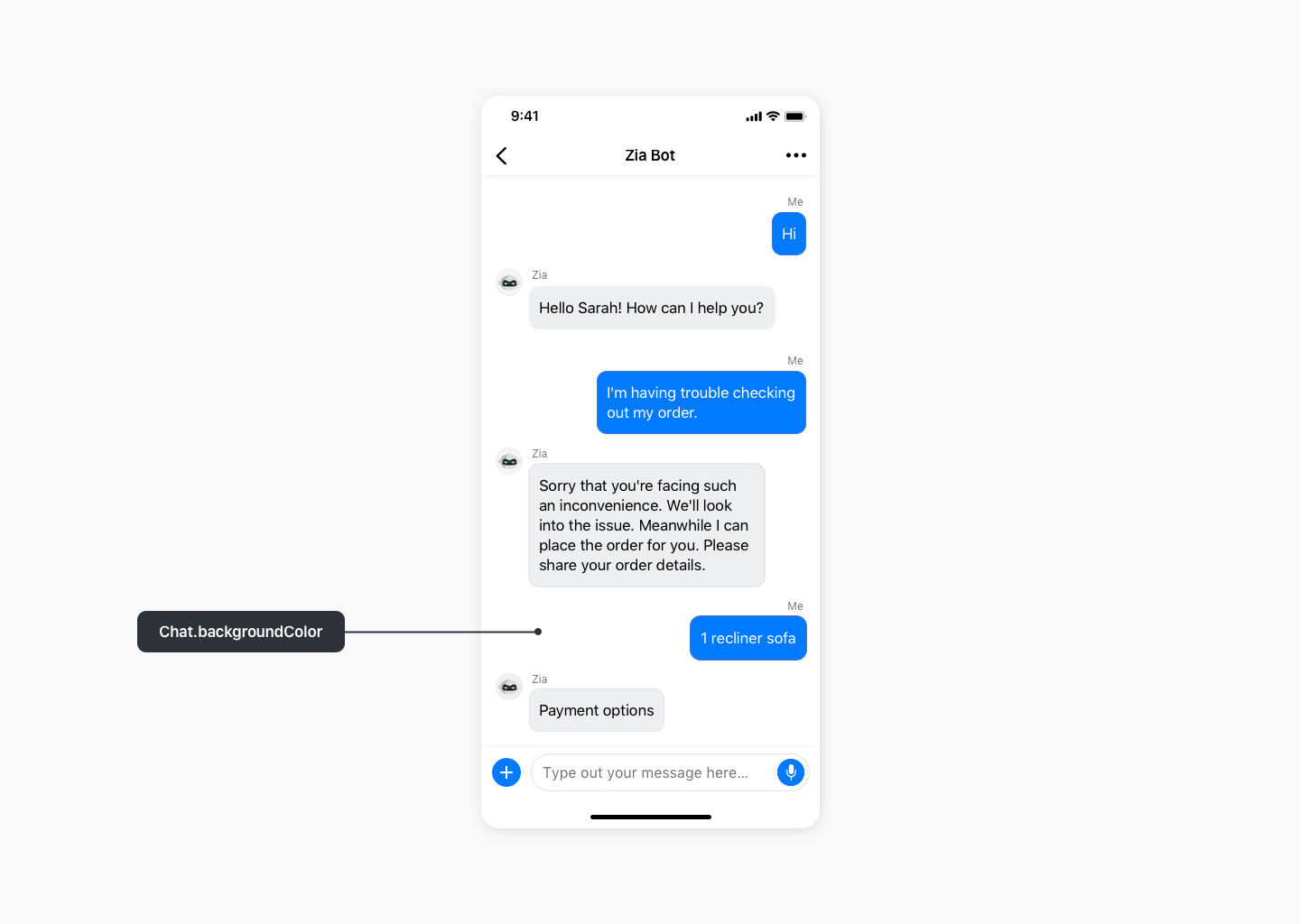
Chat.backgroundColor
Copied//Get the base theme using ZohoSalesIQ.Theme.baseTheme
let supportTheme = ZohoSalesIQ.Theme.baseTheme

//Customize properties in the customTheme object as desired
supportTheme.Chat.backgroundColor = UIColor.white

//Set the customized theme using the ZohoSalesIQ.Theme.setTheme(theme:) API
ZohoSalesIQ.Theme.setTheme(theme: supportTheme)
Chat.Input
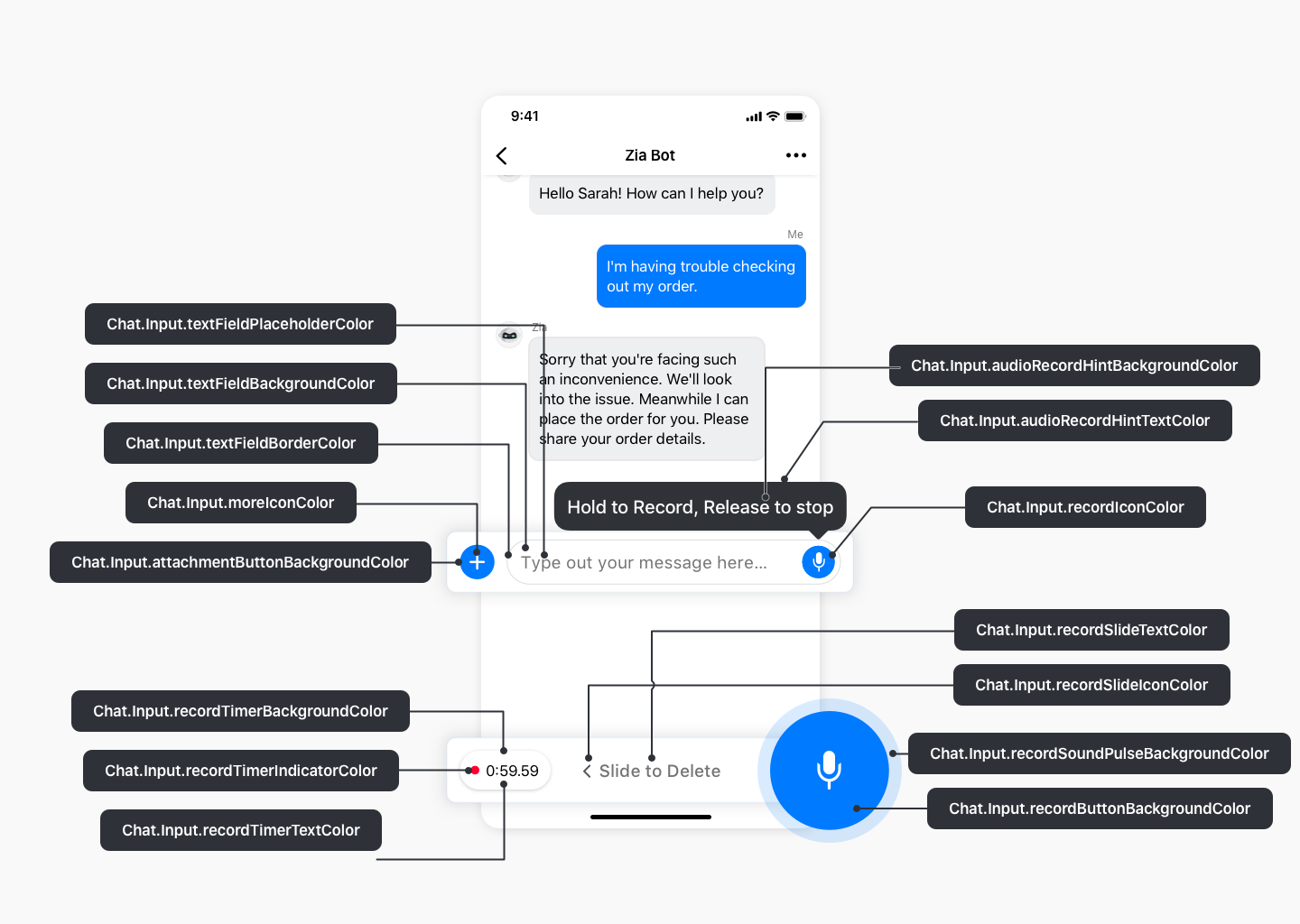
Chat.Input
Copied//Get the base theme using ZohoSalesIQ.Theme.baseTheme
let supportTheme = ZohoSalesIQ.Theme.baseTheme

//Customize properties in the customTheme object as desired
supportTheme.Chat.Input.audioRecordHintBackgroundColor = UIColor.black
supportTheme.Chat.Input.audioRecordHintTextColor = UIColor.white
supportTheme.Chat.Input.textFieldBorderColor = UIColor.gray
supportTheme.Chat.Input.textFieldTintColor = UIColor.gray
supportTheme.Chat.Input.textFieldBackgroundColor = UIColor.white
supportTheme.Chat.Input.textFieldPlaceholderColor = UIColor.gray
supportTheme.Chat.Input.textFieldTextColor = UIColor.black
supportTheme.Chat.Input.attachmentButtonBackgroundColor = UIColor.gray
supportTheme.Chat.Input.recordButtonBackgroundColor = UIColor.blue
supportTheme.Chat.Input.recordSoundPulseBackgroundColor = UIColor.lightblue
supportTheme.Chat.Input.sendButtonBackgroundColor = UIColor.white
supportTheme.Chat.Input.recordTimerBackgroundColor = UIColor.white
supportTheme.Chat.Input.recordTimerTextColor = UIColor.gray
supportTheme.Chat.Input.recordTimerIndicatorColor = UIColor.red
supportTheme.Chat.Input.recordSlideTextColor = UIColor.gray
supportTheme.Chat.Input.recordSlideIconColor = UIColor.lightgray
supportTheme.Chat.Input.recordCancelTextColor = UIColor.white
supportTheme.Chat.Input.moreIconColor = UIColor.white
supportTheme.Chat.Input.sendIconColor = UIColor.white
supportTheme.Chat.Input.recordIconColor = UIColor.blue

//Set the customized theme using the ZohoSalesIQ.Theme.setTheme(theme:) API
ZohoSalesIQ.Theme.setTheme(theme: supportTheme)
Chat.Message
Chat.Message.Common
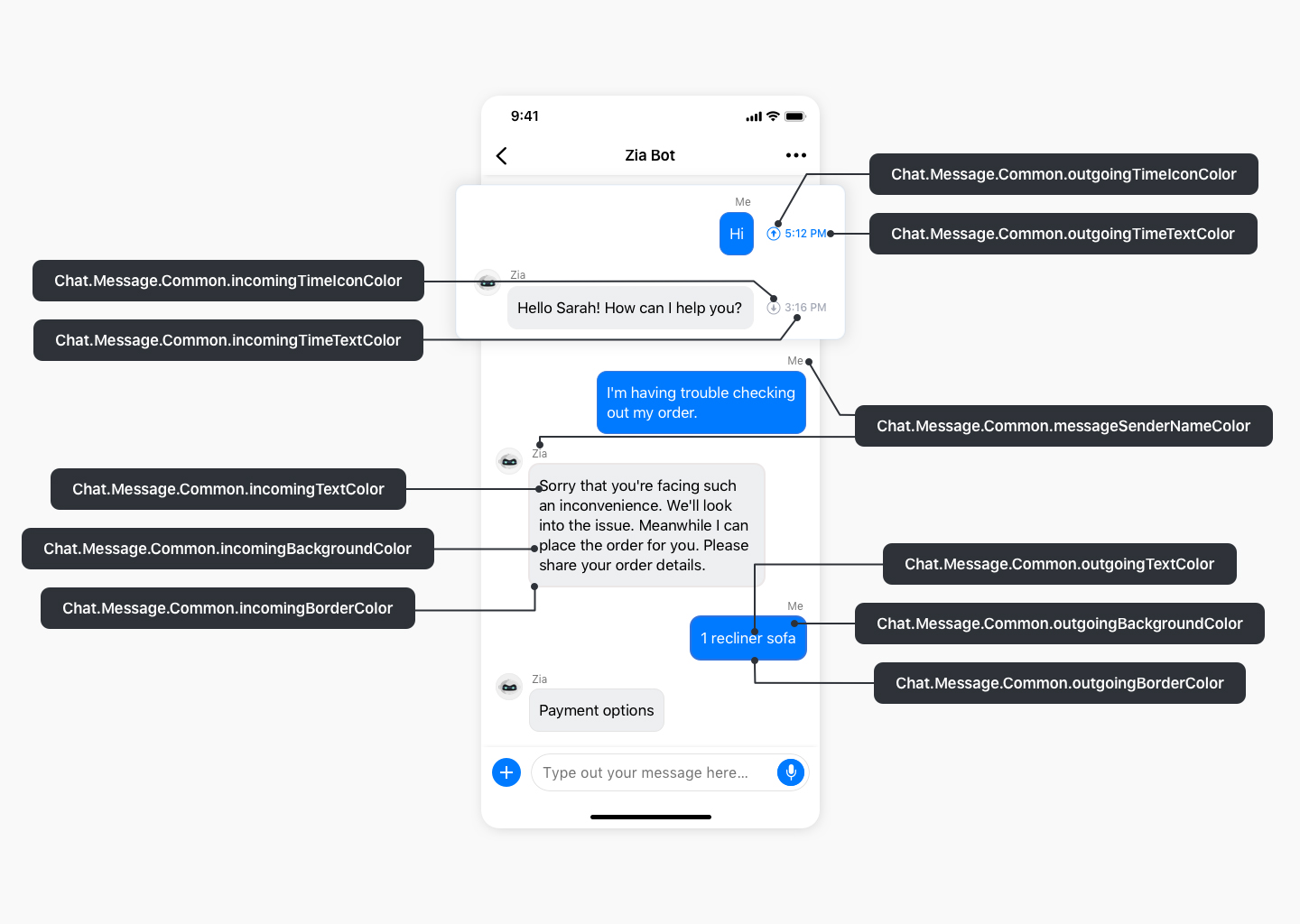
Chat.Message.Common
Copied//Get baseTheme using ZohoSalesIQ.Theme.baseTheme
let customTheme = ZohoSalesIQ.Theme.baseTheme

//Customize properties in the customTheme instance as desired
customTheme.Chat.Message.Common.incomingBackgroundColor = UIColor.lightGray
customTheme.Chat.Message.Common.outgoingBackgroundColor = UIColor.blue
customTheme.Chat.Message.Common.incomingTextColor = UIColor.black
customTheme.Chat.Message.Common.outgoingTextColor = UIColor.white
customTheme.Chat.Message.Common.incomingBorderColor = UIColor.gray
customTheme.Chat.Message.Common.outgoingBorderColor = UIColor.blue
customTheme.Chat.Message.Common.messageSenderNameColor = UIColor.gray
customTheme.Chat.Message.Common.incomingTimeTextColor = UIColor.gray
customTheme.Chat.Message.Common.incomingTimeIconColor = UIColor.gray
customTheme.Chat.Message.Common.outgoingTimeTextColor = UIColor.blue
customTheme.Chat.Message.Common.outgoingTimeIconColor = UIColor.blue
customTheme.Chat.Message.Common.botTypingIndicatorStyle = 1

//Set the customized theme using ZohoSalesIQ.Theme.setTheme API
ZohoSalesIQ.Theme.setTheme(theme: customTheme)
Chat.Message.InfoMessage
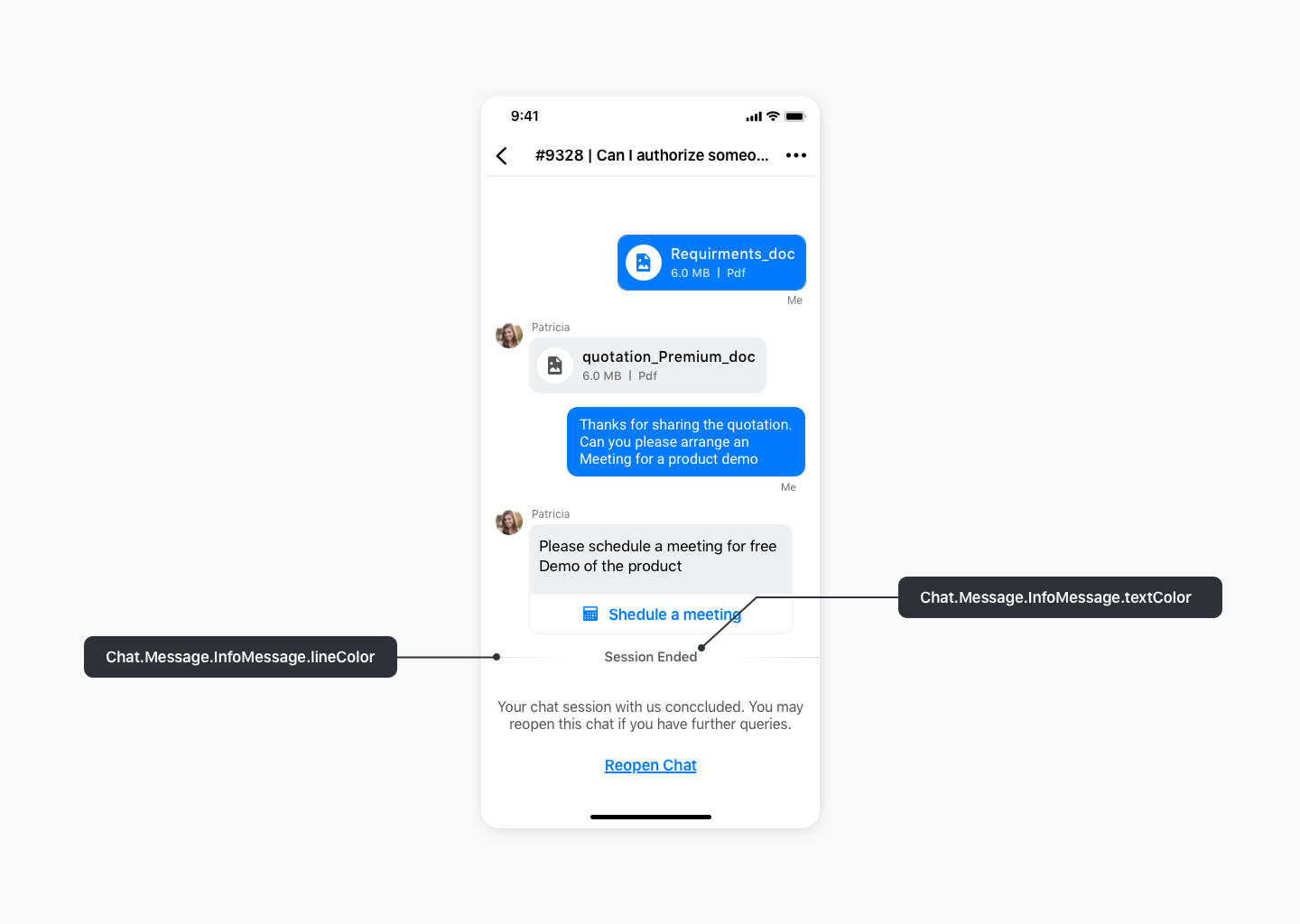
Chat.Message.InfoMessage
Copied//Get baseTheme using ZohoSalesIQ.Theme.baseTheme
let customTheme = ZohoSalesIQ.Theme.baseTheme

//Customize properties in the customTheme instance as desired
customTheme.Chat.Message.InfoMessage.textColor = UIColor.gray
customTheme.Chat.Message.InfoMessage.lineColor = UIColor.gray

//Set the customized theme using ZohoSalesIQ.Theme.setTheme API
ZohoSalesIQ.Theme.setTheme(theme: customTheme)
Chat.Message.Suggestion

Chat.Message.Suggestion
Copied//Get baseTheme using ZohoSalesIQ.Theme.baseTheme
let customTheme = ZohoSalesIQ.Theme.baseTheme

//Customize properties in the customTheme instance as desired
customTheme.Chat.Message.Suggestion.backgroundColor = UIColor.white
customTheme.Chat.Message.Suggestion.textColor = UIColor.blue
customTheme.Chat.Message.Suggestion.borderColor = UIColor.blue
customTheme.Chat.Message.Suggestion.cornerRadius = 10
customTheme.Chat.Message.Suggestion.displayStyle = 1

//Set the customized theme using ZohoSalesIQ.Theme.setTheme API
ZohoSalesIQ.Theme.setTheme(theme: customTheme)
Chat.Message.InputCard
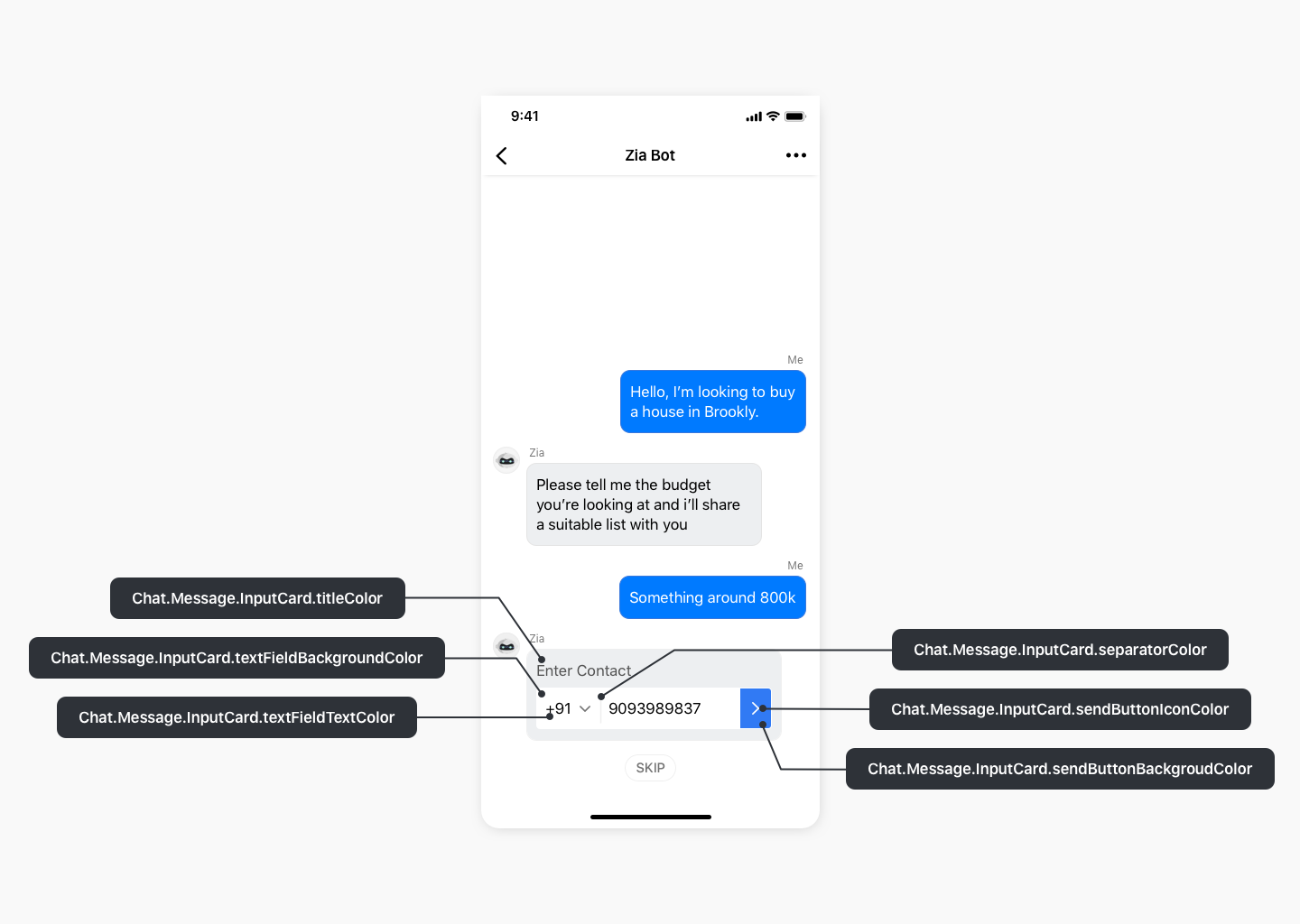
Chat.Message.InputCard
Copied//Get the base theme using ZohoSalesIQ.Theme.baseTheme
let supportTheme = ZohoSalesIQ.Theme.baseTheme

//Customize properties in the customTheme object as desired
supportTheme.Chat.Message.InputCard.titleColor = UIColor.gray
supportTheme.Chat.Message.InputCard.textFieldBackgroundColor = UIColor.white
supportTheme.Chat.Message.InputCard.textFieldTextColor = UIColor.black
supportTheme.Chat.Message.InputCard.textFieldPlaceholderColor = UIColor.gray
supportTheme.Chat.Message.InputCard.sendButtonBackgroundColor = UIColor.blue
supportTheme.Chat.Message.InputCard.sendButtonIconColor = UIColor.white
supportTheme.Chat.Message.InputCard.separatorColor = UIColor.lightgray

//Set the customized theme using the ZohoSalesIQ.Theme.setTheme(theme:) API
ZohoSalesIQ.Theme.setTheme(theme: supportTheme)
Chat.Message.AudioPlayer
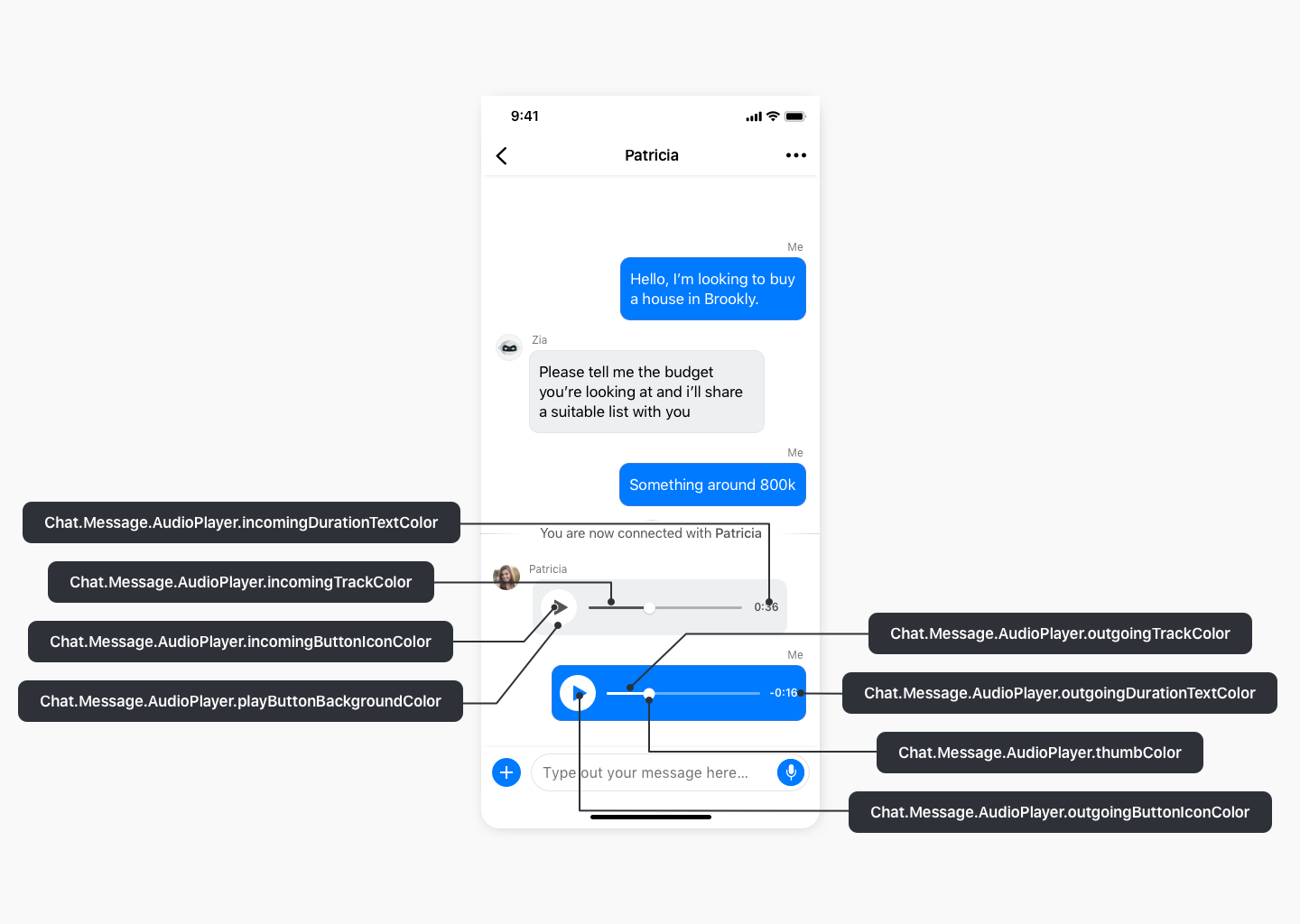
Chat.Message.AudioPlayer
Copied//Get baseTheme using ZohoSalesIQ.Theme.baseTheme
let customTheme = ZohoSalesIQ.Theme.baseTheme

//Customize properties in the customTheme instance as desired
customTheme.Chat.Message.AudioPlayer.incomingTrackColor = UIColor.gray
customTheme.Chat.Message.AudioPlayer.outgoingTrackColor = UIColor.white
customTheme.Chat.Message.AudioPlayer.outgoingDurationTextColor = UIColor.white
customTheme.Chat.Message.AudioPlayer.incomigDurationTextColor = UIColor.gray
customTheme.Chat.Message.AudioPlayer.playButtonBackgroundColor = UIColor.white
customTheme.Chat.Message.AudioPlayer.incomingButtonIconColor = UIColor.gray
customTheme.Chat.Message.AudioPlayer.outgoingButtonIconColor = UIColor.blue

//Set the customized theme using ZohoSalesIQ.Theme.setTheme API
ZohoSalesIQ.Theme.setTheme(theme: customTheme)
Chat.Message.SkipActionButton
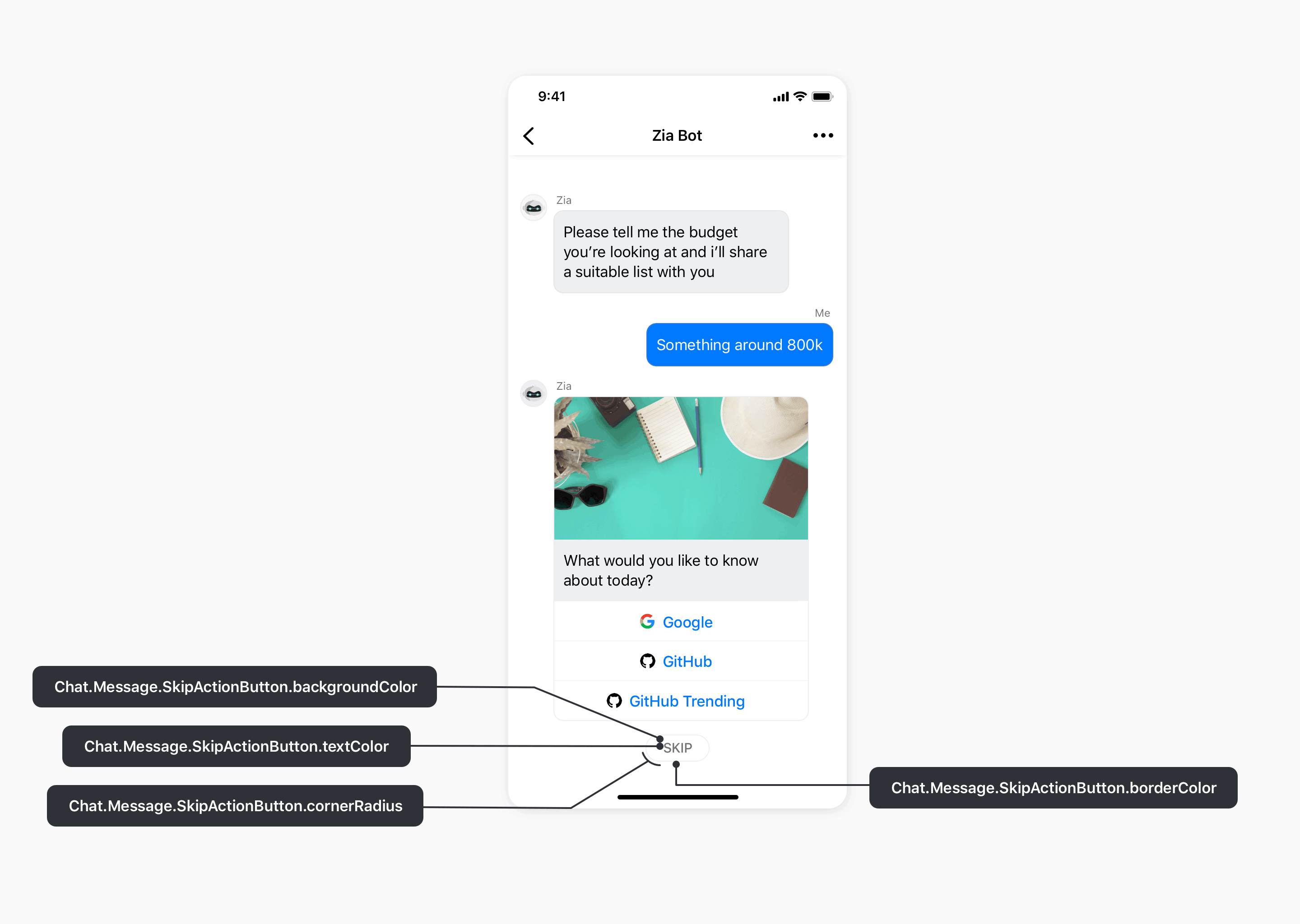
Chat.Message.SkipActionButton
Copied//Get the base theme using ZohoSalesIQ.Theme.baseTheme
let supportTheme = ZohoSalesIQ.Theme.baseTheme

//Customize properties in the customTheme object as desired
supportTheme.Chat.Message.SkipActionButton.textColor = UIColor.gray
supportTheme.Chat.Message.SkipActionButton.backgroundColor = UIColor.white
supportTheme.Chat.Message.SkipActionButton.borderColor = UIColor.gray
supportTheme.Chat.Message.SkipActionButton.cornerRadius = UIColor.gray

//Set the customized theme using the ZohoSalesIQ.Theme.setTheme(theme:) API
ZohoSalesIQ.Theme.setTheme(theme: supportTheme)
Chat.Message.Selection
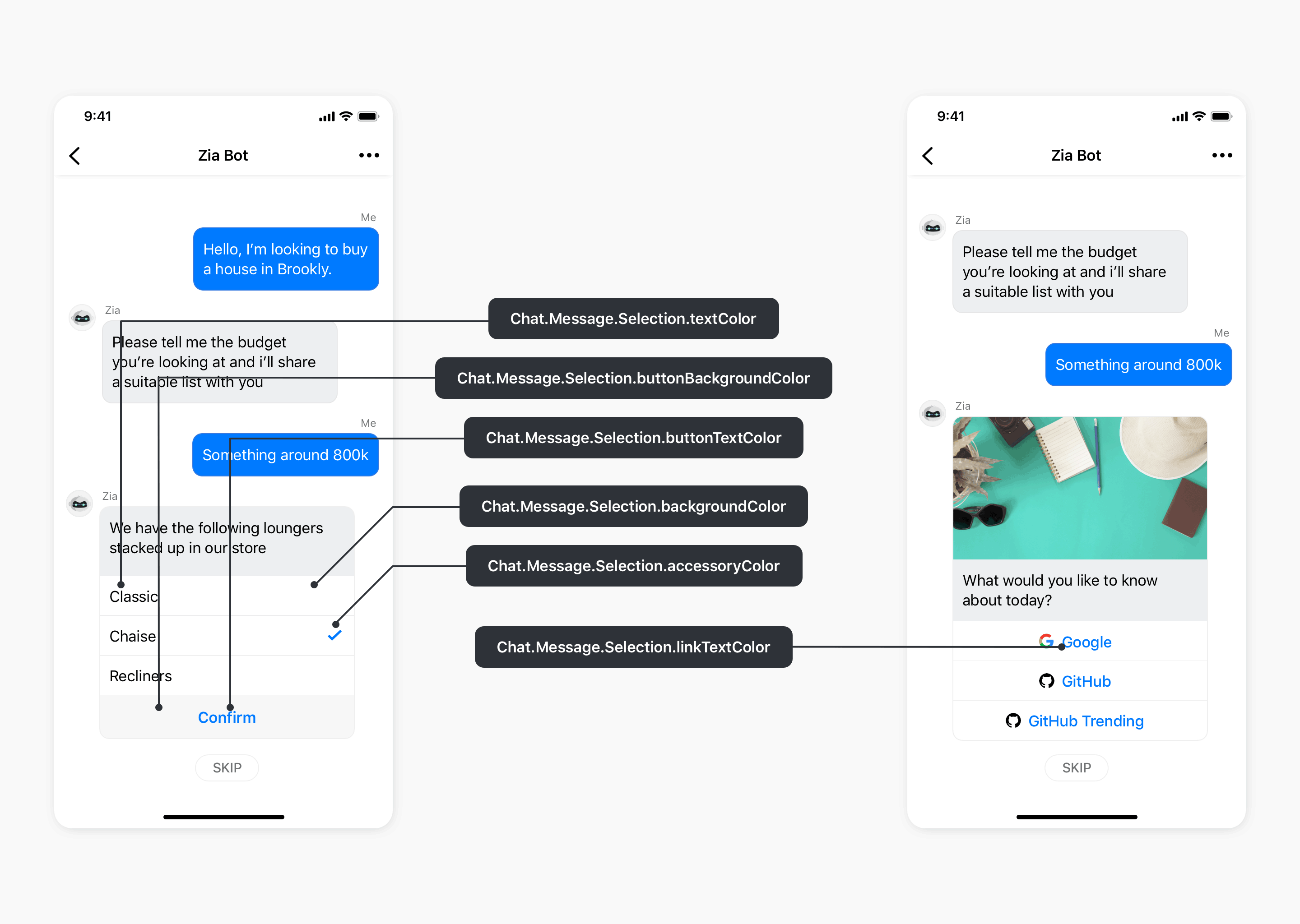
Chat.Message.Selection
Copied//Get baseTheme using ZohoSalesIQ.Theme.baseTheme
let customTheme = ZohoSalesIQ.Theme.baseTheme

//Customize properties in the customTheme instance as desired
customTheme.Chat.Message.Selection.backgroundColor = UIColor.white
customTheme.Chat.Message.Selection.selectionBackgroundColor = UIColor.lightGray
customTheme.Chat.Message.Selection.textColor = UIColor.black
customTheme.Chat.Message.Selection.buttonBackgroundColor = UIColor.white
customTheme.Chat.Message.Selection.buttonTextColor = UIColor.blue
customTheme.Chat.Message.Selection.linkTextColor = UIColor.blue
customTheme.Chat.Message.Selection.accessoryColor = UIColor.blue

//Set the customized theme using ZohoSalesIQ.Theme.setTheme API
ZohoSalesIQ.Theme.setTheme(theme: customTheme)
Chat.Message.Slider
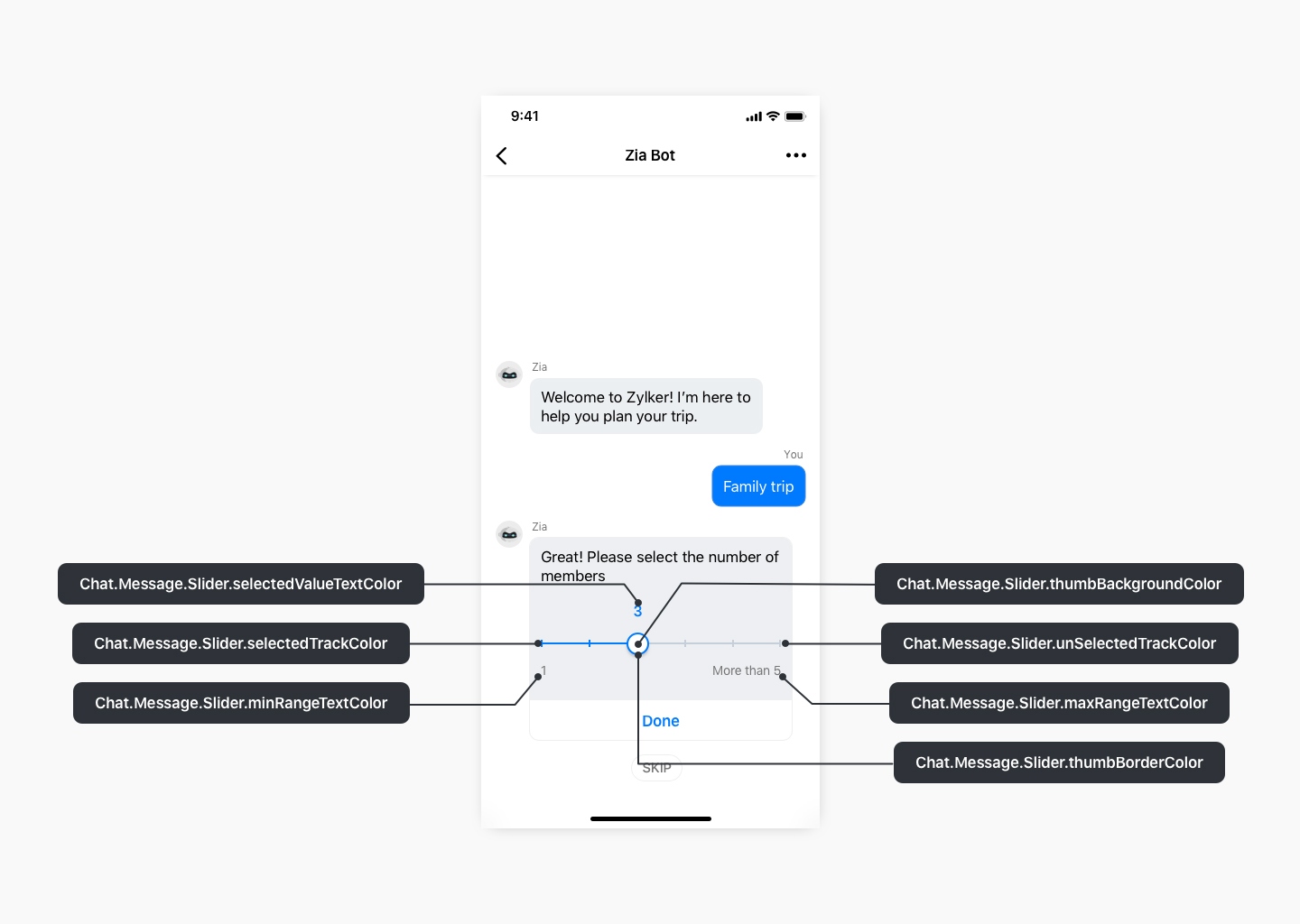
Chat.Message.Slider
Copied//Get the base theme using ZohoSalesIQ.Theme.baseTheme
let supportTheme = ZohoSalesIQ.Theme.baseTheme

//Customize properties in the customTheme object as desired
supportTheme.Chat.Message.Slider.thumbBorderColor = UIColor.blue
supportTheme.Chat.Message.Slider.selectedTrackColor = UIColor.blue
supportTheme.Chat.Message.Slider.selectedValueTextColor = UIColor.blue
supportTheme.Chat.Message.Slider.unSelectedTrackColor = UIColor.gray
supportTheme.Chat.Message.Slider.thumbBackgroundColor = UIColor.white
supportTheme.Chat.Message.Slider.minRangeTextColor = UIColor.white
supportTheme.Chat.Message.Slider.maxRangeTextColor = UIColor.lightgray

//Set the customized theme using the ZohoSalesIQ.Theme.setTheme(theme:) API
ZohoSalesIQ.Theme.setTheme(theme: supportTheme)
Chat.HandOffBanner

Chat.HandOffBanner
Copied//Get baseTheme using ZohoSalesIQ.Theme.baseTheme
let customTheme = ZohoSalesIQ.Theme.baseTheme

//Customize properties in the customTheme instance as desired
customTheme.Chat.HandOffBanner.backgroundColor = UIColor.lightGray
customTheme.Chat.HandOffBanner.textColor = UIColor.black
customTheme.Chat.HandOffBanner.buttonTitleColor = UIColor.blue

//Set the customized theme using ZohoSalesIQ.Theme.setTheme API
ZohoSalesIQ.Theme.setTheme(theme: customTheme)
Chat.EmailTranscript
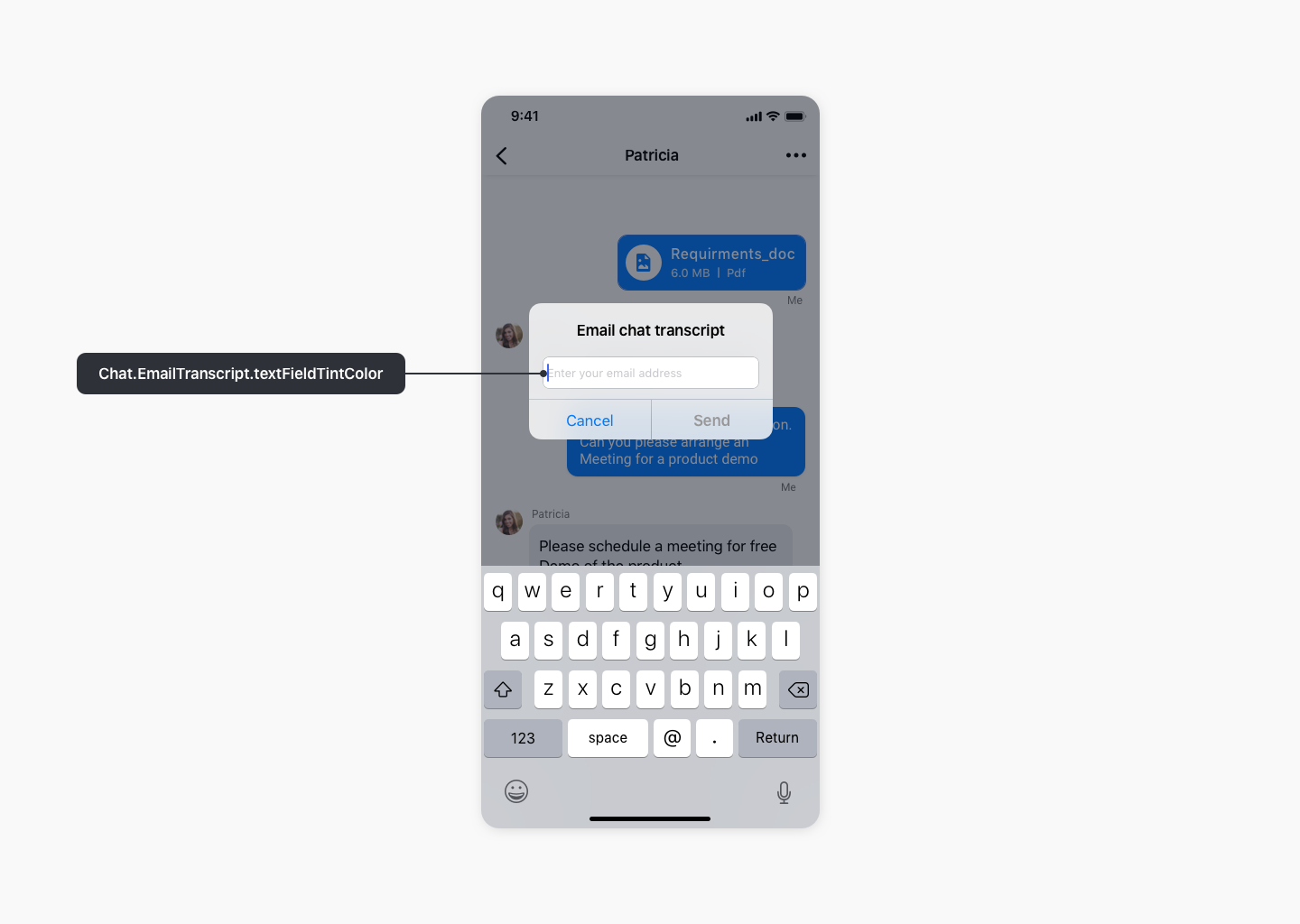
Chat.EmailTranscript
Copied//Get baseTheme using ZohoSalesIQ.Theme.baseTheme
let customTheme = ZohoSalesIQ.Theme.baseTheme

//Customize properties in the customTheme instance as desired
customTheme.Chat.EmailTranscript.textFieldTintColor = UIColor.blue

//Set the customized theme using ZohoSalesIQ.Theme.setTheme API
ZohoSalesIQ.Theme.setTheme(theme: customTheme)