
Most of the surveys you come across ask you the same flat list of questions regardless of what you just told them. A pet owner and someone without a pet answer the exact same twelve questions. A first-time customer and someone who’s bought from the brand for five years get identical follow-ups. It’s not that the survey designer didn’t care. It’s that building a survey that actually responds to each answer used to take real effort, so most people didn’t bother.
Survey logic changes this by offering survey designers the ability to personalize the survey based on how the user responds to a particular question. In this article, let us learn what survey logic is, how to build a survey by embedding logic into it, and the best practices you need to follow while doing it.
What survey logic actually means
Survey logic lets a survey change based on how someone answers. Rather than sending every respondent through the exact same set of questions, it can show, hide, or reorder content as they move through the survey. There are a few types of logic used for this, and the names can sometimes get confusing because they are often used to mean the same thing.
Conditional logic is the broadest term. It basically means, “if this answer, then do this.” Skip logic and display logic both fall under conditional logic, but they handle the response differently. Skip logic sends a respondent to another question or page, while display logic shows or hides a question or answer option without changing their position in the survey. Most survey platforms use a mix of both. What matters is whether the tool can adjust the survey to match the different paths your respondents may take.
The result of using any of this well is what’s usually called a personalized survey. In a personalized survey using survey logic, two respondents can start at the same first question and end up answering an almost entirely different set of questions, based purely on how they responded along the way.
The building blocks of a personalized survey with survey logic
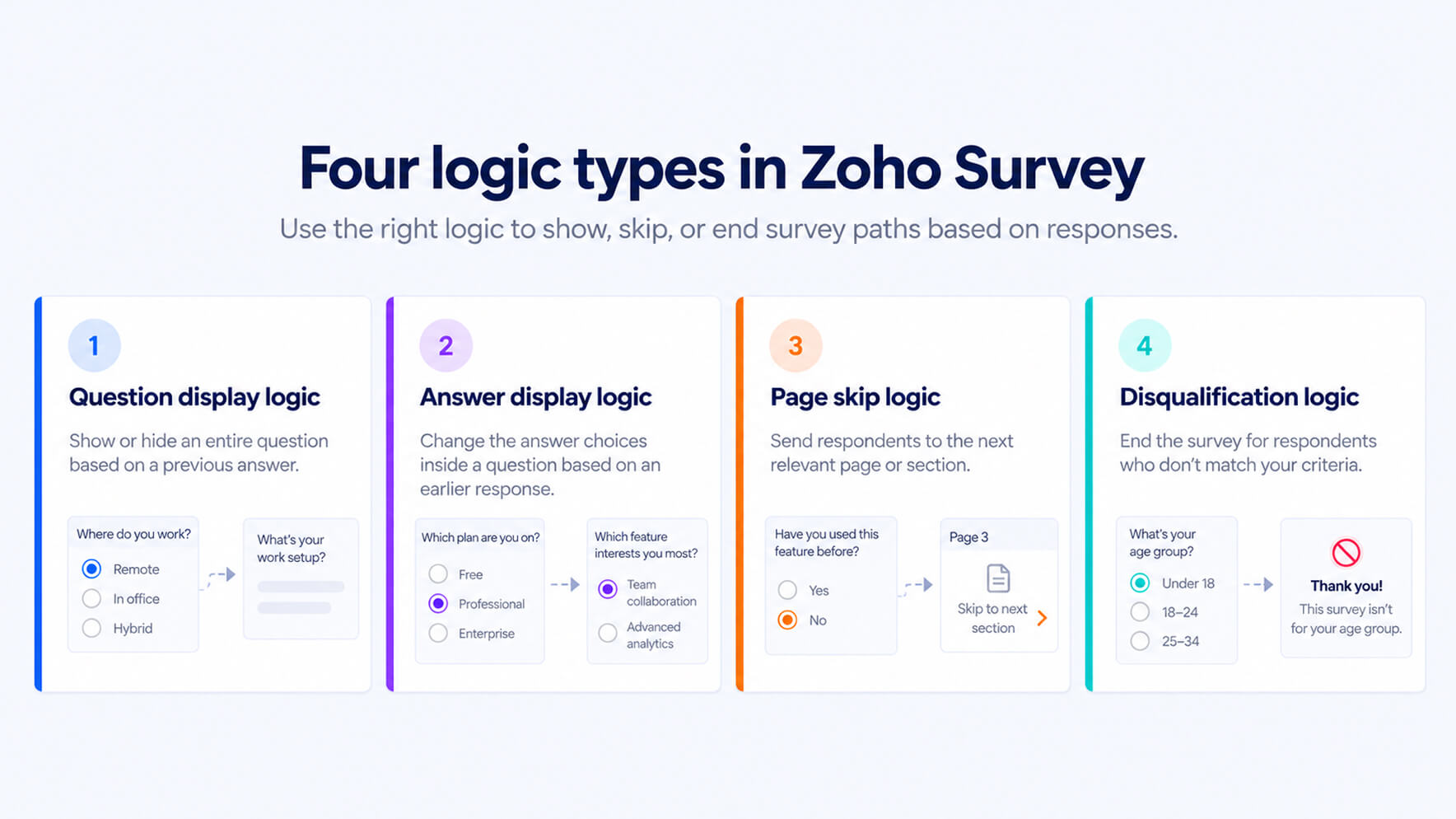
Zoho Survey’s logic builder breaks this down into four distinct types, and understanding what each one is makes it much easier to build something that works on the first try.
Question display logic lets you decide when a question shows up. A question can appear to everyone, remain hidden, or appear only after a respondent gives a specific answer. For example, you could ask about someone’s remote work setup only if they answered “remote” when asked where they work.
Answer display logic works one level down, controlling which answer options appear within a question rather than the question itself. A survey question about a product feature can present different answer choices depending on which plan or tier a respondent has already indicated they’re on.
Page skip logic moves respondents between entire pages or sections, which is the version most people picture when they hear the term skip logic. A respondent who indicates they haven’t used a specific feature can skip an entire page of follow-up questions about that feature and land directly on the next relevant section.
Disqualification logic, one of Zoho Survey’s four logic types, lets you end a survey for respondents who don’t meet your criteria. They’re sent to a separate ending page rather than continuing through questions that don’t apply to them. This is useful for screening surveys aimed at a specific age group, industry, or other requirement.
Step-by-step guide to creating a survey with logic
Logic-heavy surveys can become confusing pretty quickly if you start adding rules without figuring out the flow first. Here’s a simpler way to build them:
- Figure out the branches first. Before you start building, write down which questions depend on earlier answers and which ones everyone will see. You’ll usually find that there are fewer branches than you expected, which makes the whole survey easier to manage.
- Keep the first rule simple. Start with a basic condition such as, “if someone answers X, show Y.” Build and test that first before adding more conditions. A lot of survey flows can be handled with simple rules like this.
- Use And/Or only when you need it. Zoho Survey lets you group conditions using And/Or, with up to 64 conditions in a single logic rule. That’s enough for fairly detailed screening criteria. Keep in mind that every extra condition creates another path to test. So it’s better to use them only when a simple condition won’t do the job.
- Check what happens to mandatory questions. A mandatory question won’t require an answer if the logic skips over it completely. This is useful for screening surveys because someone who gets routed away from a required question won’t be stopped by it.
- Preview the survey as different respondent types before launch. Zoho Survey’s real-time preview lets a builder walk through the survey exactly as a respondent with a specific set of answers would. This is the fastest way to catch a branch that dead-ends or a question that shows up for the wrong group.
Why real-time personalization is relevant
Lack of personalization in your survey has a cost that shows up quietly in response rates. Gartner has highlighted survey fatigue as a limitation of customer surveys, noting that response rates decline with each subsequent survey a customer receives and that responses are often rushed or ambiguous, reducing data quality. A flat, one-size-fits-all survey makes that fatigue worse, since every irrelevant question a respondent has to click through adds friction that a well-branched survey would have skipped entirely.
The expectation gap runs the same direction. McKinsey’s research on personalization found that 71% of consumers expect brands to tailor interactions to them, and 76% get frustrated when that doesn’t happen. A survey is one of the few direct conversations a brand has with its audience, and a respondent who gets asked five questions that clearly don’t apply to them notices exactly the kind of impersonal treatment that expectation is set against.
What separates basic branching from advanced conditional logic
Many survey tools have some form of skip logic. But things get more interesting when a survey needs to handle multiple conditions. More advanced tools let you combine conditions using And/Or, apply logic across different question types, and trigger actions beyond skipping a question. For example, a respondent could receive a specific follow-up email or be directed to a custom completion page based on their survey responses.
Zoho Survey also includes piping and autofill, which can make the survey feel more personal. Piping takes an answer someone has already given and uses it later in the survey. For example, if a respondent names a product in question three, that product name can automatically appear in question eight. They don’t have to type it again, and the survey actually follows the conversation.
Getting the most out of survey logic
Once you have branching available, it can be tempting to use it for almost every question. That usually makes things harder. A survey with logic on every question becomes difficult to manage and much harder to test, since every new branch creates another path to check before the survey goes live. Logic works best when there are a few clear groups of respondents, such as different plan tiers, product users, or qualifying criteria, and each group needs a slightly different set of questions.
Used with that kind of restraint, survey logic turns a static form into something closer to a real conversation, one that adjusts based on what the person in front of it just said.