
Delivery Time
0.00s
0.00s
0.00s
0.00s
0.00s
0.00s
ZeptoMail is powered by the creators of
Zoho Mail—a platform with decade long experience in email hosting
"ZeptoMail's SMTP configuration option along with separate Agents for specific functions and mail monitoring convinced us to move. We were able to migrate effortlessly from our previous solution. It has allowed us to minimize the frequency of transactional reports and helped us improve our business deals with better email deliverability."
"We were looking for a solution which is cost effective, easy to configure, has better analytics and customer support. ZeptoMail helps in improving customer relationship since it has high open rate. We can extract detailed report on deliverability. API integration is an excellent feature. It has been very good and more than 99% of the emails get delivered."
"We have over 5 lakh traders. On a daily basis we send transactional emails in large volumes for daily reports, billing, digitally signed reports, retention statements etc. We tried multiple well-known services but were not satisfied with their pricing and performance. ZeptoMail's SMTP has helped us achieve affordable and reliable delivery."

Integrate in
minutes!
Finish the setup and start sending emails in just a few minutes. Choose between SMTP relay, email sending API, and plug-ins to get started seamlessly.
SMTP relay
If your application already supports SMTP, simply enter ZeptoMail’s server details and credentials to start sending emails. With SMTP relay, you can connect your existing application or platform without making major code changes.
Email sending API
For deeper control use the email sending API to send transactional emails directly from backend services. The REST-based API enables applications to send single or batch emails, automate notifications, and integrate email delivery into workflows.
curl "https://zeptomail.zoho.com/v1.1/email" \
-X POST \
-H "Accept: application/json" \
-H "Content-Type: application/json" \
-H "Authorization: [Authorization key]"  \
-d '{
"from": {"address": "yourname@yourdomain.com"},
"to": [{
    "email_address": {
        "address": "receiver@yourdomain.com",
        "name": "Receiver"
    }
}],
"subject":"Test Email",
"htmlbody":" Test email sent successfully. "}'
// https://www.npmjs.com/package/zeptomail

// For ES6
import { SendMailClient } from "zeptomail";

// For CommonJS
// var { SendMailClient } = require("zeptomail");

const url = "zeptomail.zoho.com/";
const token = "[Authorization key]";

let client = new SendMailClient({ url, token });

client
  .sendMail({
  from: {
      address: "yourname@yourdomain.com",
      name: "noreply"
  },
  to: [
      {
      email_address: {
          address: "receiver@yourdomain.com",
          name: "Receiver"
      },
      },
  ],
  subject: "Test Email",
  htmlbody: " Test email sent successfully.",
  })
  .then((resp) => console.log("success"))
  .catch((error) => console.log("error"));
using System;
using System.Net;
using System.Text;
using System.IO;
using System.Net.Http;
using Newtonsoft.Json;
using Newtonsoft.Json.Linq;

namespace Rextester {
  public class Program {
  public static void Main(string[] args) {
  System.Net.ServicePointManager.SecurityProtocol =
    System.Net.SecurityProtocolType.Tls12;
  var baseAddress = "https://zeptomail.zoho.com/v1.1/email";

  var http = (HttpWebRequest)WebRequest.Create(new Uri(baseAddress));
  http.Accept = "application/json";
  http.ContentType = "application/json";
  http.Method = "POST";
  http.PreAuthenticate = true;
  http.Headers.Add("Authorization", "[Authorization key]");
  JObject parsedContent = JObject.Parse("{"+
    "'from': {'address': 'yourname@yourdomain.com'},"+
    "'to': [{'email_address': {"+
    "'address': 'receiver@yourdomain.com',"+
    "'name': 'Receiver'"+
    "}}],"+
    "'subject':'Test Email',"+
    "'htmlbody':' Test email sent successfully.'"+
  "}");
  Console.WriteLine(parsedContent.ToString());
  ASCIIEncoding encoding = new ASCIIEncoding();
  Byte[] bytes = encoding.GetBytes(parsedContent.ToString());

  Stream newStream = http.GetRequestStream();
  newStream.Write(bytes, 0, bytes.Length);
  newStream.Close();

  var response = http.GetResponse();

  var stream = response.GetResponseStream();
  var sr = new StreamReader(stream);
  var content = sr.ReadToEnd();
  Console.WriteLine(content);
  }
  }
}
import requests

url = "https://zeptomail.zoho.com/v1.1/email"

payload = """{
    "from": {
      "address": "yourname@yourdomain.com"
    },
    "to": [{
      "email_address": {
        "address": "receiver@yourdomain.com",
        "name": "Receiver"
      }}],
    "subject":"Test Email",
    "htmlbody":"Test email sent successfully."
    }"""
headers = {
 'accept': "application/json",
 'content-type': "application/json",
 'authorization': "[Authorization key]",
}

response = requests.request("POST",url,data=payload,headers=headers)

print(response.text)
<?php
$curl = curl_init();
curl_setopt_array($curl, array(
    CURLOPT_URL => "https://zeptomail.zoho.com/v1.1/email",
    CURLOPT_RETURNTRANSFER => true,
    CURLOPT_ENCODING => "",
    CURLOPT_MAXREDIRS => 10,
    CURLOPT_TIMEOUT => 30,
    CURLOPT_SSLVERSION => CURL_SSLVERSION_TLSv1_2,
    CURLOPT_HTTP_VERSION => CURL_HTTP_VERSION_1_1,
    CURLOPT_CUSTOMREQUEST => "POST",
    CURLOPT_POSTFIELDS => '{
    "from": { "address": "yourname@yourdomain.com"},
    "to": [
            {
            "email_address": {
                "address": "receiver@yourdomain.com",
                "name": "Receiver"
            }
            }
        ],
    "subject":"Test Email",
    "htmlbody":" Test email sent successfully. ",
    }',
    CURLOPT_HTTPHEADER => array(
    "accept: application/json",
    "authorization: [Authorization key]",
    "cache-control: no-cache",
    "content-type: application/json",
    ),
    ));

    $response = curl_exec($curl);
    $err = curl_error($curl);

    curl_close($curl);

    if ($err) {
        echo "cURL Error #:" . $err;
    } else {
        echo $response;
    }
    ?>
import java.io.BufferedReader;
import java.io.InputStreamReader;
import java.io.OutputStream;
import java.net.HttpURLConnection;
import java.net.URL;

import org.json.JSONObject;

public class JavaSendapi {
  public static void main(String[] args) throws Exception {
  String postUrl = "https://zeptomail.zoho.com/v1.1/email";
  BufferedReader br = null;
  HttpURLConnection conn = null;
  String output = null;
  StringBuffer sb = new StringBuffer();
  try {
    URL url = new URL(postUrl);
    conn = (HttpURLConnection) url.openConnection();
    conn.setDoOutput(true);
    conn.setRequestMethod("POST");
    conn.setRequestProperty("Content-Type", "application/json");
    conn.setRequestProperty("Accept", "application/json");
    conn.setRequestProperty("Authorization", "[Authorization key]");
    JSONObject object = new JSONObject("{\n" +
    "  \"from\": {\n" +
    "    \"address\": \"yourname@yourdomain.com\"\n" +
    "  },\n" +
    "  \"to\": [\n" +
    "    {\n" +
    "      \"email_address\": {\n" +
    "        \"address\": \"receiver@yourdomain.com\",\n" +
    "        \"name\": \"Receiver\"\n" +
    "      }\n" +
    "    }\n" +
    "  ],\n" +
    "  \"subject\": \"Test Email\",\n" +
    "  \"htmlbody\": \" Test email sent successfully.\"\n" +
    "}");
    OutputStream os = conn.getOutputStream();
    os.write(object.toString().getBytes());
    os.flush();
    br = new BufferedReader(
    new InputStreamReader((conn.getInputStream()))
    );
    while ((output = br.readLine()) != null) {
    sb.append(output);
    }
    System.out.println(sb.toString());
  } catch (Exception e) {
      br = new BufferedReader(
        new InputStreamReader((conn.getErrorStream()))
      );
      while ((output = br.readLine()) != null) {
        sb.append(output);
      }
      System.out.println(sb.toString());
    } finally {
        try {
          if (br != null) {
          br.close();
          }
        } catch (Exception e) {
          e.printStackTrace();
        }
        try {
          if (conn != null) {
            conn.disconnect();
          }
        } catch (Exception e) {
          e.printStackTrace();
        }
      }
  }
}
Affordable pricing
Pay as you go pricing.
No monthly plans.
Estimate your cost
1 credit = 10,000 emails
*Each credit is valid up to 6 months from purchase
1 credit = 10000 emails Each credit is valid for 6 months from purchase
Ready to get started?
Pay-as-you-go system allows you to buy and pay for credits as and when you need them.
Contact sales for pricingTransactional Email
What are transactional emails?
Transactional emails act as an acknowledgement for transactions between your business and your user. These emails are automatically triggered by user actions on your website or in your application.
Marketing vs Transactional
Marketing emails are bulk emails that are sent with the intention of selling or promoting a product or service. Transactional emails are unique emails that convey important information. They can be of different types, such as account information, invoices, and more, depending on your business.
Why are they important?
Transactional emails are the most important emails for any business. With an 8X higher open rate than marketing emails, they help foster trust, build your reputation, and establish communication with users. When done right, they're key to customer retention.
ZeptoMail Feature
Highlights
Great deliverability for your emails
We do one thing and do it well—deliver transactional emails reliably through SMTP relay and email sending APIs. Built exclusively for transactional email, our infrastructure is optimized for high deliverability and fast delivery. Your users receive critical emails like verification codes and password resets instantly, without delays.
Segment your emails
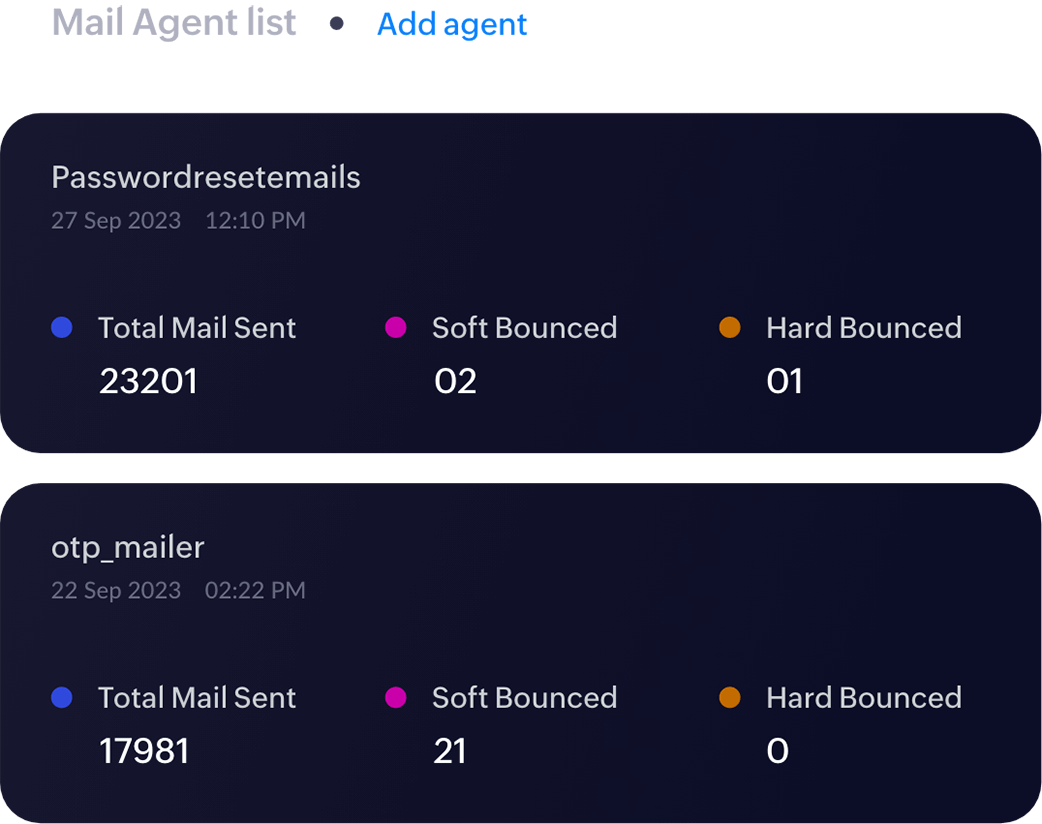
If you run multiple businesses, applications, or send different types of transactional emails, having them cluttered together can be chaotic. With ZeptoMail, you can segment emails into streams by using Agents. Each group comes with its own SMTP relay credentials and email sending API tokens for complete segregation.
Deeper insight into your emails
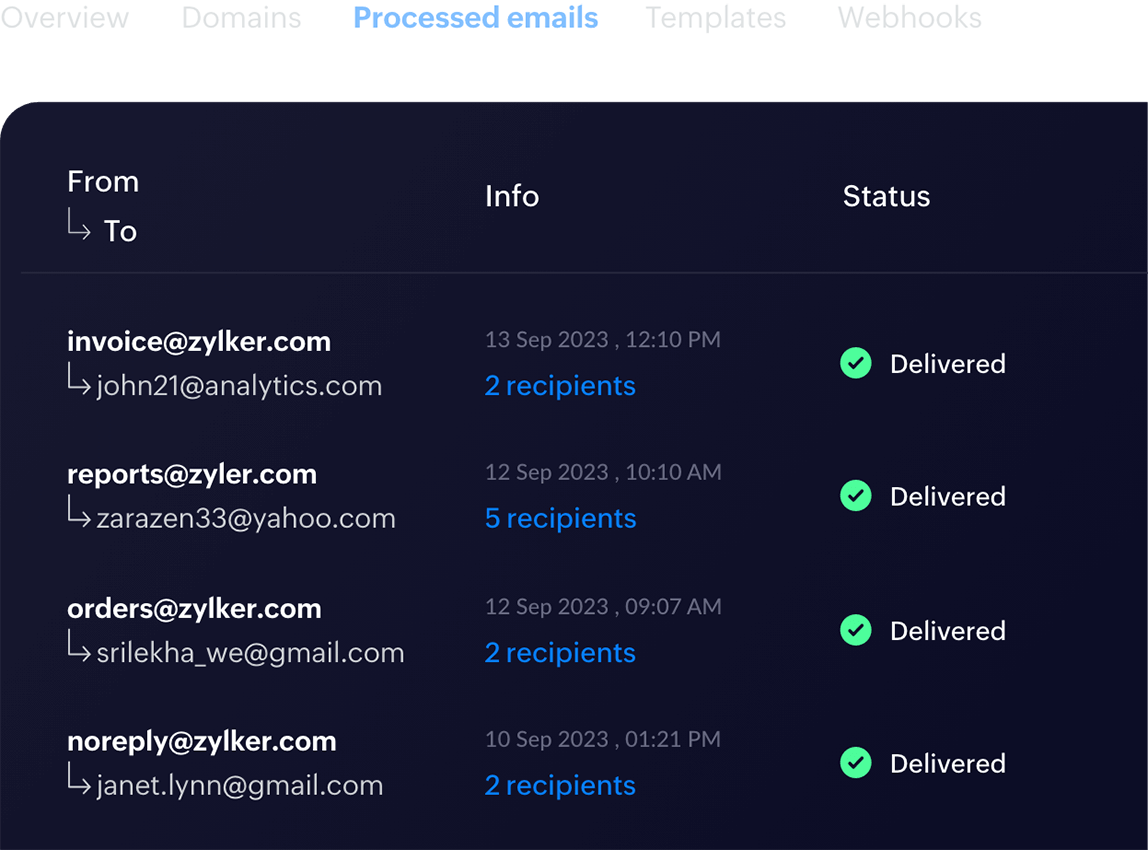
Monitor the performance of your transactional emails with built-in analytics and reporting tools. ZeptoMail provides insights into email activity so you can track delivery success and engagement. View detailed logs and real-time reports on open and clicks triggered via our email sending API or SMTP connection.
Protect your sender reputation
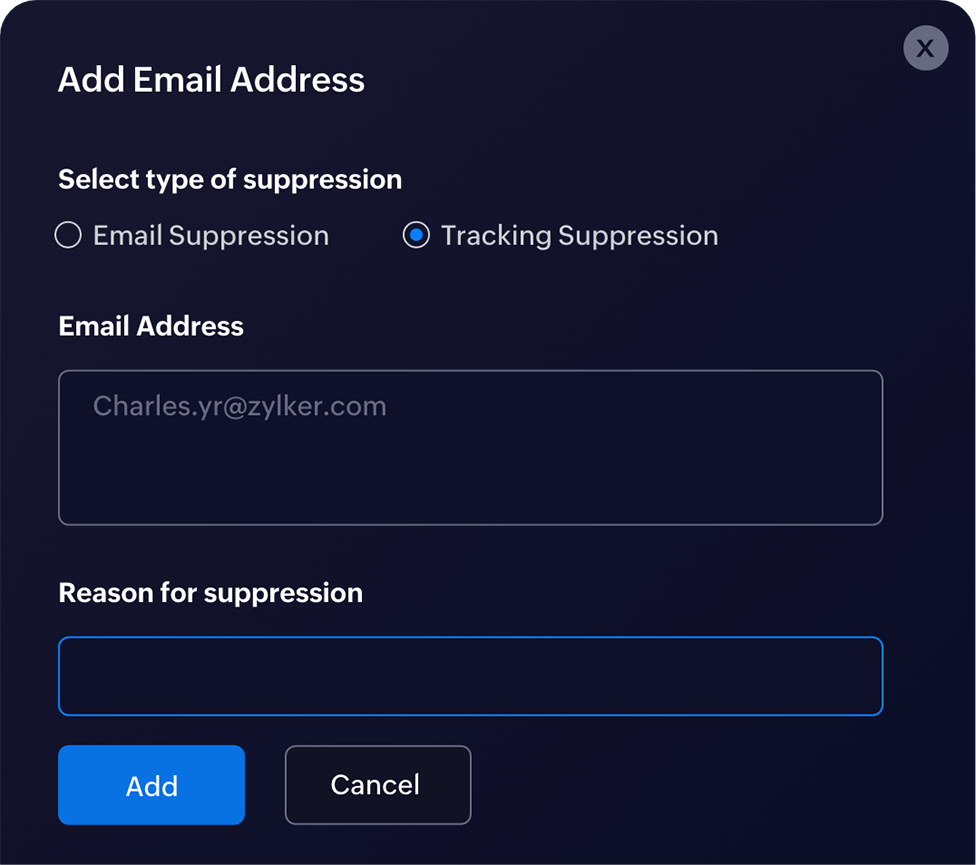
Having too many bounces or spam complaints can affect the delivery of your transactional emails. Our singular focus on transactional emails and reputation management tools suppression list in ZeptoMail allows you to protect your reputation.
Readily available templates
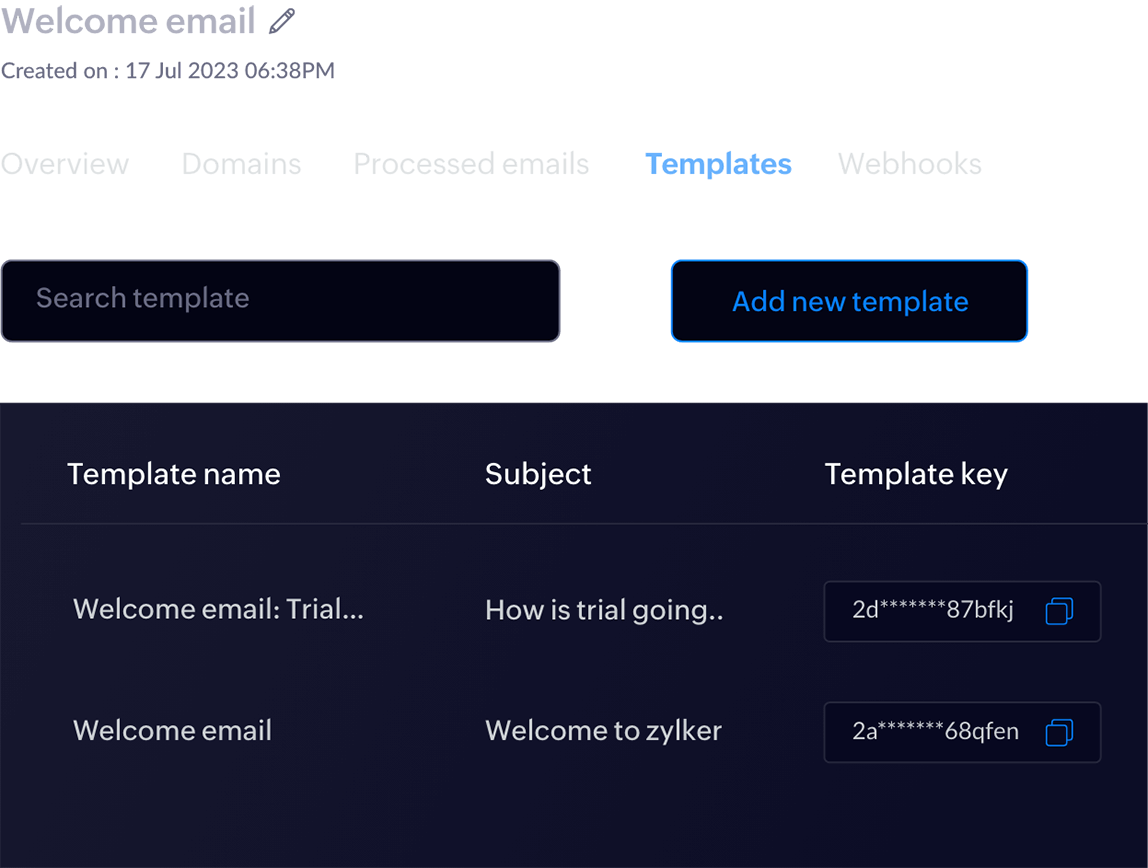
Writing the same email repeatedly eats up time that could be spent building your business. ZeptoMail comes with email templates for common transactional emails. You can pick from the ones available, or create your own from scratch for emails triggered using our email sending API.
Why choose
ZeptoMail?
Exclusively transactional
Undivided focus on transactional emails ensures great inbox placement and delivery in seconds using SMTP relay and email API
Easy to use
User-friendly interface that makes connecting ZeptoMail to your business seamless
Unbelievably affordable
Flexible pay-as-you-go pricing without the burden of monthly plans and unused emails
Delivery for all volumes
SMTP relay servers and APIs equipped to scale with your business and increasing email volume
24/7 support
Round the clock access to technical assistance over chat, phone, and email for all things ZeptoMail
No gatekeeping
No hidden costs—all of ZeptoMail's features are available to all of our users irrespective of sending volume
Need more
reasons?
Secure SMTP/API
We handle your important emails with care. Whether it is SMTP or API, ZeptoMail has multiple layers of security and privacy measures in place to ensure that your data is secure.
ExploreCredits purchased
2500Feature-rich interface
ZeptoMail is a feature-rich platform that makes managing transactional emails easy. These features help send, manage and monitor emails you send out.
Full featuresIntegrations
ZeptoMail's integration with WordPress, Zapier, Zoho CRM, Zoho Flow and many other applications, make workflows across multiple applications hassle-free.
Learn moreFrequently asked questions
What is SMTP relay?
SMTP relay is a method used to send emails from an application or server through an external email service provider using the Simple Mail Transfer Protocol (SMTP). Your application connects to an SMTP server that handles sending, routing, and deliverability.
What is email sending API?
An email sending API allows applications to send emails programmatically using HTTP requests. Developers can trigger emails directly from their application based on events such as user signups or purchases.
What is a transactional email service?
A transactional email service is built to deliver automated applications. These emails are triggered when a user completes an action on a website or application—for example, orders placed, password resets, and more.
How do you send a transactional email?
Transactional emails from ZeptoMail can be sent using SMTP or API. SMTP is a simple configuration that helps you get started faster, while APIs can be used for a more robust and in-depth integration with ZeptoMail.
How to authenticate a domain to improve email deliverability?
Domains can be authenticated using protocols, such as SPF, DKIM, DMARC, and CNAME. In the case of ZeptoMail, SPF and DKIM configurations are mandatory in order to add domains to the platform. These authentication methods also help protect your domain's reputation.
Does ZeptoMail provide dedicated IPs?
While a well-managed and shared IP address offers a higher chance of great deliverability, certain businesses with high email volume may require a dedicated IP. You can contact us to learn more about which option will serve your purposes better.
How does ZeptoMail's credit system work?
Credits function as units of payment for ZeptoMail. Each credit allows you to send 10,000 emails. You can buy multiple credits, or one credit at a time. All credits expire six months after purchase.
Why do I need a transactional email service?
Marketing emails run a risk of being marked as spam by users. When this occurs, the delivery of transactional emails sent from the same service, also takes a hit. A dedicated transactional email service can help ensure good deliverability and to protect your sender reputation.
How to choose the right transactional email service?
Transactional emails are critical, making picking the best transactional email service both important and tricky. With multiple providers on the market, here are some pointers on what to look for: Deliverability, reasonable pricing, ease of setup, analytics and good technical support.