Get related records from Zoho Desk
Table of Contents
Note:
- Each time the zoho.desk.getRelatedRecords integration task is executed, it triggers an API request in the back-end. This call is deducted from the external calls limit available for the service from which the task is executed, based on your pricing plan.
- Only actual executions that receive a response (whether success or failure) are counted, not the number of times the task appears in the script. For example, if zoho.desk.getRelatedRecords integration task is placed inside a for each task that iterates five times, the number of external calls consumed will be five, even though the task appears only once in the script.
Overview
This task is used to fetch records from a submodule related to a record in a parent module in Zoho Desk.
Syntax
<variable> = zoho.desk.getRelatedRecords(<orgID>, <sub_module>, <parent_module>, <record_ID>, <fromIndex>, <limit>, <query_value>, <connection>);
where,
| Parameter | Data type | Description |
| <variable> | KEY-VALUE | variable which will hold the response returned by Zoho Desk. It represents the related records fetched from the specified submodule. |
| <orgID> | NUMBER | specifies the organization ID of the account from which the records will be fetched. This can be found in Zoho Desk Settings > Developer Space > API. 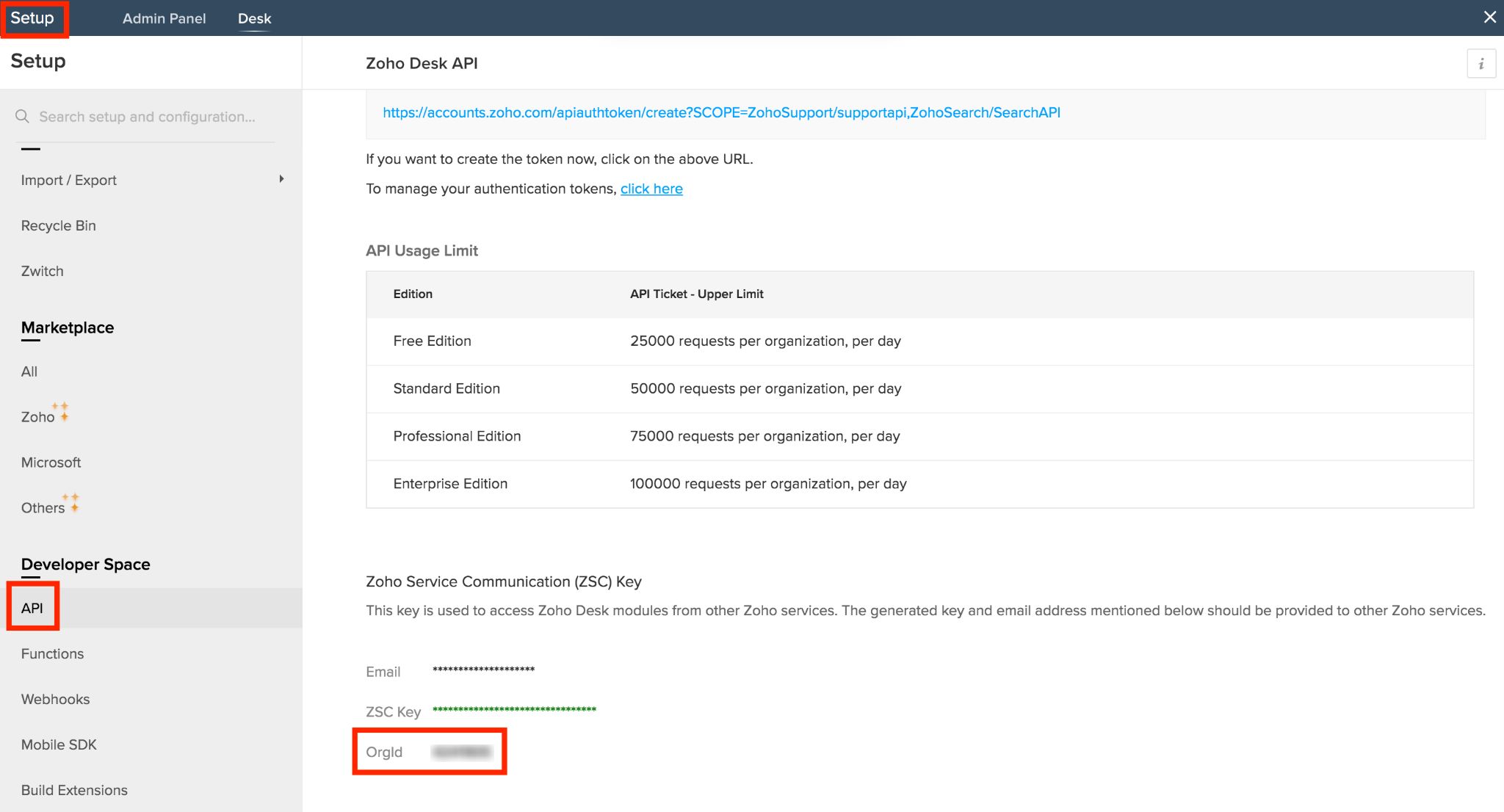 |
| <sub_module> | TEXT | specifies the name of the submodule from which the records will be fetched. The zoho.desk.getRelatedRecords task allows you to fetch:
|
| <parent_module> | TEXT | specifies the name of the module whose related records will be fetched. |
| <record_ID> | NUMBER | specifies the ID of the parent record. Learn how to fetch the record ID after creating, searching or fetching records. |
<fromIndex> (optional) | NUMBER | specifies the index number, starting from which the records will be fetched.
*Note: This is a mandatory param when used in Zoho Creator. |
<limit> (optional) | NUMBER | specifies the number of records to be fetched.
*Note: This is a mandatory param when used in Zoho Creator. |
<query_value> (optional) | KEY-VALUE | specifies the query to include secondary information related to the selected module. To learn about the applicable values, click here and go to <ModuleName> -> List <subModule> by <ModuleName> *Note: This is a mandatory param when used in Zoho Creator. |
<connection> (optional)* | TEXT | specifies the name of the connection. The scopes which need to be selected are: *Note: This is a mandatory param when used in Zoho Creator. |
Note:
In integration tasks, the parameters must be in the defined order as given in the syntax, for the Deluge task to be executed. If you choose to use an optional parameter, ensure that all preceding parameters in the syntax are explicitly specified. If a preceding optional parameter is not required, a null value can be assigned instead, to maintain the defined syntax order.
For example, in the below syntax, options_map and connection are optional parameters:
<variable> = zoho.crm.v8.task (<module_name>, <record_details>, <options_map>, <connection>);
If you want to use the connection parameter, module_name, record_details and options_map must be specified in the
exact order as the syntax. You can assign an empty map to the options_map parameter if it is not required.
Example 1
The following script fetches all the records from the submodule - tickets associated with the contact of record ID - 168XXXXXXXXXXXX043.
 queryValue = {"":""};
 response = zoho.desk.getRelatedRecords(641XXXXXX, "tickets", "contacts", 168XXXXXXXXXXXX043, 1, 10, queryValue, "desk_connection");
where,
response641XXXXXX"tickets""contacts"168XXXXXXXXXXXX043Example 2
The following script fetches all the records from the submodule - timeEntry associated to the task with record ID - 168XXXXXXXXXXXX043. It sorts the records in descending order based on the the field - executedTime and returns 3 records starting from the index 1.
 queryValue = {"orderBy":"DESC"};
 response = zoho.desk.getRelatedRecords(641XXXXXX, "timeEntry", "tasks", 168XXXXXXXXXXXX043, 1, 3, queryValue, "desk_connection");
where,
"timeEntry""tasks"168XXXXXXXXXXXX04313queryValue"orderBy""desk_connection"Sample Response
Success Response
The success response returned is of the following format. It represents the values of the records fetched from the specified submodule (eg, tickets).
{
"data": [
{
"id": "168XXXXXXXXXXX043",
"ticketNumber": "677",
"email": "smith@gmail.com",
"phone": "999999999",
"subject": "Ticket subject 1",
"status": "Open",
"statusType": "Open",
"createdTime": "2019-01-24T12:48:23.000Z",
"priority": null,
"channel": "Phone",
"dueDate": "2019-03-21T16:16:16.000Z",
"responseDueDate": null,
"commentCount": "1",
"threadCount": "120",
"closedTime": null,
"onholdTime": null
"departmentId": "168XXXXXXXXXXXX044",
"contactId": "168XXXXXXXXXXXX005",
"productId": null,
"assigneeId": "189XXXXXXXXXX001",
"teamId": "892XXXXXXXXXX071",
"webUrl": "https://desk.zoho.com/support/smith/ShowHomePage.do#Cases/dv/bf5c8f5ad85af0491d39fc24ba1e02adafb6719abeecaa48",
"lastThread": null,
"customerResponseTime": "2019-03-24T12:48:22.000Z"
}
{
"id": "168XXXXXXXXXXXXX043",
"ticketNumber": "678",
"email": "zen@gmail.com",
"phone": "1111111111",
"subject": "Ticket subject 2",
"status": "Closed",
"statusType": "Closed",
"createdTime": "2019-01-24T13:24:19.000Z",
"priority": "High",
"channel": "Phone",
"dueDate": "2019-03-15T16:16:16.000Z",
"responseDueDate": null,
"commentCount": "1",
"threadCount": "121",
"closedTime": "2019-01-24T13:24:58.000Z",
"onholdTime": null,
"departmentId": "168XXXXXXXXXXXX044",
"contactId": "168XXXXXXXXXXXX005",
"productId": null,
"assigneeId": "189XXXXXXXXXX007",
"teamId": ""892XXXXXXXXXX072",
"webUrl": "https://desk.zoho.com/support/zen/ShowHomePage.do#Cases/dv/bf5c8f5XXXXXXXXXXXXXXXXXXXXXXXXXXfb6719abeecaa48",
"lastThread": null,
"customerResponseTime": "2019-03-24T13:24:18.000Z"
}
]
}
Failure Response
The failure response returned for incorrect or non-existent organization ID is of the following format.
{
"errorCode":"UNPROCESSABLE_ENTITY",
"message":"The value passed for the 'orgId' parameter is invalid."
}The failure response returned for an incorrect or non-existent record ID is of the following format.
{
"errorCode":"URL_NOT_FOUND",
"message":"The URL you requested could not be found."
}