Zoho Mail Technical Support Channels
Zoho Mail provides you with multiple ways to contact our technical support team for quick assistance. Our technical support team is available 24/7 to help with your email account, including setup, migration, usage, and troubleshooting.
Our product experts are available over email, call, or chat based on your subscribed plan.
Self-service portal
The self-service portal in the Zoho Mail Admin Console helps you resolve basic queries related to administrative tasks and common issues you may face while setting up your Zoho Mail account. You can use the portal for quick self-service assistance and contact our technical support team for further troubleshooting if your issue is not resolved.
To access the self-service portal:
- Log into your Zoho Mail Admin Console as an Administrator.
- Click on the Help icon available on the top or the bottom right corner.
- Navigate to Contact Us and you'll be shown the list of modules in Admin Console.
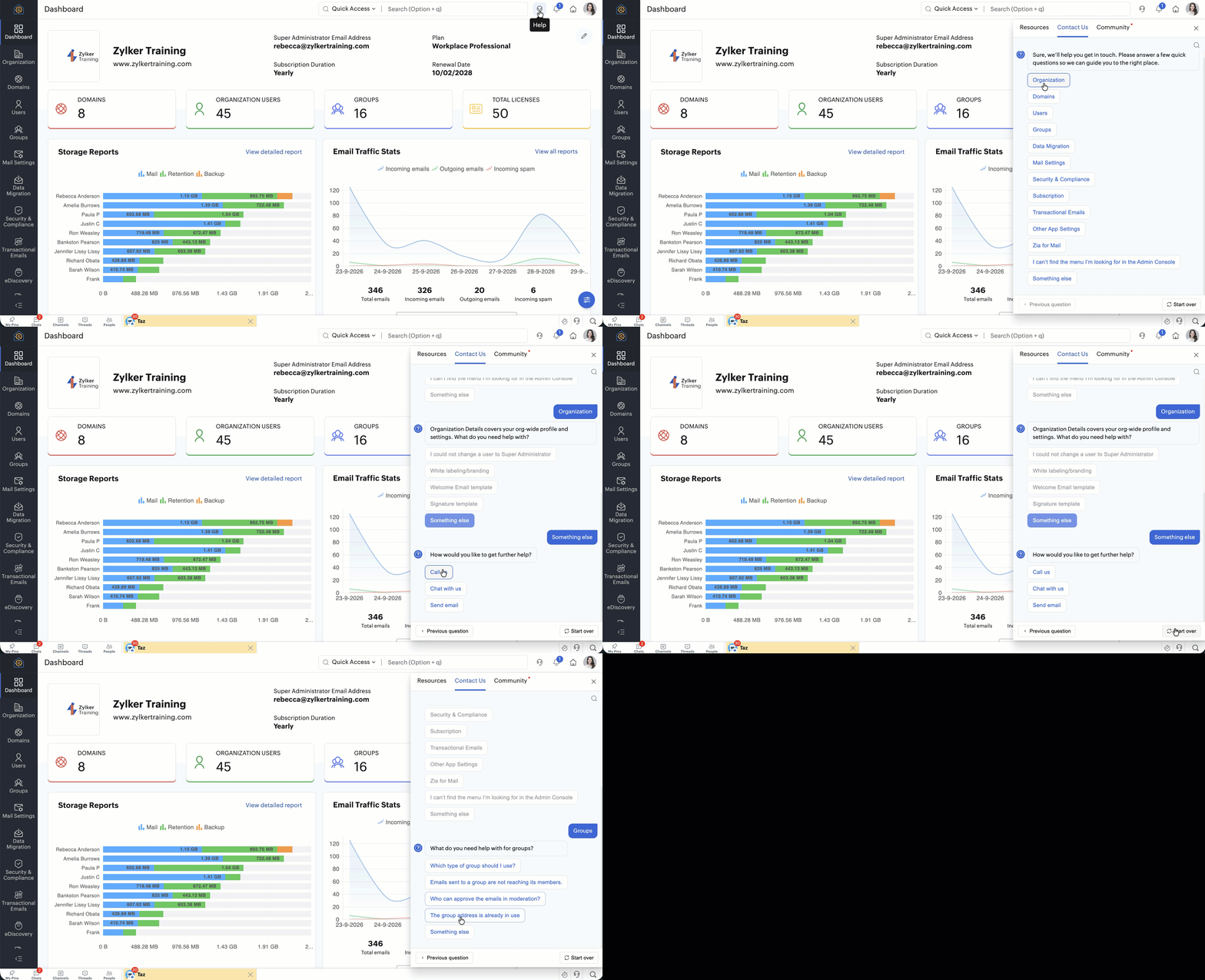
- Choose the module based on the query you have and follow the instructions shown on the self-service portal window.
- If your query is not resolved through the portal, choose the Something else option to reach out to our technical support team via email, call, or chat.
Shoot us an email
You can contact our technical support team by sending an email for any queries related to your Zoho Mail or Zoho Workplace account. Emails sent to the technical support team are reviewed by our product experts, and you will receive a response as soon as possible.
You can email your queries to support@zohomail.com with necessary screenshots and account details for better assistance.
Email support is available for all Zoho Mail users irrespective of your subscription plans (Paid or Free organization accounts or Personal accounts).
Give us a call
You can directly reach out to the product experts in the technical support team over a call for real-time assistance with your queries. The 'Give us a Call' option is now available exclusively to the Administrators, from the Admin Console.
Call support is available only for users who have subscribed to one of the paid plans.
You can reach out to our technical support team via call at:
- India - 1800-102-9646
- USA - +1 844-755-5753
Follow the steps given below to call and get real-time help from our product experts:
- Log into your Zoho Mail Admin Console as an Administrator.
- Click on the Help icon available on the top or the bottom right corner.
- Navigate to Contact Us.
- If your query has not been resolved through the self-service portal, choose Something else > Give us a call.
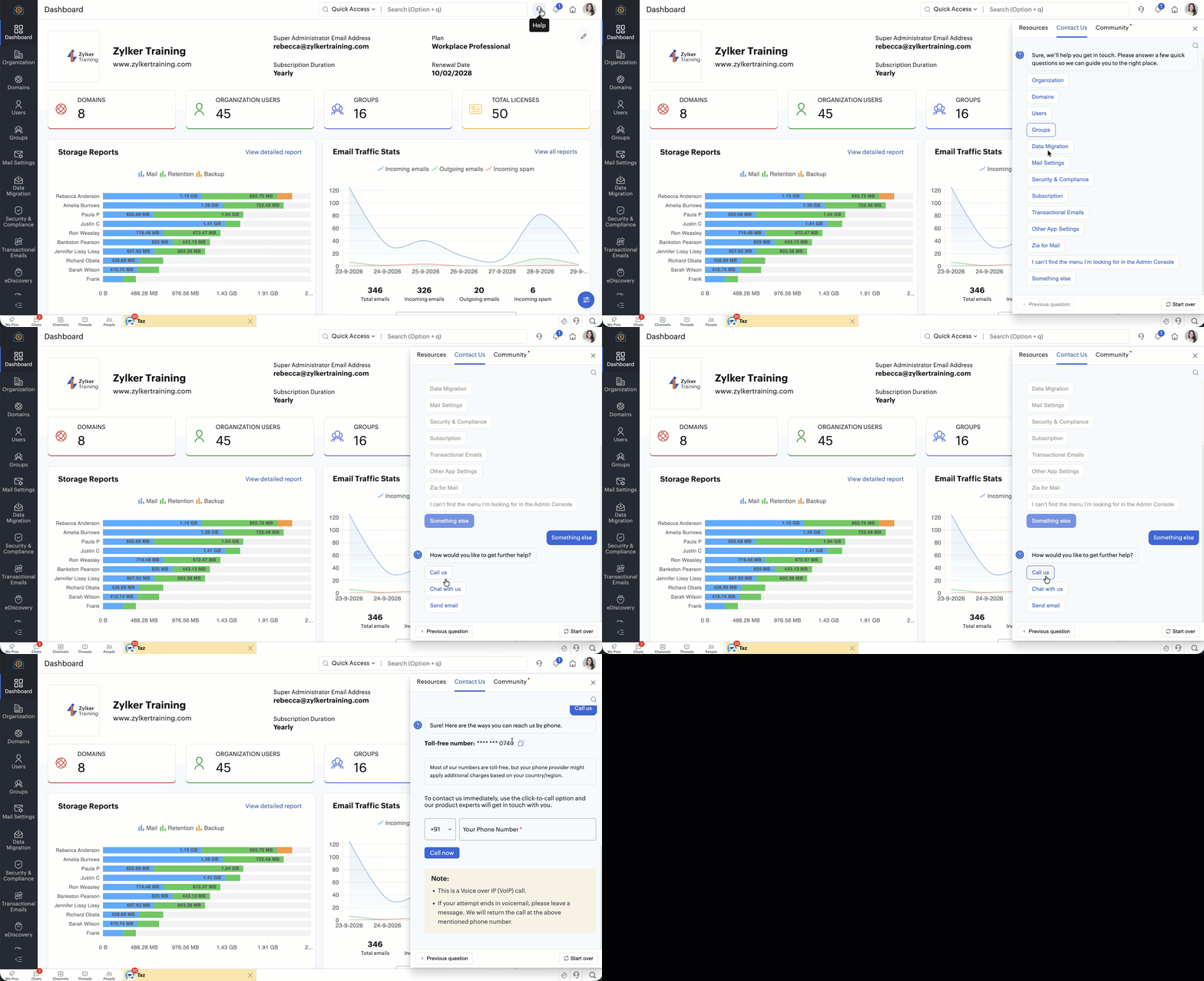
- Enter your contact number in the 'Your Phone Number' field and click on 'Call now' button to make a call directly from Zoho Mail Admin Console.
- This call will be placed using Voice over IP (*VoIP*), allowing you to connect with our experts directly.
- In case of any challenges with the Voice over IP (VoIP) option or if VoIP option is unavailable on your Admin Console, please reach us at our toll-free number using your mobile phone or telephone.
Most of our numbers are toll-free, but your phone provider might apply additional charges based on your country/region.
Chat with us
Our product experts in the technical support team are also available over live chat for quick assistance with your queries. The 'Chat with us' option is available exclusively from the Admin Console for the Administrators.
Live chat option is available only for users who have subscribed to one of the paid plans.
Follow the steps given below connect over live chat with our product expert:
- Log into your Zoho Mail Admin Console account as an Administrator.
- Click on the Help icon available on the top or the bottom right corner.
- Navigate to Contact Us.
- If your query has not been resolved through the self-service portal, choose Something else > Chat with us and initiate the chat with our technical support team.
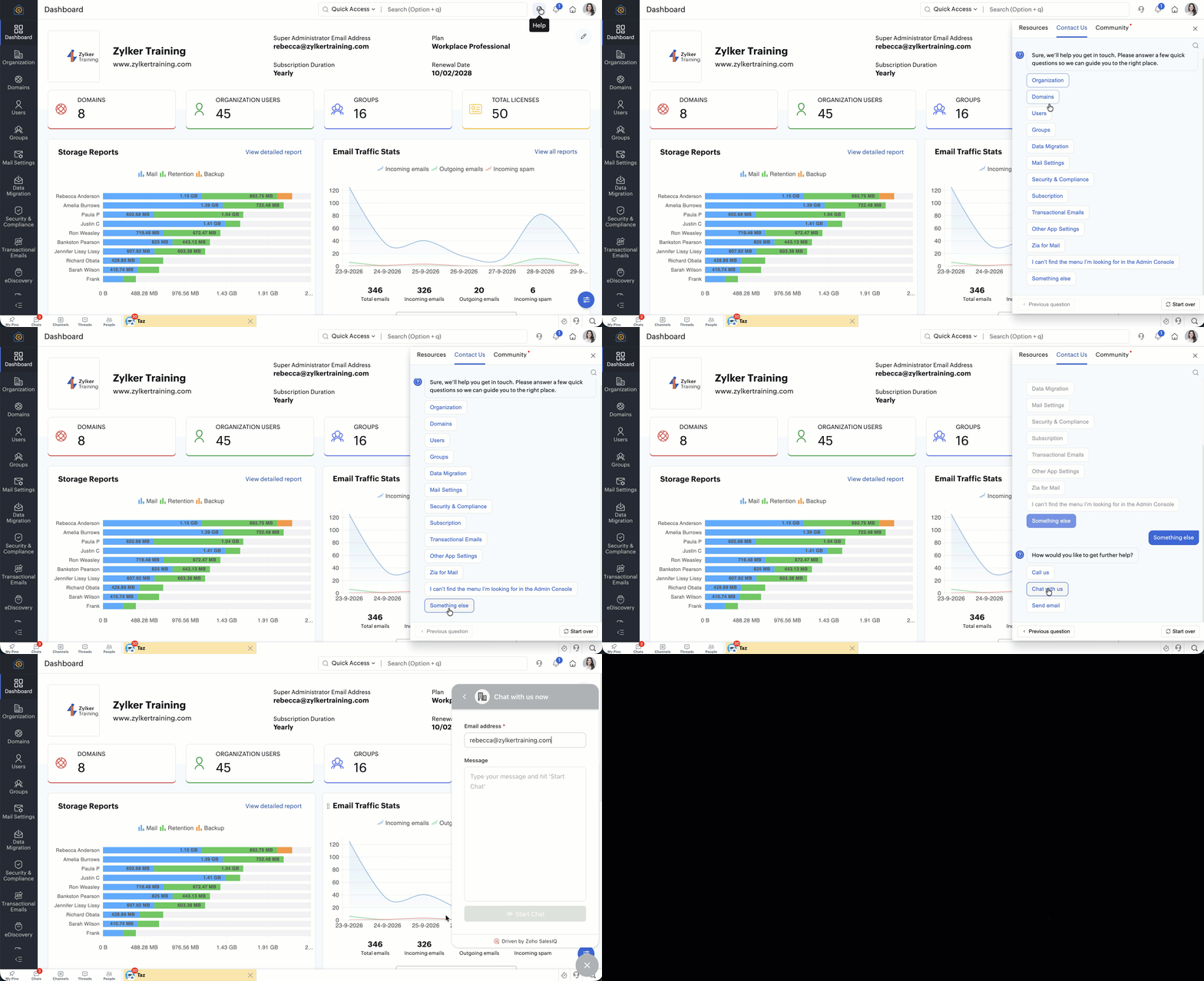
- Based on the expert availability, you will be able to initiate a chat.
The chat window will be displayed at the bottom right of your screen allowing you to get instant responses.
Support Channel Availability
By default our technical support team is available over email 24/7 for all users.
However to expedite the resolution, the multi-channel availability is determined based on the plan subscribed.
| Free User Support | Paid User Support | Partner/ Distributor Support | Enterprise Support | |
| Supported Plans | All plans
| All Paid Plans | For All Zoho Workplace and Zoho Mail Partners/ Distributors | All Paid Plans |
| Email Support | Yes (24/7) | Yes (24/7) | Yes (24/7) | Yes (24/7) |
| Phone Support | No | Yes (24/7) | Yes (24/7) | Yes (24/7) |
| Chat Support | No | Yes (24/7) | Yes (24/7) | Yes (24/7) |
| Response time | 24 hours | 8 hours | 8 hours | 1 hour |
| Onboarding support | No | Yes | Yes* | Yes |
| 1-on-1 session | No | Yes | Yes** | Yes |
| Dedicated Customer Relationship Manager | No | No | No | Yes |
| License count | Available for all | Available for all | Available for all | Available for organizations with minimum of 500 licenses |
| Support cost | Free | Free | Free | 25% of total licenses purchased |
| Subscription period | None | Paid plan subscription cycle | Paid plan subscription cycle | Paid plan subscription cycle |
| Quarterly report on usage and recommendations for best utilization of Zoho Services | No | No | No | Yes |
* - Onboarding support will be provided for the first Five customers onboarded. The onboarding support there on for the customers onboarded will be taken care of by the Partner or the Distributor.
** - Basic and intermediate technical queries related to implementation, functionalities, and features will be taken care of by the Partner/ Distributor. Advanced technical queries related to the product beyond the purview of the Partner/ Distributor will be taken care of by the Zoho Workplace/ Zoho Mail technical support team.